Introduction
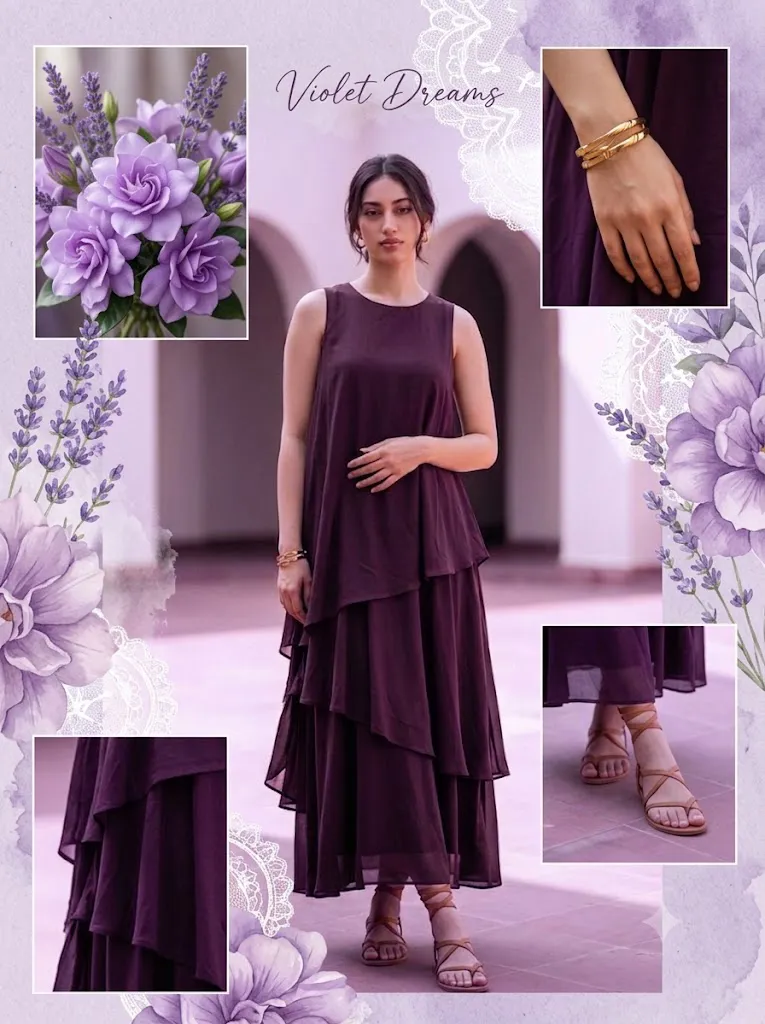
The Dreamy Purple Aesthetic Collage Portrait has become one of the most popular photo editing styles across Pinterest, Instagram, and other visual platforms. This artistic editing trend combines soft pastel purple tones, elegant floral decorations, scrapbook-inspired layouts, and romantic lighting to create eye-catching portraits that feel both modern and timeless. Inspired by Pinterest mood boards and fashion editorials, this style transforms ordinary photos into beautiful works of digital art.
"Dreamy Purple Aesthetic Collage Portrait Prompt"
Convert the uploaded photos into a dreamy purple aesthetic collage with a soft feminine Pinterest vibe. Use one main center photo as the focus and arrange smaller aesthetic photos around it in a scrapbook-style layout. Add large purple floral elements, lavender accents, delicate overlays, and soft artistic blending. Enhance the purple outfit tones, smooth skin details, and natural beauty while keeping the edit elegant and minimal. Include close-up crop elements for a trendy aesthetic look. Create a classy, visually balanced, high-quality collage with soft lighting, romantic vibes, and a modern desi aesthetic.
Unlike traditional portrait editing, a purple aesthetic collage tells a visual story. Instead of relying on a single image, multiple photographs are arranged together with artistic blending, close-up crops, floral overlays, lavender accents, and dreamy lighting effects. The result is a visually balanced collage that highlights the subject's personality while maintaining a clean and luxurious appearance.
One of the reasons this editing style has gained immense popularity is its versatility. Whether you're creating content for Instagram, Pinterest, YouTube thumbnails, personal portfolios, or digital wallpapers, the dreamy purple aesthetic fits almost every creative project. The soft feminine color palette creates a calming atmosphere, while elegant textures and modern scrapbook elements add depth and sophistication.
Artificial Intelligence has made creating these collages easier than ever. Instead of spending hours designing every element manually, creators can now generate professional-quality collage portraits simply by writing detailed prompts. AI understands lighting, composition, color harmony, and facial consistency, allowing beginners and professionals alike to produce stunning visuals within minutes.
This guide will walk you through everything you need to know about creating a Dreamy Purple Aesthetic Collage Portrait—from writing effective prompts to selecting the best AI tools and applying professional photo editing techniques.
How To Use Photo Editing?
Photo editing is the foundation of every successful aesthetic collage. Even when using AI-generated images, careful editing enhances realism, improves color harmony, and gives the final artwork a polished editorial look.
Begin by selecting high-quality source images. Clear, well-lit portraits with good facial details provide the best foundation for creating a dreamy collage. If you are using multiple images, choose photos with similar lighting and facial expressions to maintain consistency throughout the design.
The central image should act as the primary focus of the collage. Arrange smaller supporting photos around it in a scrapbook-style composition. These secondary images may include close-up facial crops, profile shots, or artistic angles that add visual interest without distracting from the main portrait.
Color grading is one of the most important editing steps. Apply soft lavender and pastel purple tones throughout the entire collage while preserving natural skin colors. Avoid oversaturation, as subtle colors create a more elegant and premium appearance.
Use blending modes to seamlessly combine floral graphics, paper textures, handwritten elements, and soft overlays. Large purple flowers, lavender branches, butterflies, and watercolor textures work exceptionally well with this style.
Skin retouching should remain natural. Remove temporary blemishes while preserving realistic facial texture. Modern aesthetic editing values authenticity rather than excessive smoothing.
Finally, apply soft lighting adjustments, subtle glow effects, and gentle shadows to create depth and visual balance. These finishing touches help the collage resemble a professionally designed Pinterest mood board.
Tools You Can Use For Prompt Copy and Create Photo
Today, numerous AI platforms and editing applications allow creators to generate beautiful purple aesthetic collages quickly and efficiently.
1. ChatGPT
ChatGPT is an excellent assistant for writing highly detailed AI image prompts. It helps describe composition, colors, lighting, clothing, decorations, facial expressions, and artistic styles in a structured format that AI image generators can easily understand.
2. Midjourney
Midjourney is widely recognized for producing artistic, cinematic, and Pinterest-inspired visuals. It generates highly detailed portraits with beautiful lighting, soft textures, and luxurious color palettes.
3. Leonardo AI
Leonardo AI specializes in realistic portrait generation with advanced prompt controls. It produces excellent facial consistency, elegant compositions, and highly detailed aesthetic edits.
4. Flux AI
Flux AI has become increasingly popular for creating ultra-realistic portraits with natural lighting, beautiful skin textures, and editorial-quality rendering. It performs exceptionally well with dreamy pastel color palettes.
5. Adobe Firefly
Adobe Firefly offers intuitive AI image generation integrated with Adobe's creative ecosystem. It provides high-resolution outputs suitable for commercial and personal projects.
6. Adobe Photoshop
Photoshop remains the industry standard for creating scrapbook collages and advanced retouching.
Its powerful features include:
- Layer management
- Blend modes
- Professional masking
- Color grading
- Skin retouching
- Object removal
- Background refinement
7. Lightroom
Lightroom is ideal for enhancing exposure, adjusting color balance, applying cinematic presets, and refining overall image quality before creating the collage.
8. Canva
Canva offers an easy-to-use interface with collage templates, aesthetic stickers, typography, frames, and decorative elements. It is perfect for beginners who want to create Pinterest-inspired layouts without advanced editing skills.
How To Edit Photo?
Creating a professional Dreamy Purple Aesthetic Collage involves several editing stages that work together to produce a balanced and visually appealing design.
Step 1: Select High-Quality Images
Choose portraits with sharp facial details and consistent lighting. Higher-resolution images produce better editing results.
Step 2: Build the Collage Layout
Place one large portrait in the center and arrange smaller supporting images around it. Include close-up facial crops to create a trendy scrapbook appearance.
Step 3: Apply Purple Color Grading
Adjust the overall color palette using soft lavender, violet, and pastel purple tones. Keep skin colors realistic while allowing the purple theme to dominate the background and decorative elements.
Step 4: Add Floral Decorations
Insert large purple flowers, lavender branches, petals, and botanical elements. Position them naturally around the composition without covering important facial features.
Step 5: Blend Artistic Elements
Use soft overlays such as paper textures, watercolor effects, glowing light leaks, handwritten notes, torn paper edges, or translucent shapes to enhance the Pinterest aesthetic.
Step 6: Retouch Skin Naturally
Remove minor imperfections while maintaining authentic skin texture. Avoid over-editing to preserve realism.
Step 7: Enhance Lighting
Increase brightness slightly and soften harsh shadows. Add gentle glow effects around highlights to create a dreamy romantic atmosphere.
Step 8: Refine Details
Sharpen eyes, hair strands, and clothing while preserving smooth tonal transitions throughout the collage.
Step 9: Maintain Visual Balance
Ensure decorative elements, textural overlays, and close-up crops are evenly distributed. Avoid overcrowding any section of the composition.
Step 10: Export the Final Image
Save the collage in high resolution using PNG or high-quality JPEG format. Exporting at maximum quality ensures excellent results for social media, Pinterest boards, digital wallpapers, or print.
Conclusion
The Dreamy Purple Aesthetic Collage Portrait is more than just a photo editing trend—it is a creative way to express elegance, romance, and modern digital artistry. By combining soft purple tones, floral decorations, scrapbook-inspired layouts, artistic overlays, and professional editing techniques, you can transform simple portraits into visually stunning masterpieces.
Thanks to AI-powered image generation and advanced editing software, creating Pinterest-worthy collage portraits has never been easier. A well-written prompt provides the foundation, while thoughtful editing enhances lighting, color harmony, facial details, and overall composition.
Whether you are a content creator, influencer, photographer, digital artist, or someone who simply enjoys aesthetic editing, mastering this style can elevate your creative projects and help your work stand out online. With consistent practice and attention to detail, you can produce luxurious, high-quality purple aesthetic collages that capture attention and leave a lasting impression.