Introduction
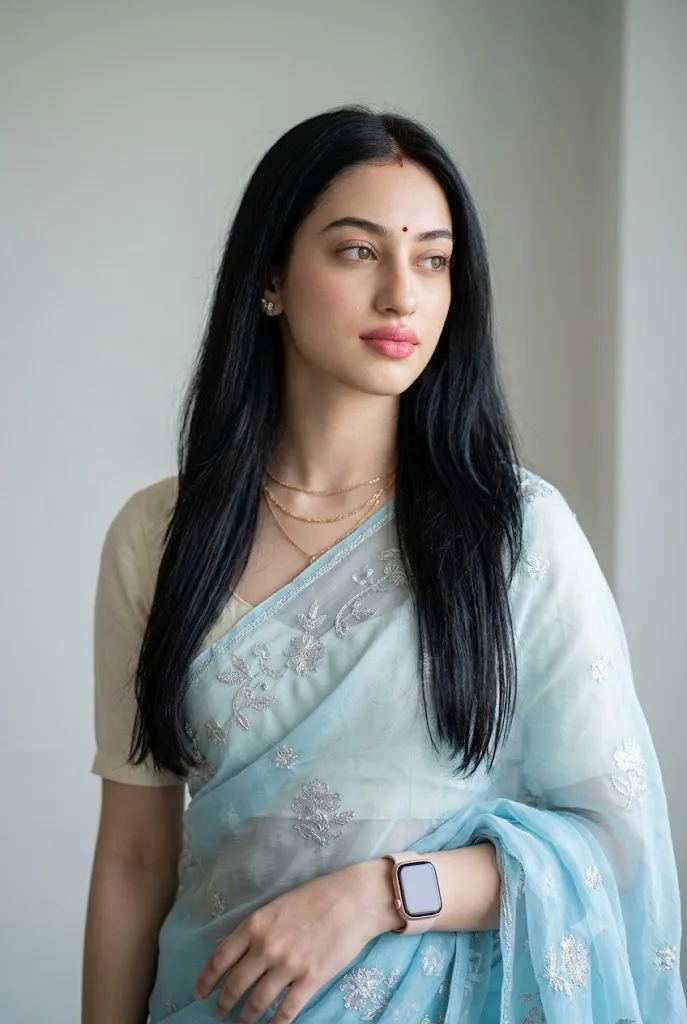
The Elegant South Asian Saree Studio Portrait Prompt is a premium AI photography style designed to create graceful, realistic, and editorial-quality portraits inspired by professional fashion studios. This portrait style celebrates the timeless beauty of traditional South Asian attire while combining it with modern photography techniques, soft lighting, and high-end digital rendering.
"Elegant South Asian Saree Studio Portrait Prompt"
Create a captivating studio portrait of a young South Asian woman with long, dark, silky straight hair cascading naturally over her shoulders. Preserve the facial identity, proportions, and key facial details of the uploaded reference image with 100% facial resemblance. Dress her in a delicate light blue sheer saree featuring silver embroidered floral borders paired with a matching light-colored blouse. Add multiple thin golden necklaces with small pendants, subtle stud earrings, a small red bindi, soft pink lipstick, and a modern rose gold smartwatch on her left wrist. Pose her looking gently toward the right side of the frame with a calm, thoughtful, and elegant expression. Place her against a clean minimalist light grey or off-white studio background with soft depth of field. Illuminate the portrait using soft natural studio lighting that highlights realistic skin texture, flowing hair, embroidered fabric details, and elegant accessories. Render the image with cinematic color grading, HDR, ultra-photorealistic quality, professional editorial fashion photography, hyper-detailed textures, premium 8K resolution, and a 2:3 aspect ratio.
Unlike ordinary portrait photography, this aesthetic focuses on elegance, simplicity, and natural beauty. The subject is photographed in a clean studio environment with soft lighting, minimal distractions, and carefully balanced composition. Traditional clothing such as a delicately embroidered saree is paired with subtle accessories and natural makeup to create a refined and sophisticated appearance.
One of the defining features of this portrait style is its attention to realistic details. AI carefully preserves facial identity, natural skin texture, hair flow, clothing folds, jewelry, and overall proportions while enhancing the image with professional-quality lighting and color grading. The result is a portrait that looks as if it were captured by an experienced fashion photographer in a luxury studio.
The soft studio lighting highlights facial features without creating harsh shadows, while the minimalist background ensures that all attention remains on the subject. Elegant jewelry, delicate embroidery, and refined styling add depth and authenticity to the final image.
Thanks to modern AI image generation technology, anyone can create stunning studio portraits with the help of a detailed prompt and a high-quality reference photo. AI can accurately maintain facial identity while transforming a simple image into an editorial-style portrait suitable for portfolios, social media, magazines, and personal creative projects.
This guide explains how to use AI photo editing, the best tools for creating elegant saree portraits, an example prompt, and editing techniques that help achieve professional-quality results.
How To Use Photo Editing?
Creating an Elegant South Asian Saree Studio Portrait begins with selecting a high-quality reference image. A clear photograph with visible facial features and natural lighting allows AI to preserve the person's identity while applying the desired artistic style.
Step 1: Choose a High-Resolution Portrait
Select a portrait with sharp facial details, natural expression, and balanced lighting. A high-resolution image helps the AI generate more realistic textures and finer details.
Step 2: Write a Detailed Prompt
A successful prompt should clearly describe every important visual element, including:
- Traditional saree style
- Studio background
- Facial expression
- Hairstyle
- Jewelry
- Makeup
- Lighting
- Camera composition
- Editorial photography quality
- Realistic skin texture
The more descriptive your prompt is, the better the AI can understand your creative vision.
Step 3: Upload the Reference Image
Import your portrait into an AI image generator or image-to-image editing platform. This allows the AI to retain your facial identity while transforming the overall style.
Step 4: Generate Multiple Versions
Create several variations to compare facial resemblance, lighting, clothing details, and overall composition.
Step 5: Select the Best Result
Choose the portrait that best preserves your natural appearance while achieving the desired editorial aesthetic.
Step 6: Apply Final Refinements
Use professional editing software to improve sharpness, color balance, lighting, and overall image quality.
Combining AI generation with careful post-processing produces a polished studio portrait suitable for both digital and print use.
Tools You Can Use For Prompt Copy and Create Photo
Many AI platforms and editing applications are capable of generating elegant studio portraits.
ChatGPT
Useful for writing detailed AI prompts that describe clothing, lighting, facial features, accessories, and photography style.
Midjourney
Creates artistic editorial portraits with luxurious lighting, realistic fabrics, and premium visual composition.
Flux AI
Excellent for preserving facial identity while generating highly realistic portraits with natural skin texture.
Stable Diffusion
Provides advanced image-to-image generation, ControlNet support, and prompt customization for maximum creative control.
GPT Image
Ideal for producing premium-quality AI portraits with detailed styling instructions and consistent character identity.
Adobe Photoshop
Perfect for professional retouching, skin refinement, color grading, jewelry enhancement, and background adjustments.
Adobe Lightroom
Useful for improving exposure, white balance, highlights, shadows, and achieving soft editorial color grading.
Canva
Great for designing posters, social media posts, profile pictures, invitations, and presentation graphics using the completed portrait.
Using AI image generation together with professional editing software helps produce elegant portraits with magazine-quality results.
How To Edit Photo?
Professional editing enhances the AI-generated portrait while preserving its natural and sophisticated appearance.
Preserve Natural Skin Texture
Avoid excessive skin smoothing. Maintaining realistic skin texture creates a more authentic editorial portrait.
Enhance Soft Lighting
Adjust highlights and shadows to create balanced studio lighting with gentle facial illumination.
Improve Color Balance
Refine white balance and saturation so that the saree, jewelry, and skin tones appear natural and harmonious.
Sharpen Clothing Details
Enhance the embroidery, fabric folds, and jewelry without creating artificial-looking textures.
Refine Hair
Smooth flyaway strands while preserving natural volume and movement for a realistic appearance.
Clean the Background
Keep the background simple, soft, and distraction-free so the focus remains entirely on the subject.
Export in High Resolution
Save the completed portrait in 8K or the highest available resolution for printing, portfolios, magazines, posters, or social media platforms.
Conclusion
The Elegant South Asian Saree Studio Portrait Prompt combines traditional fashion, modern studio photography, and advanced AI image generation to create timeless editorial portraits. With realistic facial identity, graceful styling, professional lighting, and refined composition, this style produces images that resemble luxury fashion magazine photography.
The key to success is writing a detailed prompt that accurately describes the clothing, accessories, lighting, expression, background, and overall artistic direction. AI provides the creative foundation, while professional editing enhances realism, polish, and presentation quality.
Whether you are creating personal portraits, fashion portfolios, cultural photography, social media content, or professional editorial artwork, this elegant saree portrait style offers endless creative opportunities. By combining thoughtful prompt writing with careful editing techniques, you can consistently generate beautiful studio portraits that capture both tradition and contemporary elegance.