Introduction
Portrait photography is often at its most beautiful when it combines natural light, timeless styling, and a sense of quiet storytelling. One portrait style that perfectly captures these qualities is the Fuji Pro 400H Window Light Portrait. Inspired by the beloved Fujifilm Pro 400H film stock, this aesthetic blends soft pastel tones, gentle sunlight, organic textures, and elegant composition to create images that feel both cinematic and nostalgic.
"Fuji Pro 400H Window Light Portrait Prompt"
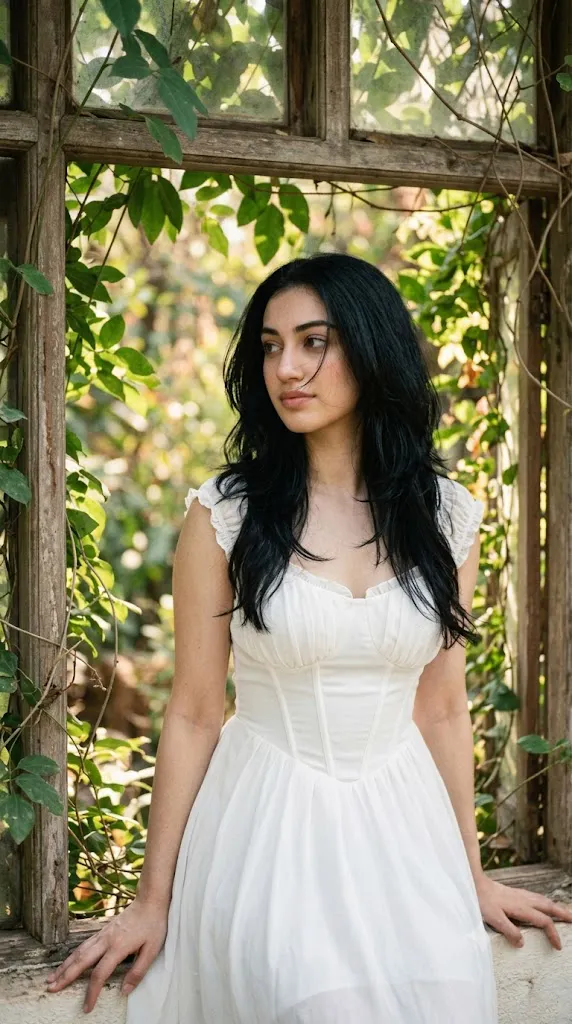
Create a soft cinematic portrait using the uploaded image strictly as the facial identity reference. Preserve facial structure, skin tone, and all facial details exactly. A young woman sits beside an old wooden window surrounded by lush green leaves and climbing vines. Warm sunlight filters through the foliage, creating soft highlights and natural shadows across her face. She wears a flowing white dress with subtle corset-inspired shaping and delicate pleated details. Long black butterfly-cut hair frames her face, with a few loose strands gently crossing her cheeks. Fuji Pro 400H film aesthetic, vintage lens filter, soft pastel color palette, realistic skin texture, natural lighting, shallow depth of field, highly detailed foliage, photorealistic rendering, cinematic atmosphere, 8K resolution.
The Fuji Pro 400H look became popular among portrait photographers because of its ability to render skin tones beautifully while maintaining soft greens, delicate highlights, and a dreamy atmosphere. Although the original film has been discontinued, its visual signature continues to inspire photographers, digital artists, and AI image creators around the world.
In this portrait concept, a young woman sits beside an old wooden window surrounded by lush green vines and leaves. Natural sunlight filters through the foliage, creating soft highlights and beautiful shadows that gently illuminate her face. She wears a clean white flowing dress with subtle corset-inspired shaping and delicate pleated details that enhance elegance without appearing overly formal.
Her hairstyle features long black butterfly-cut layers that naturally frame the face. A few loose strands of hair fall softly across her cheeks, creating movement and realism. The overall mood is calm, romantic, and slightly nostalgic, as if captured during a peaceful summer morning in a countryside home.
One of the defining characteristics of this portrait style is its emphasis on natural beauty. Rather than relying on dramatic fashion styling or heavy retouching, the image celebrates authentic facial features, soft textures, and ambient light. This approach creates portraits that feel personal, intimate, and emotionally engaging.
Modern AI image-generation tools allow creators to recreate this aesthetic with remarkable realism. However, achieving a convincing Fuji Pro 400H look requires more than simply writing a prompt. Understanding light, color grading, composition, and editing techniques can significantly improve the final result.
In this article, we will explore how to edit images effectively, the best tools for generating and refining portraits, and a complete workflow for creating a professional Fuji Pro 400H Window Light Portrait.
How To Use Photo Editing?
Photo editing plays a critical role in transforming a generated portrait into a polished and believable image. Even highly realistic AI-generated photographs can benefit from subtle enhancements that reinforce the Fuji Pro 400H aesthetic.
The first step is exposure balancing. Window-light portraits often contain bright highlights near the window and softer shadows around the subject. Proper exposure adjustment helps preserve detail in both areas while maintaining a natural appearance.
White balance is particularly important for achieving the Fuji-inspired look. Slightly warm highlights combined with neutral shadows often create the soft, airy atmosphere associated with film photography. Avoid overly cool tones, as they can reduce the cozy and nostalgic feeling.
Skin retouching should remain minimal. The Fuji Pro 400H style emphasizes realistic skin texture, natural pores, and authentic beauty. Excessive smoothing can make the image appear artificial and remove the charm that defines this aesthetic.
Hair enhancement can add significant realism. Subtle adjustments to clarity and sharpness help reveal individual strands while maintaining softness. The loose hairs around the face should remain visible, contributing to a natural and spontaneous appearance.
Color grading is perhaps the most important editing stage. Gentle greens, creamy whites, soft highlights, and pastel undertones are key characteristics of the Fuji Pro 400H palette. Careful color adjustments help recreate the timeless film-inspired atmosphere.
Film grain can also enhance authenticity. A subtle grain layer adds texture and recreates the feel of traditional film photography without overwhelming image quality.
Finally, selective sharpening should focus on the eyes, eyelashes, hairline, and clothing details. These elements naturally draw the viewer’s attention and strengthen the overall portrait.
Tools You Can Use For Prompt Copy and Create Photo
Creating a successful Fuji Pro 400H Window Light Portrait requires both image-generation tools and editing software.
AI Image Generation Tools
ChatGPT
ChatGPT is excellent for writing detailed prompts that describe lighting, wardrobe, composition, environment, and photographic style.
Midjourney
Midjourney creates visually stunning portraits with artistic depth and cinematic atmosphere.
Leonardo AI
Leonardo AI specializes in highly realistic portraits with detailed textures and natural lighting.
Ideogram
Ideogram is useful for producing balanced lifestyle portraits with realistic compositions.
Adobe Firefly
Adobe Firefly integrates AI image generation with professional creative workflows.
Editing Software
Adobe Photoshop
Photoshop provides advanced retouching, masking, and compositing capabilities.
Adobe Lightroom
Lightroom is ideal for exposure correction, color grading, and film-style adjustments.
Capture One
Capture One offers exceptional color control and professional image-processing tools.
Snapseed
Snapseed provides powerful editing features on mobile devices.
PicsArt
PicsArt offers creative effects, filters, and social-media-friendly editing options.
How To Edit Photo?
Step 1: Import the Image
Open the portrait in Photoshop, Lightroom, or your preferred editing application.
Step 2: Correct Exposure
Balance bright window highlights and shadow areas while preserving realism.
Step 3: Adjust White Balance
Introduce subtle warmth while maintaining neutral skin tones.
Step 4: Refine Skin Texture
Preserve natural pores and facial details without excessive smoothing.
Step 5: Enhance Hair Detail
Improve strand visibility while maintaining softness and movement.
Step 6: Improve Window Light
Increase subtle glow around sunlit areas for a natural appearance.
Step 7: Refine Green Tones
Adjust foliage colors to create soft, film-inspired greens.
Step 8: Apply Fuji-Inspired Color Grading
Introduce pastel highlights and gentle tonal transitions.
Step 9: Add Film Grain
Apply subtle grain for an authentic analog feel.
Step 10: Sharpen Key Features
Focus sharpening on the eyes, hairline, and dress details.
Step 11: Fine-Tune Contrast
Maintain soft contrast while preserving depth and dimension.
Step 12: Export in High Quality
Save the final image as PNG, TIFF, or maximum-quality JPEG.
Conclusion
The Fuji Pro 400H Window Light Portrait Prompt combines natural sunlight, elegant styling, lush greenery, and timeless film aesthetics into a portrait style that feels both nostalgic and contemporary. Inspired by one of the most beloved portrait film stocks ever created, this aesthetic emphasizes soft colors, authentic beauty, and emotional storytelling.
Its popularity comes from its ability to transform simple moments into cinematic works of art. A flowing white dress, butterfly-cut hairstyle, old wooden window, and sunlit foliage work together to create an image that feels peaceful, romantic, and deeply personal.
With modern AI image-generation platforms and professional editing software, creators can now recreate this iconic look with remarkable accuracy. By focusing on lighting, color harmony, realistic textures, and subtle film-inspired enhancements, it is possible to produce portraits that rival traditional film photography.
Whether you are creating social media content, building a photography portfolio, experimenting with AI art, or pursuing fine-art portraiture, the Fuji Pro 400H Window Light Portrait offers a beautiful and timeless visual style that continues to inspire photographers and artists worldwide.