Introduction
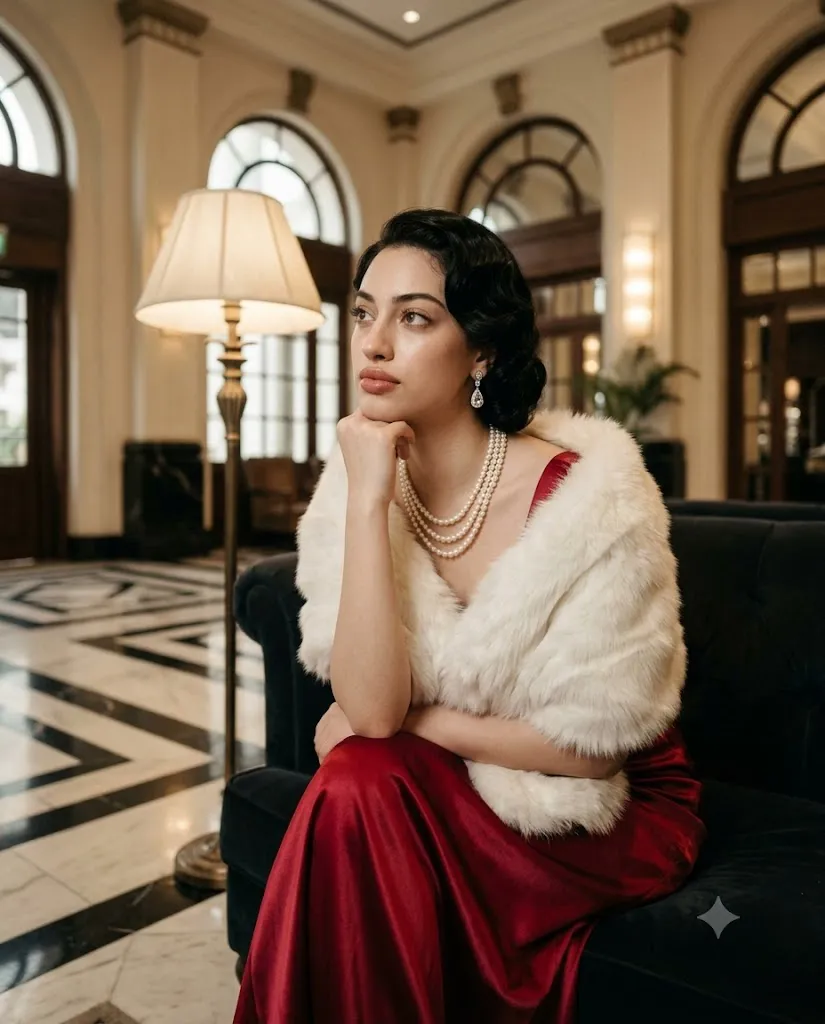
The Golden Age Hollywood Glamour Portrait is a timeless AI photo editing style inspired by the classic cinema era of the 1940s and 1950s. This aesthetic captures the elegance, sophistication, and luxury of vintage Hollywood photography while combining it with modern ultra-realistic portrait quality.
"Golden Age Hollywood Glamour Portrait Prompt"
Create a high-resolution ultra-realistic cinematic portrait inspired by the Golden Age of Hollywood from the 1940s–1950s. Preserve the exact facial identity, facial structure, proportions, symmetry, and natural skin texture without altering the face. The subject is a young woman with fair skin styled in classic vintage elegance. Her dark brown hair is arranged in Hollywood finger waves with structured curls and a shoulder-length vintage bob style. Makeup is timeless and refined with softly shaped eyebrows, subtle eye makeup, clean winged eyeliner, and deep wine-red matte lipstick. She is seated upright with elegant posture. Her left arm rests naturally across her midsection while her right hand gently supports her chin. Her gaze looks upward and slightly left, creating a calm, dreamy, sophisticated expression. She wears a luxurious deep crimson ruby-red satin evening gown with a V-neckline and smooth fabric draping. A soft white fur stole wraps naturally around her arms and shoulders. Add a three-strand pearl necklace and delicate crystal earrings with subtle reflections. Place her in an opulent Art Deco-inspired interior with tall arched windows, vintage architecture, marble flooring, and a warm glowing floor lamp. Use soft diffused cinematic lighting with gentle shadows, warm highlights, and a classic Hollywood photography atmosphere. Create realistic skin texture, natural fabric reflections, shallow depth of field, premium studio photography quality, medium shot framing, warm cinematic tones, 4:5 aspect ratio, and ultra-realistic detail.
During the Golden Age of Hollywood, portraits were known for their dramatic yet soft lighting, refined fashion, graceful poses, and cinematic storytelling. This style focuses on creating images that feel like a scene from an old movie — elegant, nostalgic, romantic, and full of character.
Unlike modern fashion portraits that often rely on bold effects, this vintage glamour style emphasizes natural beauty, classic styling, and emotional expression. The combination of carefully styled hair, timeless makeup, luxurious clothing, and rich environments creates a premium cinematic appearance.
The main elements of this portrait style include Hollywood finger-wave hairstyles, satin gowns, pearl jewelry, elegant accessories, Art Deco interiors, warm studio lighting, and soft cinematic shadows. These details recreate the feeling of classic film photography while maintaining realistic skin texture and modern image quality.
AI image generation tools make it possible to transform ordinary portraits into vintage celebrity-inspired artworks. With a detailed prompt and a quality reference image, AI can preserve facial identity while applying the Golden Age Hollywood atmosphere.
This guide explains how to use photo editing, the best tools for creating vintage glamour portraits, an example prompt, and editing techniques to achieve a luxury cinematic look.
How To Use Photo Editing?
Creating a Golden Age Hollywood portrait begins with choosing the right reference image. A clear photo with visible facial features and natural expressions allows AI to preserve identity while transforming the overall style.
The goal of editing is to enhance the vintage cinematic atmosphere without changing the person’s natural appearance.
Step 1: Select A High-Quality Reference Photo
Choose an image where the face, hairstyle, and expression are clearly visible. A portrait with a natural pose works best for this style.
Step 2: Use A Detailed Prompt
A detailed prompt helps AI understand the complete visual direction. Include elements such as:
- 1940s–1950s Hollywood glamour
- Vintage cinematic lighting
- Classic hairstyle
- Luxury evening gown
- Art Deco background
- Soft film photography look
- Realistic skin texture
The more specific the description, the more accurate the final result becomes.
Step 3: Upload The Image
Upload the reference photo into an AI image editor that supports image transformation. The AI will analyze the image and apply the vintage Hollywood aesthetic.
Step 4: Generate Multiple Variations
Create different versions and compare facial accuracy, lighting, hairstyle, outfit details, and overall mood.
Step 5: Select The Best Result
Choose the image that maintains the original identity while achieving a sophisticated classic cinema appearance.
Step 6: Final Adjustments
Use professional editing software to improve colors, contrast, texture, and cinematic effects.
Combining AI generation with manual editing creates a realistic and premium vintage portrait.
Tools You Can Use For Prompt Copy and Create Photo
Several AI and editing tools can help create Golden Age Hollywood-inspired portraits.
ChatGPT
Useful for creating detailed prompts that describe fashion, lighting, environment, poses, and cinematic style.
Midjourney
Creates artistic vintage portraits with strong atmosphere, classic styling, and dramatic compositions.
Flux AI
Generates realistic transformations while preserving facial structure and image details.
Stable Diffusion
Provides advanced image-to-image editing with customization options and style control.
GPT Image
Helpful for creating detailed AI portraits with specific instructions for vintage themes and realistic rendering.
Adobe Photoshop
A professional tool for refining AI-generated portraits. It helps with:
- Skin adjustments
- Color grading
- Light effects
- Texture enhancement
- Background editing
- Adobe Lightroom
Useful for creating warm vintage tones, adjusting shadows, and adding cinematic color grading.
Canva
Great for creating posters, social media designs, vintage covers, and editorial layouts.
Using AI tools together with professional editing software creates a high-end Hollywood-style result.
How To Edit Photo?
Editing helps enhance the vintage cinematic feeling while keeping the portrait realistic.
Create Soft Cinematic Lighting
Adjust brightness and shadows to create a gentle studio-light effect. Golden Age portraits usually use controlled lighting with smooth transitions.
Enhance Skin Texture
Keep natural skin details visible while making minor adjustments for a polished film-photo appearance.
Adjust Colors
Use warm tones such as:
- Soft ivory highlights
- Warm beige
- Burgundy reds
- Charcoal shadows
Avoid modern color grading or excessive saturation.
Improve Hair And Clothing Details
Enhance vintage hairstyles, satin textures, jewelry reflections, and fabric details to make the portrait more luxurious.
Add Film Texture
Apply subtle film grain, vintage noise, and slight softness to recreate classic photography.
Create Background Depth
Use shallow depth of field to keep the subject sharp while gently softening the environment.
Refine Composition
Maintain elegant spacing and balance. The subject should remain the main focus.
Export High Resolution
Save the final image in high quality for posters, creative projects, portfolios, or social media.
Conclusion
The Golden Age Hollywood Glamour Portrait style combines classic cinema elegance with modern AI technology to create stunning vintage-inspired artwork. This aesthetic captures the beauty of old Hollywood through luxurious fashion, refined expressions, cinematic lighting, and timeless styling.
The key to creating a successful result is using a detailed prompt that explains facial identity, hairstyle, clothing, environment, and lighting. AI tools simplify the transformation process, while professional editing helps improve realism and overall quality.
Whether you are creating a vintage fashion portrait, cinematic poster, social media artwork, or creative photography project, this style provides a sophisticated and memorable visual experience.
The combination of Art Deco surroundings, classic Hollywood fashion, warm lighting, and realistic details creates portraits that feel elegant, nostalgic, and timeless.
With the right prompt and editing techniques, ordinary photos can be transformed into premium portraits that look like they belong to a classic Hollywood film archive.