Introduction
The Golden Coastal Editorial Portrait Prompt is designed for creators who want to produce elegant, magazine-quality portraits inspired by modern coastal fashion editorials. This prompt combines soft seaside lighting, luxury styling, Pinterest-inspired posing, and professional travel photography to create an image that feels sophisticated, timeless, and naturally beautiful. The atmosphere is calm and airy, making it ideal for fashion campaigns, lifestyle editorials, premium social media content, travel branding, and personal portrait collections.
"Golden Coastal Editorial Portrait Prompt"
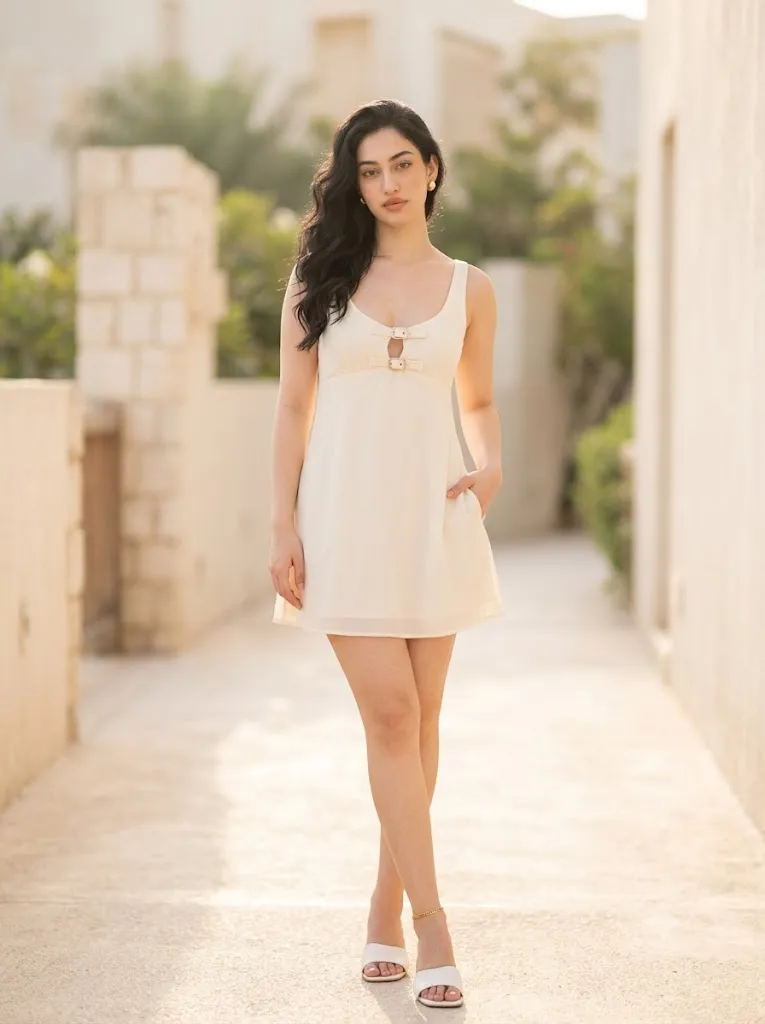
Create a photorealistic fashion editorial portrait using the uploaded reference image strictly as the facial identity reference. Preserve the exact facial structure, skin tone, eye shape, eyebrows, nose, lips, hairstyle, jawline, and natural expression without beautification. Dress the subject in a cream georgette short dress with two elegant buckle details, white slip-on sandals, minimal gold stud earrings, and a delicate gold anklet. Place the subject on a breezy coastal pathway surrounded by pale stone walls under warm afternoon sunlight. Capture the image using a Canon EOS R5 with an 85mm prime lens at f/1.8, ISO 100. Add realistic skin texture, subtle hair movement, fine textile detail, creamy ivory bokeh, cinematic editorial color grading, ultra-detailed 8K quality, and no text or watermark.
A defining feature of this prompt is complete facial identity preservation. When using a reference image, the AI should preserve every facial detail exactly as it appears. The face should remain unchanged, including bone structure, eye shape, eyebrows, nose, lips, skin tone, hairstyle, jawline, and natural facial expression. The objective is to transport the subject into a luxurious coastal environment while maintaining authentic identity instead of creating an AI-enhanced version.
The styling focuses on minimalist luxury. The subject wears a cream georgette short dress with two elegant buckle details positioned at the center front. The lightweight fabric moves gently with the coastal breeze, creating graceful movement without appearing exaggerated. White slip-on sandals, delicate gold stud earrings, and a thin gold anklet complete the outfit while maintaining an understated editorial aesthetic.
The setting captures the charm of a Mediterranean-inspired coastal walkway. Pale stone walls line an open-air pathway, warmed by late afternoon sunlight. The soft architectural textures complement the neutral clothing palette while adding depth to the composition.
The warm coastal sunlight creates gentle highlights across the subject's skin, while creamy ivory tones dominate the environment. Background details gradually dissolve into beautiful bokeh produced by an 85mm lens at f/1.8, allowing the subject to remain the clear visual focus.
Captured as though photographed using a Canon EOS R5 paired with an 85mm prime lens at ISO 100, the portrait achieves realistic skin pores, detailed fabric textures, natural hair movement, cinematic color grading, and luxurious editorial quality worthy of high-end fashion magazines.
How To Use Photo Editing?
Professional editing helps elevate the AI-generated portrait while preserving its natural appearance.
Begin by balancing exposure carefully. Coastal scenes often contain bright highlights on stone walls, so protect whites while maintaining detail.
Adjust white balance toward warm afternoon sunlight while preserving realistic skin tones.
Retouch the skin lightly. Remove temporary imperfections only while maintaining natural pores and realistic facial texture.
Increase clarity selectively around clothing details, jewelry, hair strands, and facial features without creating an artificial appearance.
Enhance the texture of the stone pathway while keeping the background softly blurred.
Apply warm editorial color grading featuring creamy whites, soft beige, and gentle golden highlights.
Finish the image using delicate film grain to reinforce the premium magazine aesthetic.
Tools You Can Use For Prompt Copy and Create Photo
Several modern AI generators and editing applications can produce outstanding editorial portraits.
AI Image Generation Tools
ChatGPT
Perfect for creating highly detailed prompts covering lighting, clothing, environment, camera settings, and identity preservation.
Midjourney
Produces artistic fashion editorials with cinematic composition.
Leonardo AI
Excellent for photorealistic portrait generation and realistic environments.
Ideogram
Suitable for elegant editorial photography and fashion concepts.
Adobe Firefly
Provides AI-powered image generation integrated with Adobe Creative Cloud.
Professional Editing Software
Adobe Photoshop
Ideal for portrait refinement, environmental cleanup, and professional retouching.
Adobe Lightroom
Excellent for exposure correction, cinematic color grading, and finishing.
Capture One
Offers industry-leading color rendering and realistic skin tone management.
Affinity Photo
Provides advanced editing features for portrait photography.
Snapseed
A practical mobile editing application for warmth, grain, contrast, and clarity adjustments.
How To Edit Photo?
Step 1: Upload the Reference Image
Choose a clear, high-resolution portrait showing the face from a natural angle.
Step 2: Generate the Base Portrait
Create the full editorial scene while preserving facial identity exactly.
Step 3: Correct Exposure
Protect bright stone textures while maintaining balanced skin highlights.
Step 4: Preserve Natural Skin
Maintain realistic pores and subtle facial texture without excessive smoothing.
Step 5: Enhance Hair
Refine loose hair strands flowing naturally in the coastal breeze.
Step 6: Improve Clothing Detail
Increase definition within the georgette fabric while maintaining soft movement.
Step 7: Refine Background
Keep the stone pathway detailed while allowing distant architecture to blur naturally.
Step 8: Apply Cinematic Color Grading
Balance warm golden highlights with soft neutral cream tones.
Step 9: Add Fine Film Grain
Introduce subtle analog-inspired grain to strengthen the editorial appearance.
Step 10: Verify Facial Accuracy
Compare the completed portrait with the uploaded reference image to ensure complete facial consistency.
Step 11: Final Refinements
Remove visual artifacts while maintaining realistic lighting, shadows, and textures.
Step 12: Export in High Resolution
Save the finished portrait as PNG or TIFF for magazines, fashion portfolios, travel campaigns, websites, or premium printing.
Conclusion
The Golden Coastal Editorial Portrait Prompt blends luxury fashion photography with the relaxed elegance of coastal travel. Warm afternoon sunlight, creamy architectural tones, minimalist styling, and natural editorial posing combine to create a portrait that feels sophisticated without appearing overly staged.
Every detail—from accurate facial identity preservation and realistic skin texture to flowing georgette fabric, delicate jewelry, airy lighting, and cinematic color grading—works together to produce an image worthy of premium fashion magazines. Instead of relying on dramatic visual effects, this prompt achieves beauty through authentic styling, refined composition, and natural light.
Although AI can generate remarkably realistic editorial portraits, achieving professional-quality results still depends on carefully written prompts and thoughtful post-processing. Preserving facial identity, refining lighting, balancing colors, enhancing textures, and maintaining natural realism all contribute to a convincing final image.
Whether you are creating luxury fashion editorials, travel campaigns, lifestyle branding, Pinterest-inspired content, or portfolio photography, the Golden Coastal Editorial Portrait Prompt provides an elegant foundation for producing timeless, photorealistic, and high-end magazine-quality portraits.