Introduction
The Golden Hour Double Exposure Saree Portrait Prompt is a beautiful combination of fine art photography, cinematic storytelling, and magical realism. Inspired by professional editorial photography, this creative prompt blends two portraits into a single breathtaking composition using the classic double-exposure technique. The result is an emotional image that feels elegant, dreamy, and timeless while maintaining realistic lighting and natural details.
"Golden Hour Double Exposure Saree Portrait Prompt"
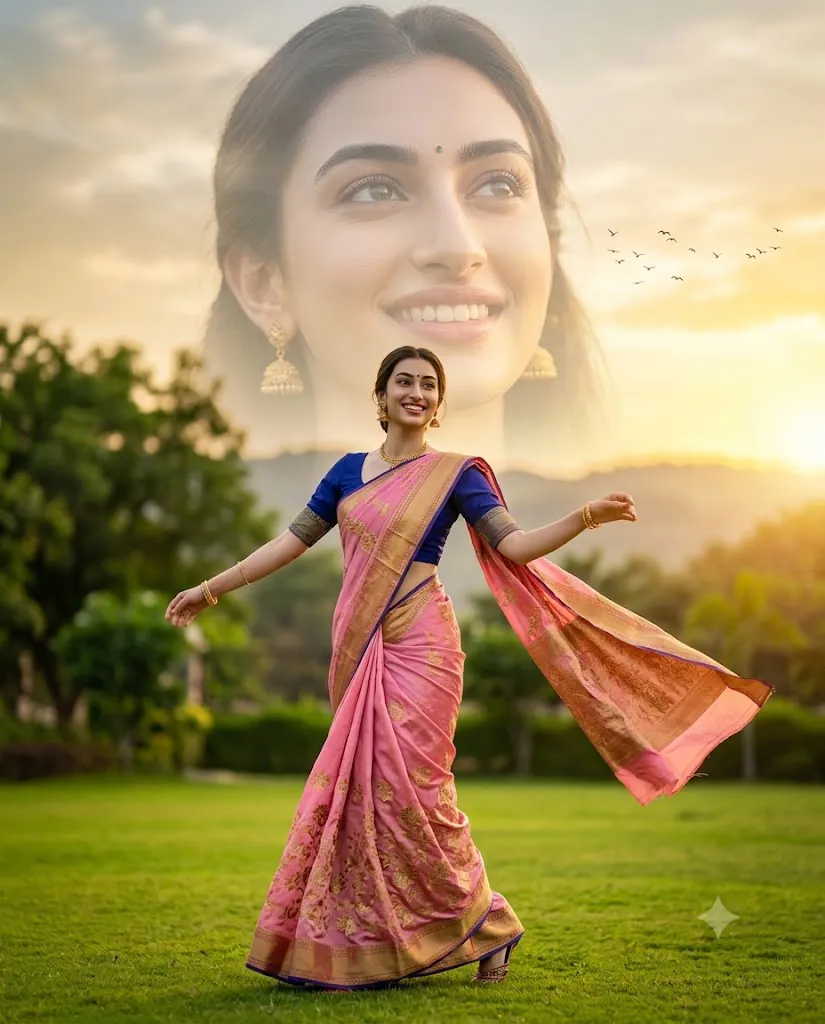
Create a photorealistic double-exposure portrait of a woman using the uploaded reference image while preserving the exact facial identity. A full-body woman wearing a vibrant soft-pink silk saree with gold floral embroidery and a royal blue blouse performs a graceful mid-twirl in a lush green garden. Her saree pallu flows naturally in the wind while she smiles brightly. A massive semi-transparent portrait of her face blends into the sunset sky above, softly illuminated with low opacity. Warm golden-hour lighting, cinematic rim light, shallow depth of field, realistic skin texture, lush green landscape, distant hills, birds in flight, magical realism, editorial photography, ultra-detailed composition, and 8K resolution with a 4:5 aspect ratio.
In this portrait, a full-body woman dressed in a vibrant soft-pink silk saree with delicate gold floral embroidery gracefully twirls across a lush green garden. Her flowing saree pallu catches the gentle breeze, creating a sense of movement and elegance. Above her, a massive semi-transparent portrait of her face blends softly into the glowing sunset sky, symbolizing hope, beauty, and inner confidence.
Golden hour sunlight fills the entire scene with warm golden tones while soft cinematic rim lighting highlights the edges of her hair and saree. The blurred trees, distant hills, and birds flying across the sky create a peaceful atmosphere that perfectly complements the artistic composition. This prompt is ideal for photographers, AI artists, fashion creators, and digital designers who want to produce luxurious portrait artwork with an emotional storytelling effect.
Whether you are creating social media content, portfolio projects, magazine-style artwork, or AI-generated fashion photography, this prompt delivers a premium visual experience with realistic textures, vibrant colors, and professional-quality composition.
How To Use Photo Editing?
After generating your AI portrait, photo editing helps transform it into a polished editorial masterpiece. Begin by adjusting the exposure to preserve the soft golden-hour glow while ensuring that the highlights remain balanced.
Increase contrast slightly to improve depth between the foreground subject and the oversized facial portrait. Carefully adjust the white balance by adding warm yellow and orange tones that reflect natural sunset lighting.
The double-exposure effect should appear smooth and realistic. Lower the opacity of the large facial portrait so it blends naturally into the sky without hiding the clouds or background details. Maintain clear facial features while allowing the sky to remain visible through the portrait.
Enhance the silk saree by increasing texture and clarity so the gold embroidery becomes more detailed. Apply subtle sharpening to the woman's eyes, hair, and jewelry while preserving realistic skin texture.
Finally, add a soft cinematic vignette and gentle color grading to unify the composition. Avoid over-editing because natural realism is the key element of this artistic portrait style.
Tools You Can Use For Prompt Copy and Create Photo
Several AI image generation tools can accurately create this beautiful double-exposure portrait.
1. ChatGPT Image Generation
ChatGPT creates highly detailed photorealistic portraits with cinematic lighting, accurate facial identity, realistic clothing textures, and artistic compositions.
2. Midjourney
Midjourney is perfect for editorial portraits, fantasy realism, and creative double-exposure artwork with outstanding visual quality.
3. Flux AI
Flux AI produces ultra-realistic portraits featuring natural skin textures, accurate facial details, and beautiful lighting effects.
4. Leonardo AI
Leonardo AI offers advanced prompt customization, allowing users to control poses, clothing, lighting, and artistic effects with precision.
5. Google Gemini
Google Gemini understands complex prompts well and generates realistic portraits with balanced colors and natural environments.
6. Adobe Firefly
Adobe Firefly combines AI image generation with professional Adobe editing tools, making post-processing faster and more efficient.
7. Ideogram AI
Ideogram AI creates clean, detailed portraits with strong prompt accuracy and vibrant visual quality.
How To Edit Photo?
Follow these simple steps to create a professional double-exposure portrait.
Step 1: Copy the Prompt
Copy the complete AI prompt and paste it into your preferred AI image generator, such as ChatGPT, Midjourney, Flux AI, Leonardo AI, or Google Gemini.
Step 2: Generate the Image
Choose the highest quality settings available and generate the portrait. If necessary, regenerate the image until the facial identity, lighting, and composition match your expectations.
Step 3: Download the Image
Download the image in high resolution (4K or 8K) to preserve every detail for editing.
Step 4: Open in a Photo Editing App
Import the image into Adobe Lightroom, Adobe Photoshop, Snapseed, PicsArt, or Canva for professional editing.
Step 5: Adjust Lighting and Colors
Increase exposure slightly, reduce highlights, lift shadows, and apply warm golden color grading to recreate the soft sunset atmosphere.
Step 6: Refine the Double Exposure Effect
Reduce the opacity of the oversized facial portrait so it blends naturally into the sky. Smooth the edges and ensure both portraits merge seamlessly without harsh transitions.
Step 7: Enhance Details
Sharpen the eyes, hair, silk saree texture, jewelry, and facial features. Increase clarity on the gold embroidery while keeping skin tones soft and realistic.
Step 8: Export the Final Image
Save the finished portrait in high-quality JPG or PNG format at maximum resolution. Your Golden Hour Double Exposure Saree Portrait is now ready for Instagram, Pinterest, digital portfolios, magazine covers, or professional print projects.
Conclusion
The Golden Hour Double Exposure Saree Portrait Prompt is an excellent choice for creating luxurious AI portraits that combine elegant fashion with cinematic storytelling. The blend of a graceful full-body portrait and a large semi-transparent facial image creates an artistic composition that feels emotional, sophisticated, and visually unforgettable.
Whether you are an AI artist, photographer, content creator, or digital designer, this prompt provides endless creative possibilities. By combining detailed prompt writing with careful photo editing, you can produce stunning editorial-quality portraits that capture beauty, confidence, and timeless elegance. Experiment with different lighting, poses, and color grading styles to create your own signature double-exposure artwork while maintaining a realistic and premium visual aesthetic.