Introduction
The Golden Hour Lakeside Serenity Portrait Prompt is crafted for creators who want to produce calm, emotional, and cinematic portraits surrounded by the peaceful beauty of nature. Inspired by fine art photography, outdoor editorial campaigns, and cinematic storytelling, this prompt places the subject in a tranquil lakeside environment where warm sunset light, still water, and lush forests combine to create a timeless visual experience.
"Golden Hour Lakeside Serenity Portrait Prompt"
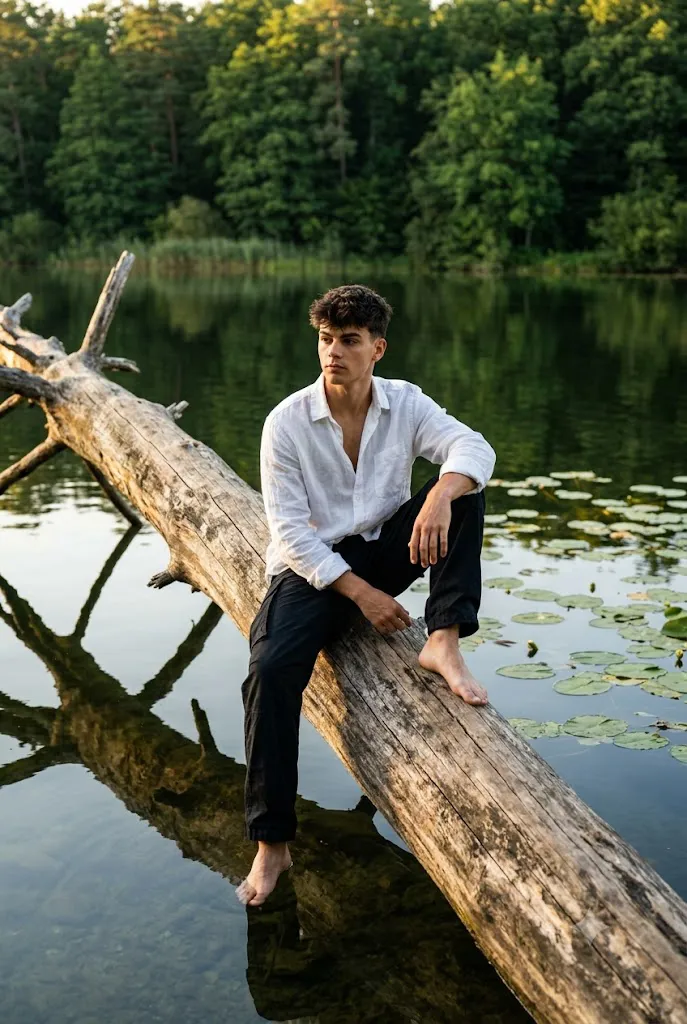
Create a photorealistic portrait using the uploaded image strictly as the facial identity reference. Preserve the exact facial structure, skin tone, hairstyle, eyes, eyebrows, nose, lips, jawline, and proportions without beautification. Dress the subject in a white linen shirt and black trousers. Position the subject sitting barefoot on a fallen tree trunk surrounded by calm lake water with natural reflections and floating lily pads. Place the environment within a lush green forest during golden hour. Capture the portrait using a professional DSLR with an 85mm lens, shallow depth of field, warm sunset lighting, realistic skin texture, cinematic color grading, fine analog film grain, and ultra-detailed 8K quality. No text or watermark.
Unlike dramatic fashion portraits that rely on bold colors and intense compositions, this style emphasizes simplicity, emotion, and atmosphere. The subject sits barefoot on a fallen tree trunk partially surrounded by calm lake water, creating a natural connection between the person and the landscape. Gentle reflections on the water, floating lily pads, and dense green trees reinforce a peaceful mood while subtle melancholy gives the portrait emotional depth.
One of the most important instructions in this prompt is complete facial identity preservation. When using an uploaded reference image, every facial feature must remain exactly the same. The AI should preserve the facial proportions, skin tone, hairstyle, eye shape, eyebrows, nose, lips, jawline, and overall identity without beautifying, reshaping, or altering the subject. Only the clothing, environment, lighting, pose, and artistic atmosphere should change.
The clothing remains intentionally minimal. A white linen shirt paired with black trousers creates an elegant contrast against the deep greens of the surrounding forest while maintaining a timeless, natural appearance. Sitting barefoot further strengthens the feeling of peace, freedom, and connection with nature.
Golden hour lighting plays a central role in the composition. Warm sunlight reflects softly across the lake surface, producing delicate highlights and natural rim lighting around the subject. The result is an image that feels cinematic without becoming artificial.
Captured using a professional DSLR or mirrorless camera with a portrait lens, the final portrait combines shallow depth of field, realistic skin texture, rich environmental detail, and cinematic color grading suitable for magazines, portfolios, outdoor campaigns, and fine art photography collections.
How To Use Photo Editing?
Professional editing helps transform an AI-generated portrait into a refined editorial-quality image while maintaining realistic textures and natural lighting.
Begin by balancing exposure carefully. Preserve the warm highlights created by the sunset while maintaining detail in the forest shadows.
Adjust white balance toward warm golden-hour tones without making skin appear overly orange.
Retain realistic skin texture by gently removing temporary blemishes while preserving pores and natural facial details.
Enhance water reflections subtly without making them appear unrealistic.
Increase clarity around clothing textures, tree bark, lily pads, and surrounding foliage while keeping the background naturally soft.
Apply gentle cinematic color grading that balances warm sunlight with cool forest greens.
Finish with fine analog-style film grain for a timeless outdoor editorial appearance.
Tools You Can Use For Prompt Copy and Create Photo
Modern AI image generators and editing software simplify the creation of cinematic lakeside portraits.
AI Image Generation Tools
ChatGPT
Ideal for writing highly detailed prompts describing identity preservation, environment, lighting, and composition.
Midjourney
Excellent for cinematic landscapes and editorial-style outdoor portraits.
Leonardo AI
Produces realistic faces with excellent environmental detail.
Ideogram
Useful for portrait photography concepts and lifestyle editorials.
Adobe Firefly
Provides AI-powered image generation integrated with Adobe Creative Cloud.
Professional Editing Software
Adobe Photoshop
Perfect for portrait retouching, lighting adjustments, and environmental refinements.
Adobe Lightroom
Excellent for exposure correction, color grading, and cinematic finishing.
Capture One
Offers industry-leading skin tone rendering and natural color management.
Affinity Photo
Provides advanced editing features suitable for outdoor portrait photography.
Snapseed
Useful for mobile editing with intuitive controls for brightness, warmth, contrast, and detail.
How To Edit Photo?
Step 1: Generate the Base Portrait
Create the lakeside scene while preserving the uploaded facial identity exactly.
Step 2: Balance Exposure
Maintain detail within both bright sunset highlights and darker forest shadows.
Step 3: Preserve Natural Skin
Retain realistic skin texture while performing minimal retouching.
Step 4: Enhance Clothing
Increase subtle texture within the linen shirt while preserving natural fabric appearance.
Step 5: Improve Water Reflections
Refine reflections without exaggerating brightness or sharpness.
Step 6: Refine Forest Details
Increase clarity around trees, foliage, lily pads, and wooden textures while maintaining realistic softness.
Step 7: Apply Cinematic Color Grading
Balance warm golden sunlight with natural green vegetation and cool water tones.
Step 8: Add Fine Film Grain
Introduce subtle analog-inspired grain for a timeless editorial finish.
Step 9: Sharpen Key Areas
Increase clarity around the face, hair, clothing, and tree trunk while preserving soft environmental depth.
Step 10: Verify Facial Consistency
Ensure every facial feature matches the uploaded reference image exactly.
Step 11: Final Refinements
Remove unwanted artifacts while maintaining realistic lighting transitions and natural environmental atmosphere.
Step 12: Export in High Resolution
Save the completed portrait as PNG or TIFF for maximum quality suitable for portfolios, print, editorials, or social media.
Conclusion
The Golden Hour Lakeside Serenity Portrait Prompt combines natural beauty, cinematic lighting, and emotional storytelling into a peaceful editorial portrait that feels timeless and authentic. The calm lake, lush forest, golden sunlight, and minimalist styling work together to create an atmosphere of quiet reflection and gentle melancholy.
By emphasizing complete facial identity preservation, realistic skin texture, subtle wardrobe styling, warm sunset lighting, and immersive environmental detail, this prompt produces portraits suitable for travel campaigns, outdoor editorials, fine art photography, personal portfolios, and lifestyle publications.
Although AI technology can generate remarkable outdoor portraits, achieving a professional-quality result still depends on carefully written prompts and thoughtful editing. Maintaining authentic facial identity, refining natural lighting, balancing warm and cool color tones, preserving realistic textures, and enhancing environmental depth all contribute to creating a believable cinematic image.
Whether your goal is creating artistic outdoor photography, adventure-inspired editorials, cinematic social media content, or emotionally rich portraiture, the Golden Hour Lakeside Serenity Portrait Prompt offers a strong foundation for producing photorealistic images filled with tranquility, warmth, and timeless visual storytelling.