Introduction
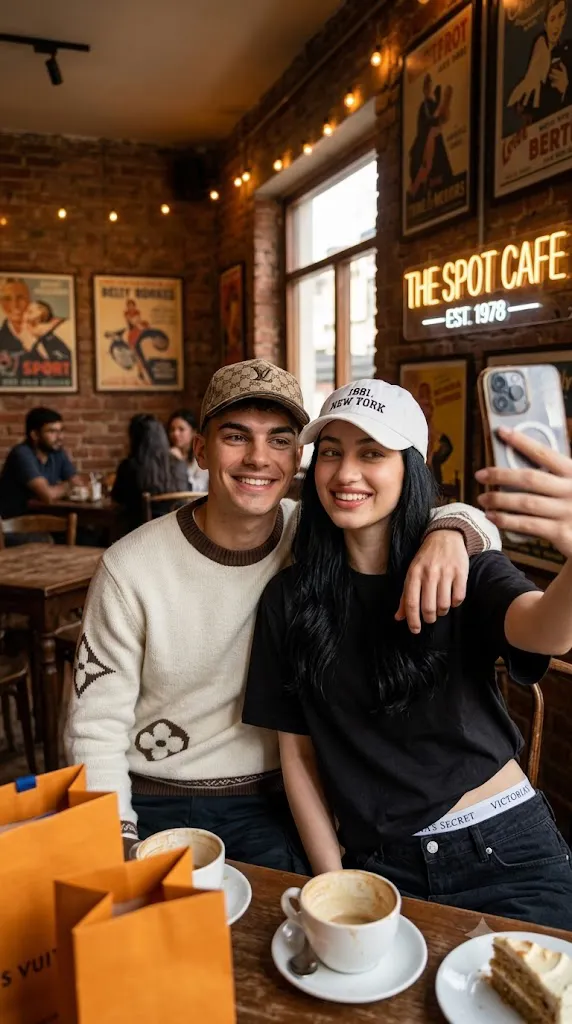
The Hyper-Realistic Retro Café Friendship Selfie Portrait Prompt is designed to create warm, authentic, and emotionally engaging portraits that celebrate friendship. Inspired by candid lifestyle photography and cozy café culture, this prompt combines realistic facial preservation with a charming vintage environment to produce images that feel genuine rather than overly staged.
"Hyper-Realistic Retro Café Friendship Selfie Portrait Prompt"
Create a hyper-realistic friendship selfie using the uploaded reference images of both people. Preserve both faces exactly as they appear in their reference photos without beautification or alteration. Position the two friends naturally taking a selfie together inside a cozy retro café with warm wooden furniture, vintage décor, pendant lights, coffee cups, and soft ambient lighting. Capture genuine smiles and relaxed body language that reflects authentic friendship. Use natural skin texture, realistic lighting, shallow depth of field, cinematic color grading, fine analog film grain, and ultra-detailed DSLR-quality rendering. If reference images for both people have not been uploaded, ask the user to upload both images before generating the portrait. No text or watermark.
A retro café provides the perfect backdrop for friendship portraits. Warm wooden furniture, vintage decorations, hanging pendant lights, textured walls, coffee cups, and soft ambient lighting create an inviting atmosphere that enhances natural interactions between friends. Instead of focusing solely on fashion, the environment becomes an important storytelling element that reflects comfort, connection, and shared memories.
The primary goal of this prompt is realism. When reference images are provided, each person's face must remain exactly the same. Facial proportions, skin tone, eye shape, eyebrows, nose, lips, hairstyle, and all unique facial characteristics should remain completely unchanged. AI should never beautify, replace, or reinterpret the faces. Only the pose, clothing (if requested), lighting, and environment should be adjusted.
Natural expressions are equally important. Rather than exaggerated smiles or dramatic poses, the portrait should capture genuine friendship through relaxed body language, soft smiles, comfortable eye contact, and spontaneous interaction. The selfie should resemble a real photograph taken during a pleasant afternoon at a favorite café.
Lighting plays a major role in achieving this atmosphere. Warm window light mixed with cozy indoor café lighting produces flattering highlights, soft shadows, and realistic skin tones. Gentle background blur created by a wide-aperture lens helps isolate the subjects while allowing the café ambiance to remain visible.
One essential requirement for creating this type of image is having reference photos of both people. Without images of both individuals, AI cannot accurately preserve their identities. Always upload a separate reference image for each person before generating the final portrait.
The completed image should resemble a high-end lifestyle editorial photographed using a professional DSLR or mirrorless camera while preserving the authenticity of an ordinary friendship selfie.
How To Use Photo Editing?
Professional editing helps refine the portrait while maintaining its natural appearance.
Begin by balancing exposure carefully so both faces are evenly illuminated without losing detail in highlights or shadows.
Adjust white balance to emphasize the warm café atmosphere while keeping skin tones realistic.
Maintain authentic skin texture. Avoid excessive smoothing because realistic friendship portraits benefit from natural facial detail.
Enhance eye clarity slightly by increasing brightness and contrast without making the eyes appear artificial.
Improve clothing textures and subtle fabric details while preserving realism.
Refine background lighting so decorative café lights create soft, attractive bokeh without distracting from the subjects.
Finish with gentle cinematic color grading and a small amount of analog-style grain to reinforce the nostalgic café atmosphere.
Tools You Can Use For Prompt Copy and Create Photo
Several AI generators and editing applications are suitable for creating realistic friendship portraits.
AI Image Generation Tools
ChatGPT
Excellent for writing detailed prompts covering identity preservation, composition, environment, lighting, and camera settings.
Midjourney
Produces artistic editorial portraits with beautiful cinematic lighting.
Leonardo AI
Offers highly realistic portrait generation with excellent facial consistency.
Ideogram
Suitable for lifestyle scenes and realistic portrait compositions.
Adobe Firefly
Integrates AI image generation with Adobe Creative Cloud.
Photo Editing Software
Adobe Photoshop
Perfect for portrait refinement, lighting adjustments, and detailed retouching.
Adobe Lightroom
Ideal for exposure balancing, warm café color grading, and natural finishing.
Capture One
Provides exceptional skin-tone rendering and professional color control.
Affinity Photo
Offers powerful editing features for professional-quality portraits.
Snapseed
Useful for mobile editing with natural adjustments for contrast, warmth, sharpening, and detail.
How To Edit Photo?
Step 1: Upload Both Reference Images
Always provide separate reference photos for both individuals to preserve each person's identity accurately.
Step 2: Generate the Base Portrait
Create the friendship selfie using both reference images while maintaining exact facial identity.
Step 3: Balance Exposure
Adjust brightness evenly across both faces without overexposing the café lighting.
Step 4: Preserve Natural Skin
Maintain realistic pores and subtle facial texture for both subjects.
Step 5: Improve Clothing Details
Enhance fabric textures while preserving realistic appearance.
Step 6: Refine Café Lighting
Balance warm ambient light and window light to create a welcoming atmosphere.
Step 7: Apply Cinematic Color Grading
Use warm browns, amber lighting, soft beige tones, and natural skin colors.
Step 8: Add Fine Film Grain
Introduce subtle analog grain that complements the nostalgic café aesthetic.
Step 9: Sharpen Important Features
Increase clarity around the eyes, hair, and clothing while keeping the background softly blurred.
Step 10: Verify Identity Preservation
Ensure both faces match their uploaded reference images exactly.
Step 11: Final Refinements
Remove unwanted artifacts while maintaining realistic lighting and natural expressions.
Step 12: Export in High Resolution
Save the finished portrait as PNG or TIFF for maximum image quality suitable for printing, portfolios, or social media.
Conclusion
The Hyper-Realistic Retro Café Friendship Selfie Portrait Prompt captures the warmth, authenticity, and emotional connection shared between friends through realistic photography and timeless editorial styling. By combining complete facial identity preservation with cozy café interiors, natural lighting, and candid interaction, this prompt creates portraits that feel genuine and memorable.
The warm retro café environment enhances the emotional storytelling while realistic expressions and subtle cinematic color grading give the final image the appearance of a professionally photographed lifestyle editorial. Rather than feeling artificial, the portrait resembles a treasured memory captured during a casual outing.
Although AI image generation greatly simplifies portrait creation, the best results still depend on carefully written prompts and thoughtful editing. Preserving each person's facial identity, balancing warm lighting, refining skin texture, maintaining natural expressions, and enhancing environmental details all contribute to a polished final image.
Most importantly, remember that both people's reference images are required. If only one image is uploaded, request the second person's photo before generating the portrait. This ensures that each individual is represented accurately and respectfully.
Whether you're creating friendship keepsakes, lifestyle content, social media posts, or editorial-style portraits, the Hyper-Realistic Retro Café Friendship Selfie Portrait Prompt provides an excellent foundation for producing beautiful, photorealistic images filled with warmth, authenticity, and lasting memories.