Introduction
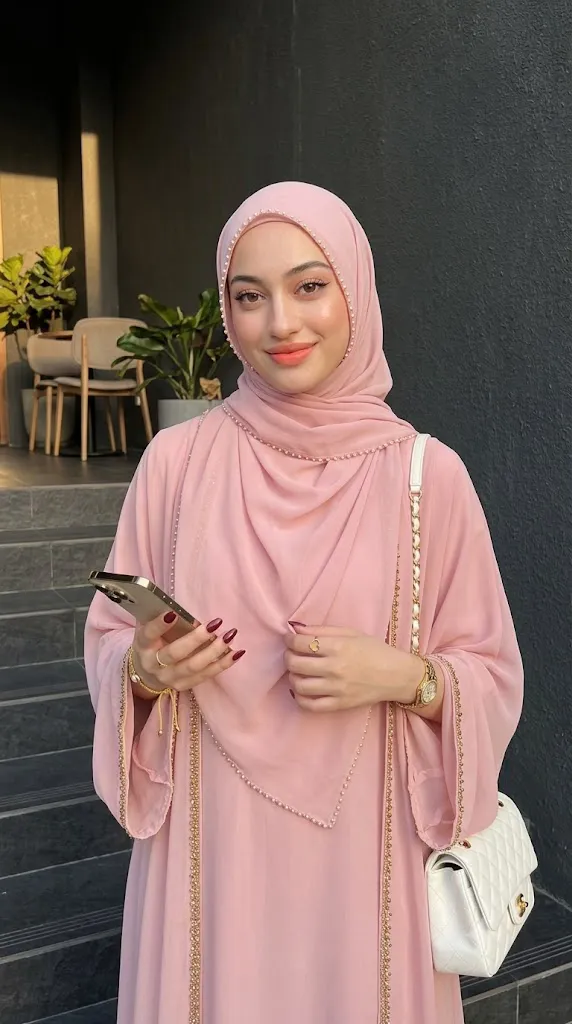
The Luxury Soft Pink Abaya Editorial Portrait Prompt is designed to create an elegant, photorealistic fashion portrait inspired by modern modest fashion editorials. It blends graceful Islamic fashion with luxury styling, cinematic lighting, and premium portrait photography to produce an image worthy of a high-end magazine cover. The emphasis is on sophistication, realistic textures, and timeless beauty while maintaining the subject's authentic identity.
"Luxury Soft Pink Abaya Editorial Portrait Prompt"
Create an ultra-realistic luxury fashion portrait using the uploaded image strictly as the facial identity reference. Preserve the exact facial structure, skin tone, hairstyle, eyes, nose, lips, jawline, and facial proportions without beautification. Dress the subject in a flowing soft pink chiffon abaya with elegant gold bead details and a matching oversized pearl-trimmed hijab. Add refined gold jewelry, a luxury white handbag with gold accents, and elegant accessories. Position the subject naturally on a stylish café staircase during golden hour with realistic sunlight and soft architectural shadows. Capture the image using a professional full-frame camera with shallow depth of field, realistic skin texture, cinematic color grading, fine analog-inspired film grain, premium editorial composition, and ultra-detailed 8K quality. No text or watermark.
A defining feature of this prompt is complete facial preservation. When using an uploaded reference photo, the AI should preserve the exact facial structure, skin tone, eye shape, eyebrows, nose, lips, jawline, and overall facial proportions. The goal is not to redesign or beautify the face but to place the person naturally into a new fashion concept while keeping them instantly recognizable.
The outfit is centered around a flowing soft pink chiffon abaya with elegant draping, wide sleeves, delicate gold bead embellishments, and a matching oversized hijab decorated with pearl details around the face. These luxurious elements create an appearance that is modest yet fashionable, combining traditional elegance with contemporary editorial styling.
Accessories complete the refined aesthetic. Gold jewelry, a luxury handbag, elegant rings, a wristwatch, and carefully coordinated nail polish introduce premium fashion details without overwhelming the composition. Every accessory contributes to the polished editorial appearance.
The setting also plays a major role. A stylish café staircase with dark architectural textures creates a dramatic contrast against the pastel tones of the abaya. Warm late-afternoon sunlight softly illuminates the subject while producing natural highlights and realistic shadows that enhance depth and realism.
Professional camera settings, realistic skin texture, natural posing, cinematic composition, and subtle depth of field combine to create an editorial portrait suitable for magazines, luxury fashion campaigns, portfolios, or social media branding.
How To Use Photo Editing?
Professional editing helps transform an AI-generated portrait into a polished editorial while preserving realism.
Begin by balancing exposure. The soft pink fabrics should retain their texture while darker architectural elements maintain visible detail.
Adjust white balance toward warm golden-hour lighting. Skin should remain natural while sunlight appears soft and inviting.
Preserve realistic skin texture. Avoid excessive smoothing because editorial photography benefits from authentic detail rather than artificial perfection.
Enhance fabric texture carefully. Chiffon layers, pearl decorations, and gold embellishments should remain detailed without looking exaggerated.
Refine jewelry highlights to create elegant reflections while maintaining realistic metallic finishes.
Use subtle sharpening around the eyes, eyelashes, and lips while allowing background elements to remain slightly softer.
Finish with cinematic color grading and a small amount of fine film grain to produce a luxurious editorial appearance.
Tools You Can Use For Prompt Copy and Create Photo
Several AI platforms and editing applications can help produce high-quality luxury portraits.
AI Image Generation Tools
ChatGPT
Ideal for writing highly detailed prompts describing clothing, lighting, facial preservation, composition, and accessories.
Midjourney
Excellent for producing cinematic editorial fashion portraits with premium artistic quality.
Leonardo AI
Provides realistic facial consistency and impressive fabric rendering.
Ideogram
Useful for fashion concepts and editorial portrait generation.
Adobe Firefly
Offers AI image generation integrated into Adobe's professional creative workflow.
Photo Editing Software
Adobe Photoshop
Perfect for detailed retouching, lighting adjustments, jewelry enhancement, and background refinement.
Adobe Lightroom
Excellent for exposure balancing, cinematic color grading, and finishing edits.
Capture One
Offers outstanding skin-tone rendering and advanced color management.
Affinity Photo
Provides professional editing features suitable for luxury portrait retouching.
Snapseed
A practical mobile editor for refining lighting, detail, warmth, and contrast.
How To Edit Photo?
Step 1: Generate the Base Portrait
Create the complete fashion scene while preserving facial identity exactly.
Step 2: Balance Exposure
Maintain detail in both the soft pink fabric and darker staircase background.
Step 3: Preserve Natural Skin
Keep realistic facial texture without excessive smoothing.
Step 4: Enhance Fabric Details
Improve chiffon folds, pearl decorations, and embroidery while maintaining realism.
Step 5: Refine Accessories
Increase detail on jewelry, handbag, wristwatch, and metallic elements naturally.
Step 6: Improve Lighting
Strengthen warm golden-hour highlights while preserving soft shadows.
Step 7: Apply Cinematic Color Grading
Balance warm sunlight with elegant pastel tones for a premium editorial look.
Step 8: Add Fine Film Grain
Introduce subtle analog grain that complements the luxury aesthetic.
Step 9: Sharpen Important Features
Improve clarity around the eyes, lips, and hijab details while keeping the background naturally softer.
Step 10: Verify Facial Consistency
Ensure every facial feature matches the uploaded reference image precisely.
Step 11: Final Refinements
Remove visual artifacts while preserving natural lighting and realistic textures.
Step 12: Export in High Resolution
Save the finished portrait as PNG or TIFF to preserve maximum quality for magazines, portfolios, websites, or print.
Conclusion
The Luxury Soft Pink Abaya Editorial Portrait Prompt combines timeless modest fashion with modern editorial photography to produce elegant, photorealistic portraits that feel sophisticated and authentic. The flowing chiffon fabrics, pearl-trimmed hijab, refined accessories, and warm architectural setting work together to create a graceful visual story.
Maintaining complete facial identity is essential to achieving realistic results. By preserving the exact facial characteristics while transforming only the clothing, environment, lighting, and styling, the final portrait remains personal and believable.
Although AI image generation has simplified portrait creation, exceptional editorial results still rely on carefully written prompts and thoughtful editing. Balancing natural lighting, preserving realistic skin, refining fabric textures, and applying elegant color grading ensure the final image reflects professional fashion photography standards.
Whether you're creating luxury fashion campaigns, personal branding images, modest fashion portfolios, magazine editorials, or social media content, the Luxury Soft Pink Abaya Editorial Portrait Prompt provides a beautiful foundation for producing cinematic portraits that celebrate elegance, realism, and timeless style.