Introduction
Luxury fashion portrait photography is all about elegance, confidence, and timeless style. The Luxury Summer Linen Fashion Editorial Portrait Prompt is designed to create a premium editorial look inspired by high-end fashion magazines and luxury lifestyle campaigns. It combines sophisticated clothing, cinematic lighting, architectural backgrounds, and natural posing to produce a realistic portrait that looks like it belongs on the cover of a fashion publication.
"Luxury Summer Linen Fashion Editorial Portrait Prompt"
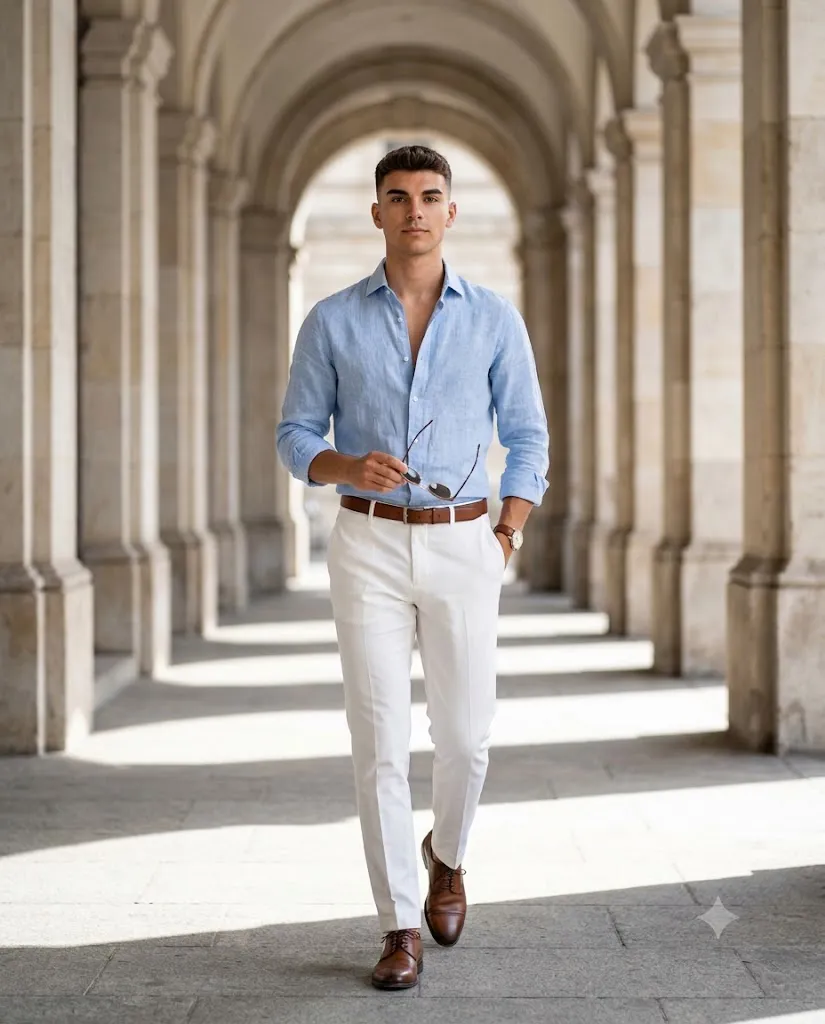
Create an 8K highly detailed photorealistic full-body fashion editorial portrait of a handsome athletic man confidently walking toward the camera. Use the uploaded image as the face reference and preserve facial identity exactly without changing facial structure, skin tone, or expression. He wears a light blue linen shirt with rolled-up sleeves and slightly unbuttoned collar, tailored white trousers, a brown leather belt, brown leather wristwatch, and polished brown leather dress shoes. He casually holds sunglasses in one hand while the other hand rests inside his pocket. The background features a luxurious classical stone colonnade with repeating arches and pillars creating symmetrical leading lines. Bright natural summer daylight, cinematic lighting, shallow depth of field, 85mm lens, f/1.8 aperture, ultra-realistic skin texture, fashion magazine quality, editorial composition, soft bokeh background, and 8K resolution.
This prompt features a handsome, athletic man confidently walking toward the camera in a relaxed yet stylish manner. He wears a light blue linen shirt with the top buttons casually undone, tailored white trousers, a brown leather belt, a classic leather wristwatch, and polished brown leather dress shoes. Holding a pair of sunglasses in one hand while keeping the other hand casually inside his pocket creates a natural editorial pose that reflects confidence without appearing forced.
The portrait is set inside a grand classical stone colonnade with elegant pillars and arches stretching into the distance. Bright natural daylight illuminates the subject while dramatic shadows across the stone floor create depth and visual interest. Combined with an 85mm lens effect, shallow depth of field, and cinematic color grading, the result is a luxurious portrait suitable for fashion portfolios, personal branding, magazine covers, and AI-generated editorial artwork.
How To Use Photo Editing?
After generating your AI portrait, photo editing is the key to achieving a polished, luxury editorial appearance. Begin by adjusting the exposure to ensure the lighting looks balanced and natural. Increase the contrast slightly to create more depth while maintaining smooth skin tones.
Enhance the white balance by adding warm sunlight tones that complement the summer atmosphere. Reduce overly bright highlights and gently lift the shadows to preserve details in the clothing and architecture.
The linen shirt should maintain its natural fabric texture, so avoid excessive smoothing. Increase clarity selectively on the shirt, trousers, leather accessories, and hair to create a premium fashion look.
Apply subtle cinematic color grading using warm highlights and slightly cool shadows. This creates the sophisticated editorial style commonly seen in luxury fashion campaigns.
Finally, sharpen the facial features, eyes, and clothing details while maintaining a smooth background blur. Small finishing touches like a soft vignette and gentle film grain can further enhance the cinematic quality without making the portrait appear artificial.
Tools You Can Use For Prompt Copy and Create Photo
Several AI image generators can produce outstanding fashion portraits from this prompt. Here are some of the best options:
1. ChatGPT Image Generation
ChatGPT can generate highly detailed editorial portraits with realistic lighting, natural poses, fashionable clothing, and cinematic compositions.
2. Midjourney
Midjourney is one of the best platforms for luxury fashion photography, producing artistic compositions, premium textures, and magazine-quality visuals.
3. Flux AI
Flux AI specializes in photorealistic portraits with exceptional facial accuracy, natural lighting, and realistic clothing textures.
4. Leonardo AI
Leonardo AI provides advanced prompt controls, making it easy to refine facial expressions, poses, clothing, and editorial lighting.
5. Google Gemini
Google Gemini offers impressive prompt understanding and produces realistic portraits with accurate lighting and composition.
6. Adobe Firefly
Adobe Firefly integrates AI generation with Adobe's editing ecosystem, making it ideal for creators who want professional post-processing.
7. Ideogram AI
Ideogram AI is excellent for generating clean, detailed fashion portraits with realistic proportions and strong visual quality.
How To Edit Photo?
Follow these simple steps to transform your AI-generated portrait into a premium luxury fashion editorial image.
Step 1: Copy the Prompt
Copy the complete prompt and paste it into your preferred AI image generator, such as ChatGPT, Midjourney, Flux AI, Leonardo AI, or Google Gemini.
Step 2: Generate the Portrait
Choose the highest quality settings available and generate the portrait. If needed, regenerate the image until you achieve the perfect facial expression, pose, and composition.
Step 3: Download the Image
Download the final image in high resolution (preferably 4K or 8K) to preserve maximum detail for editing.
Step 4: Import into an Editing App
Open the image in Adobe Lightroom, Adobe Photoshop, Snapseed, PicsArt, or any professional photo editing software.
Step 5: Adjust Lighting
Increase the exposure slightly, lower highlights, raise shadows, and add a touch of contrast to create a balanced editorial look.
Step 6: Apply Cinematic Color Grading
Add warm golden highlights with slightly cool shadows to create a luxury summer atmosphere. Fine-tune saturation to keep skin tones natural and clothing colors elegant.
Step 7: Enhance Details
Sharpen the eyes, facial features, hair, linen fabric texture, leather accessories, and architectural details. Apply subtle skin retouching while preserving realistic texture.
Step 8: Export the Final Image
Save the edited portrait in high-quality JPG or PNG format with maximum resolution. Your luxury summer fashion editorial portrait is now ready for social media, portfolio presentations, magazine-style layouts, or personal branding.
Conclusion
The Luxury Summer Linen Fashion Editorial Portrait Prompt is an excellent choice for creating elegant, high-end AI portraits that combine timeless fashion with cinematic photography. From the sophisticated linen outfit and luxurious architectural background to the realistic lighting and editorial composition, every detail contributes to a premium visual experience.
Whether you are a content creator, fashion enthusiast, photographer, or AI artist, this prompt provides everything needed to produce professional-quality portraits. By combining a powerful AI image generator with thoughtful photo editing techniques, you can create stunning editorial images that stand out on social media, websites, portfolios, and digital publications. Experiment with different lighting conditions, poses, and color grading styles to develop your own unique luxury fashion aesthetic while maintaining a realistic and sophisticated appearance.