Introduction
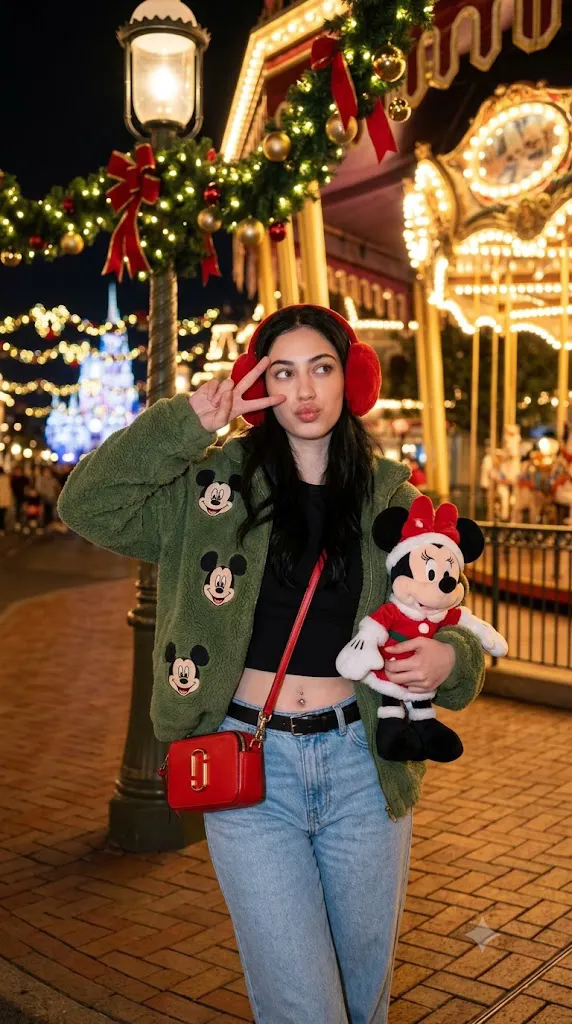
The Magical Disney Christmas Night Editorial Portrait Prompt is designed to create a festive, cinematic portrait that captures the wonder and excitement of the holiday season in a magical theme park setting. Combining Christmas decorations, warm golden lighting, vibrant colors, and premium editorial photography, this prompt produces an image that feels like it belongs on the cover of a luxury holiday magazine.
"Magical Disney Christmas Night Editorial Portrait Prompt"
Create an ultra-realistic Christmas editorial portrait using the uploaded image strictly as the facial identity reference. Preserve the exact facial structure, skin tone, hairstyle, eyes, nose, lips, and proportions without beautification. Place the subject inside a magical Christmas-themed park at night. Dress the subject in festive winter clothing with soft red earmuffs, a cozy green fuzzy jacket, stylish casual fashion, and holiday accessories. Illuminate the scene using warm Christmas lights with natural golden highlights and realistic nighttime shadows. Capture the portrait using a professional camera with shallow depth of field, cinematic composition, realistic skin texture, fine analog film grain, creamy background bokeh, premium editorial color grading, and ultra-detailed 8K quality. No text or watermark.
The scene centers around a joyful young woman standing confidently in a beautifully decorated Christmas environment. The atmosphere is filled with sparkling lights, festive ornaments, elegant decorations, and classic holiday charm. Every detail—from the glowing carousel to the decorated lamppost—helps tell a heartwarming visual story filled with celebration and seasonal magic.
A key feature of this prompt is strict facial identity preservation. When an uploaded reference image is used, the AI must maintain the exact facial structure, skin tone, eyes, nose, lips, hairstyle, jawline, facial proportions, and expression. The face should remain completely recognizable without beautification, reshaping, or artistic reinterpretation. The wardrobe, setting, and accessories may change, but the person's identity must stay intact.
The outfit combines playful holiday fashion with contemporary styling. Soft red earmuffs, a cozy green fuzzy jacket embroidered with cheerful Mickey-inspired motifs, a stylish crop top, high-waisted jeans, and festive accessories create an outfit that feels youthful, fashionable, and appropriate for a magical Christmas celebration. A plush holiday-themed Minnie-inspired toy adds personality while reinforcing the festive mood.
Lighting is one of the most important elements of the composition. Warm golden Christmas lights softly illuminate the subject while natural shadows provide depth. Decorative lights become beautiful circular bokeh in the distance, producing an inviting cinematic atmosphere. The overall color palette balances reds, greens, warm golds, and cool evening blues, creating the timeless feeling associated with holiday photography.
Captured with a professional camera using a medium portrait composition and shallow depth of field, the image keeps the subject perfectly sharp while allowing the festive background to softly blur into glowing lights. The final result is photorealistic, elegant, emotional, and suitable for magazine editorials, lifestyle campaigns, social media, or holiday-inspired creative projects.
How To Use Photo Editing?
Professional editing transforms the generated portrait into a polished editorial while preserving its festive authenticity.
Start by balancing exposure. Christmas lights should glow naturally without becoming overexposed, while the subject remains properly illuminated.
Adjust white balance toward warm evening tones. Skin should remain natural while golden decorative lights appear inviting and cozy.
Preserve realistic skin texture throughout the editing process. Editorial portraits should maintain natural pores and subtle facial details rather than appearing artificially smoothed.
Enhance clothing textures carefully. The fuzzy jacket, earmuffs, denim fabric, and holiday accessories should retain visible material detail without excessive sharpening.
Improve the sparkle of decorative lights by gently increasing highlight brilliance while avoiding unrealistic halos.
Maintain smooth background blur with creamy bokeh that enhances the magical nighttime atmosphere.
Finish with subtle cinematic color grading and fine analog-inspired film grain to create a premium editorial finish.
Tools You Can Use For Prompt Copy and Create Photo
Several AI image-generation platforms and professional editing applications can help produce this cinematic holiday portrait.
AI Image Generation Tools
ChatGPT
Excellent for writing detailed prompts covering identity preservation, wardrobe, lighting, camera settings, composition, and holiday atmosphere.
Midjourney
Creates stunning cinematic fashion editorials with beautiful lighting and artistic environments.
Leonardo AI
Produces highly realistic portraits with excellent facial consistency.
Ideogram
Suitable for editorial portrait concepts and creative visual storytelling.
Adobe Firefly
Offers AI-powered image generation integrated into Adobe's creative ecosystem.
Photo Editing Software
Adobe Photoshop
Ideal for advanced retouching, lighting refinement, and background enhancement.
Adobe Lightroom
Excellent for exposure balancing, warm color grading, and holiday atmosphere adjustments.
Capture One
Provides exceptional skin-tone rendering and professional color control.
Affinity Photo
Offers powerful editing features for editorial-quality portraits.
Snapseed
A convenient mobile editor for refining warmth, detail, contrast, and subtle grain.
How To Edit Photo?
Step 1: Generate the Base Portrait
Create the complete Christmas environment while preserving the facial identity exactly.
Step 2: Balance Exposure
Maintain bright decorative lights without losing detail in highlights.
Step 3: Preserve Natural Skin
Keep realistic skin texture while avoiding excessive smoothing.
Step 4: Refine Clothing Details
Enhance fuzzy fabrics, denim textures, and holiday accessories naturally.
Step 5: Improve Christmas Decorations
Increase the richness of ornaments, ribbons, and festive lighting while preserving realism.
Step 6: Enhance Background Bokeh
Maintain soft glowing lights that naturally separate the subject from the background.
Step 7: Apply Cinematic Color Grading
Balance warm golden lights with cool nighttime colors for a festive editorial appearance.
Step 8: Add Fine Film Grain
Apply subtle analog grain evenly across the portrait for a premium cinematic finish.
Step 9: Sharpen Important Features
Improve clarity around the eyes, lips, and hair without oversharpening the entire image.
Step 10: Verify Facial Consistency
Ensure every facial feature matches the uploaded reference photograph precisely.
Step 11: Final Refinements
Remove distracting artifacts while preserving realistic lighting and texture.
Step 12: Export in High Resolution
Save the completed portrait as PNG or TIFF to maintain maximum quality for print, portfolios, websites, or digital publishing.
Conclusion
The Magical Disney Christmas Night Editorial Portrait Prompt combines the enchantment of holiday celebrations with the sophistication of cinematic fashion photography. Rich festive decorations, glowing Christmas lights, elegant wardrobe styling, and photorealistic identity preservation come together to create an unforgettable seasonal portrait.
The balance between authentic facial fidelity and imaginative holiday styling allows the subject to remain recognizable while fully embracing the joyful atmosphere of a magical winter celebration. Warm lighting, shallow depth of field, realistic textures, and carefully controlled color grading produce images worthy of premium editorial publications.
Although AI image generation makes creating festive portraits easier than ever, exceptional results still depend on carefully written prompts and thoughtful editing. Preserving facial identity, refining textures, balancing holiday lighting, and maintaining realistic color harmony ensure the final portrait feels believable while retaining its magical cinematic charm.
Whether you're creating holiday greeting cards, lifestyle editorials, seasonal fashion campaigns, portfolio artwork, or festive social media content, the Magical Disney Christmas Night Editorial Portrait Prompt provides an excellent foundation for producing elegant, photorealistic images filled with warmth, celebration, and timeless holiday spirit.