Introduction
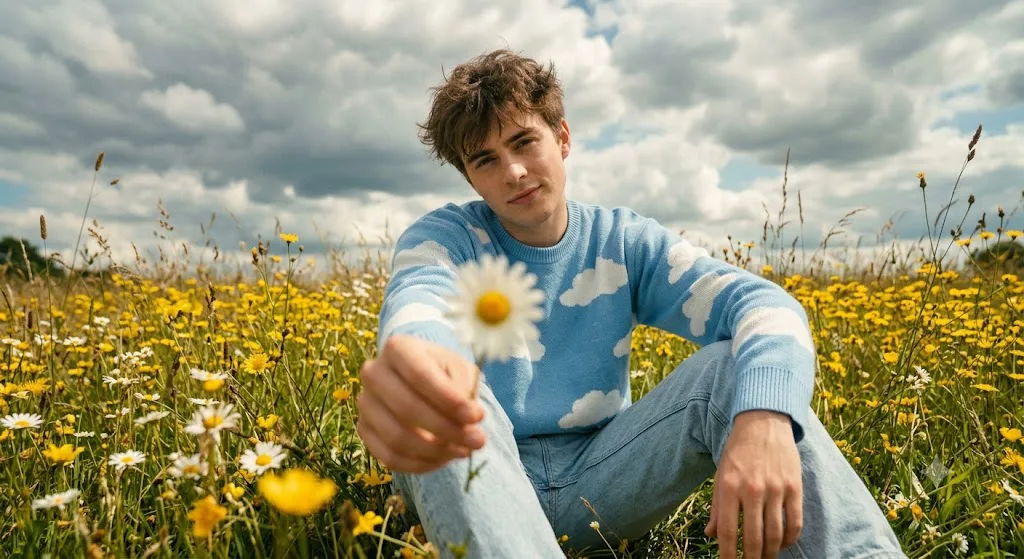
The Meadow Portrait With a Daisy Portrait Prompt is a beautiful blend of cinematic storytelling, fashion photography, and nature-inspired portraiture. This AI prompt transforms an ordinary portrait into a dreamy outdoor editorial scene where the subject is surrounded by blooming wildflowers beneath an expansive sky. The simple act of holding a daisy toward the camera creates an emotional connection with the viewer, while the shallow depth of field adds a professional cinematic touch.
"Meadow Portrait With a Daisy Portrait Prompt"
Using the uploaded portrait as the exact facial identity reference, create a hyper-realistic cinematic full-body portrait of a stylish young person sitting peacefully in a vibrant wildflower meadow during the daytime. The subject leans slightly forward while gently extending a white daisy toward the camera, creating a softly blurred foreground. Preserve the original facial structure, hairstyle, and expression. Dress the subject in a cozy sky-blue sweater decorated with white cloud patterns and light-wash denim jeans. Surround the scene with blooming yellow wildflowers, white daisies, lush green grass, and a dramatic partly cloudy sky. Apply warm natural sunlight with soft diffused lighting, shallow depth of field, DSLR-quality sharpness, creamy background blur, subtle vintage film tones, realistic skin texture, ultra-detailed flowers, cinematic HDR lighting, editorial fashion photography composition, masterpiece quality, 8K realism, and a 4:5 aspect ratio.
This style has become increasingly popular among AI artists, photographers, and content creators because it combines natural beauty with luxury editorial aesthetics. Instead of relying on complex backgrounds or dramatic props, the composition focuses on soft expressions, natural poses, vibrant flowers, and warm sunlight. The result is an image that feels peaceful, nostalgic, and effortlessly stylish.
One of the most recognizable characteristics of this portrait style is its soft cinematic lighting. Gentle daylight illuminates the subject naturally while creating subtle highlights across the face, hair, and clothing. Combined with warm color grading, vintage film tones, and creamy background blur, the final portrait resembles a high-end fashion editorial captured by a professional DSLR camera.
The surrounding meadow plays an equally important role in the composition. Fields filled with yellow wildflowers and white daisies create visual harmony while enhancing the dreamy atmosphere. A dramatic partly cloudy sky introduces depth and cinematic emotion without distracting from the main subject. Every element works together to create a portrait that feels authentic, timeless, and full of life.
Whether you are an AI prompt creator, digital artist, fashion photographer, social media creator, or blogger, learning how to create this style of portrait will help you produce elegant images suitable for portfolios, Instagram posts, magazine covers, websites, and creative marketing campaigns.
How To Use Photo Editing?
AI image generation provides an excellent starting point, but professional editing elevates the portrait to magazine-quality standards.
Step 1: Choose a High-Quality Reference Photo
Begin with a clear, high-resolution portrait featuring natural lighting and visible facial details. A quality reference image allows the AI to preserve facial identity while creating realistic outdoor portraits.
Step 2: Copy a Detailed Prompt
Use a descriptive prompt that clearly explains the subject's pose, clothing, environment, lighting, camera settings, emotional mood, and artistic style.
Step 3: Upload the Reference Image
Upload the portrait into an AI image generator that supports image-to-image editing or facial reference technology.
Step 4: Generate Multiple Variations
Create several versions to compare composition, facial resemblance, lighting, flower placement, and overall cinematic quality.
Step 5: Select the Best Result
Choose the version with the strongest balance between realism, natural expression, and environmental storytelling.
Step 6: Apply Final Editing
Open the selected image in professional editing software to enhance colors, improve sharpness, refine lighting, and complete the editorial finish.
Combining AI image generation with careful photo editing produces portraits that look naturally photographed instead of artificially generated.
Tools You Can Use For Prompt Copy and Create Photo
The following tools are highly recommended for creating cinematic meadow portraits.
ChatGPT
Excellent for writing detailed prompts describing outdoor environments, poses, camera settings, lighting, clothing, and artistic direction.
Midjourney
Produces beautiful artistic compositions with vibrant landscapes and premium editorial styling.
Flux AI
Creates realistic human portraits while maintaining facial identity and natural skin textures.
Stable Diffusion
Provides advanced image customization through image-to-image workflows, ControlNet, and prompt refinement.
GPT Image
Useful for generating realistic cinematic portraits with consistent visual quality directly from descriptive prompts.
Adobe Photoshop
Ideal for professional retouching, object removal, sharpening, skin refinement, and final image enhancement.
Adobe Lightroom
Perfect for adjusting exposure, contrast, highlights, shadows, white balance, and cinematic color grading.
Canva
Helpful for designing magazine covers, posters, YouTube thumbnails, social media graphics, and promotional content using the completed portrait.
Using AI generation alongside professional editing software ensures outstanding image quality and realistic visual presentation.
How To Edit Photo?
Professional editing transforms an AI-generated portrait into a polished editorial image.
Clean the Image
Remove unwanted artifacts or distractions while preserving natural skin texture and flower details.
Improve Lighting
Enhance highlights and shadows to create a balanced cinematic look without losing realism.
Enhance Flower Colors
Increase vibrancy carefully so that the yellow wildflowers and white daisies remain rich yet natural.
Refine Skin Texture
Maintain realistic pores and facial details while avoiding excessive smoothing.
Sharpen Important Details
Increase clarity around the eyes, hair, sweater texture, flower petals, and foreground details while keeping the overall appearance natural.
Apply Cinematic Color Grading
Use warm golden tones with a subtle vintage film effect, soft contrast, and slightly muted highlights to create a nostalgic editorial mood.
Export in High Resolution
Save the completed portrait in 4K or higher resolution for websites, fashion portfolios, social media, digital art, or high-quality printing.
Conclusion
The Meadow Portrait With a Daisy Portrait Prompt beautifully combines cinematic photography, fashion styling, and the peaceful charm of nature into one elegant visual composition. With a carefully crafted prompt, a high-quality reference image, and thoughtful editing techniques, you can create portraits that feel warm, emotional, and professionally photographed.
The success of this style depends on balancing natural lighting, authentic expressions, soft background blur, detailed flower textures, and harmonious color grading. Every element—from the gentle daisy in the foreground to the expansive meadow and dramatic sky—works together to create a timeless editorial portrait.
As AI image generation continues to advance, experimenting with different flowers, seasons, lighting conditions, and fashion choices will help you develop your own signature style. With practice and creativity, you can consistently produce ultra-realistic meadow portraits that capture both the beauty of nature and the elegance of modern fashion photography, making every image memorable, expressive, and visually captivating.