Introduction
The Mocha Studio Cinematic Fashion Portrait Prompt is designed for creators who want to produce luxurious, high-end fashion portraits with a timeless editorial aesthetic. Inspired by premium magazine photography, this prompt combines minimalist studio design, cinematic lighting, natural posing, and ultra-realistic details to create images that feel elegant and professional. Whether you are building a fashion portfolio, creating social media content, or experimenting with AI-generated photography, this prompt delivers a refined and sophisticated result.
"Mocha Studio Cinematic Fashion Portrait Prompt"
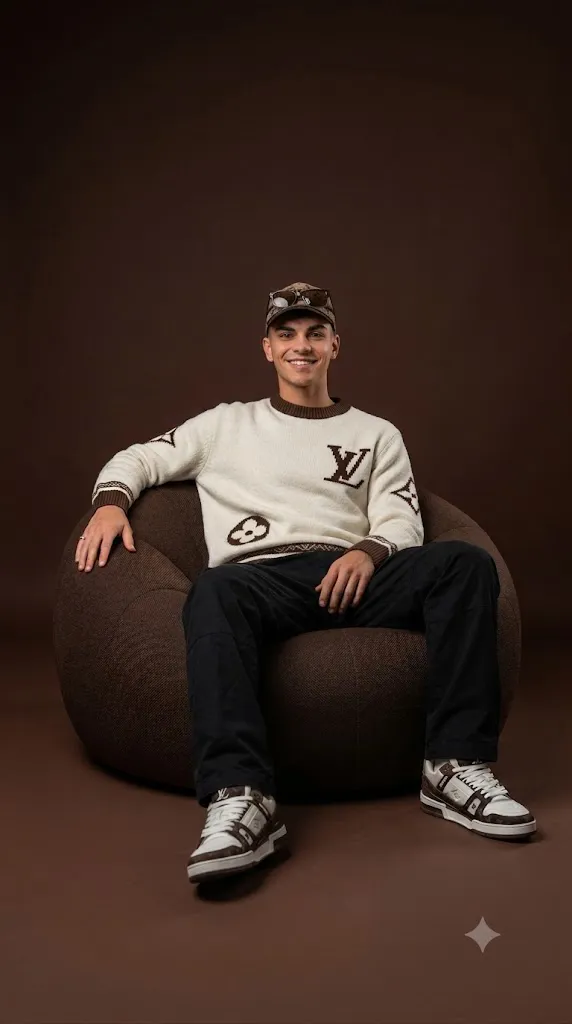
Create a hyper-realistic cinematic full-body fashion portrait using the uploaded image as the base reference. Preserve the face, skin tone, hairstyle, body proportions, clothing, scarf, ring, and every original detail exactly as shown. The subject sits naturally on a modern round bean bag chair with one arm resting comfortably on the chair and the other relaxed. The outfit remains unchanged. Place the subject against a seamless deep mocha brown studio background with a subtle gradient blending into the floor. Use professional studio lighting with soft shadows, natural skin texture, ultra-sharp details, cinematic color grading, luxury fashion magazine styling, shallow depth of field, editorial composition, and 8K ultra-realistic quality.
The portrait features a confident subject sitting comfortably on a modern round bean bag chair while maintaining a relaxed editorial pose. One arm rests naturally on the bean bag, while the other remains relaxed, creating a natural body posture that feels effortless. The clothing remains exactly the same as the original reference image, including the brown traditional outfit, matching scarf, ring, hairstyle, skin tone, and facial identity. Maintaining every original feature ensures authenticity while allowing the cinematic environment to enhance the overall presentation.
The background consists of a seamless deep mocha brown studio backdrop with a subtle gradient that blends naturally into the floor. Professional studio lighting creates soft shadows and gentle highlights that emphasize facial features, clothing textures, and natural skin detail. The result is a luxury fashion portrait that combines realism with editorial-quality styling.
How To Use Photo Editing?
Photo editing is the final step that transforms a good AI-generated portrait into a premium fashion editorial image. Begin by importing the generated portrait into your preferred editing software. Adjust the exposure slightly to maintain balanced brightness while preserving the warm cinematic atmosphere.
Fine-tune the white balance to retain the rich mocha background without affecting the natural skin tone. Increase contrast gently to create depth while keeping the shadows soft and elegant.
Enhance the clarity of the clothing fabric so the traditional outfit and scarf display realistic textures. Increase sharpness selectively around the eyes, hair, accessories, and clothing while leaving the skin smooth but natural.
Avoid excessive beauty filters because luxury editorial photography focuses on realistic skin texture rather than artificial perfection. Apply subtle color grading using warm highlights and neutral shadows to create a timeless fashion look.
Finally, add a very soft vignette around the edges and a slight cinematic finish to keep the viewer's attention focused on the subject without distracting from the minimalist composition.
Tools You Can Use For Prompt Copy and Create Photo
The following AI image generation platforms are excellent choices for creating realistic cinematic fashion portraits.
1. ChatGPT Image Generation
ChatGPT creates highly detailed, photorealistic portraits with excellent prompt understanding, accurate lighting, realistic facial features, and premium editorial compositions.
2. Midjourney
Midjourney is widely recognized for producing artistic fashion photography with cinematic lighting, luxury styling, and detailed backgrounds.
3. Flux AI
Flux AI delivers outstanding realism with natural skin texture, accurate clothing details, and professional-quality portrait photography.
4. Leonardo AI
Leonardo AI allows advanced customization of poses, lighting, clothing, and composition, making it ideal for editorial portrait creation.
5. Google Gemini
Google Gemini generates realistic portraits with strong prompt interpretation, balanced lighting, and natural-looking compositions.
6. Adobe Firefly
Adobe Firefly integrates AI image generation with Adobe Creative Cloud, making professional editing and enhancement simple.
7. Ideogram AI
Ideogram AI produces high-quality photorealistic portraits with clean details, realistic textures, and consistent image quality.
How To Edit Photo?
Follow these steps to create a premium cinematic studio portrait.
Step 1: Copy the Prompt
Copy the complete prompt and paste it into your preferred AI image generator, such as ChatGPT, Midjourney, Flux AI, Leonardo AI, or Google Gemini.
Step 2: Generate the Portrait
Select the highest image quality available and generate the portrait. If necessary, regenerate the image until the facial identity, pose, lighting, and overall composition meet your expectations.
Step 3: Download the Image
Download the portrait in high resolution, preferably 4K or 8K, to preserve every fine detail during editing.
Step 4: Open in a Photo Editing App
Import the image into Adobe Lightroom, Adobe Photoshop, Snapseed, PicsArt, or another professional editing application.
Step 5: Adjust Lighting
Increase exposure slightly, reduce highlights, lift shadows, and fine-tune contrast to achieve a balanced luxury studio appearance.
Step 6: Apply Cinematic Color Grading
Enhance the mocha background with subtle warm brown tones while maintaining natural skin colors. Apply gentle color grading for a refined editorial look.
Step 7: Enhance Details
Sharpen the eyes, hair, clothing texture, scarf, and accessories. Preserve realistic skin texture by avoiding excessive smoothing or beautification.
Step 8: Export the Final Image
Save the edited portrait in high-quality JPG or PNG format with maximum resolution. Your Mocha Studio Cinematic Fashion Portrait is now ready for portfolios, social media, fashion editorials, websites, and digital publications.
Conclusion
The Mocha Studio Cinematic Fashion Portrait Prompt is an excellent choice for creating sophisticated AI-generated fashion portraits with a premium editorial style. Its seamless mocha backdrop, professional studio lighting, realistic textures, and elegant composition make it ideal for luxury fashion photography, personal branding, and creative content creation.
Whether you are an AI artist, photographer, fashion enthusiast, or digital creator, this prompt provides everything needed to produce stunning professional-quality portraits. By combining a powerful AI image generator with careful photo editing, you can achieve realistic, magazine-worthy images that highlight both style and authenticity. Experiment with different lighting adjustments, subtle color grading, and refined finishing touches to create portraits that stand out with timeless elegance.