Introduction
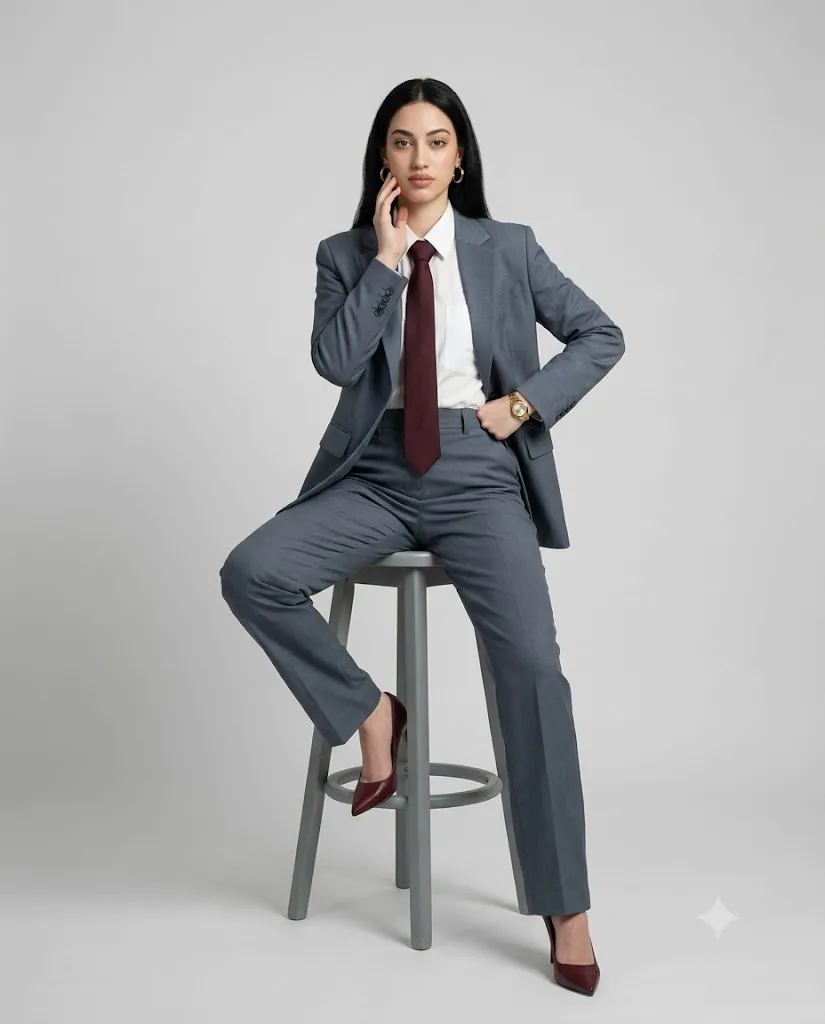
The Modern Power Dressing Studio Portrait AI Prompt is designed for creators who want to generate a sophisticated, editorial-quality fashion portrait using AI image generators. Inspired by luxury fashion magazines and premium studio photography, this prompt focuses on elegance, confidence, and minimalism. It combines a perfectly tailored slate-gray suit, crisp white shirt, burgundy tie, and professional studio lighting to create a timeless portrait suitable for portfolios, social media, fashion campaigns, and branding.
"Modern Power Dressing Studio Portrait AI Prompt"
Create a full-body fashion portrait of a woman. The subject is perfectly centered within the frame, with balanced negative space on both sides. The camera is positioned at eye level for a natural editorial perspective.Subject & Styling: A refined modern power-dressing look. The subject wears a tailored slate-gray suit featuring a structured blazer and high-waisted straight-leg trousers. Underneath, she wears a crisp white button-up shirt paired with a deep burgundy tie for strong contrast. Accessories include gold hoop earrings and a sleek gold wristwatch. The footwear consists of pointed-toe burgundy high heels that match the tie, creating cohesive color harmony. Pose & Body Position: The subject is seated on a minimal matte-gray wooden stool with a circular footrest. One leg is bent and placed on the stool's circular footrest, while the other extends naturally downward, creating a dynamic asymmetrical pose. One hand rests confidently on the waist, while the other is gently raised to the face, with the fingers lightly touching the cheek. Her posture is upright yet relaxed, conveying authority and composure. Expression & Gaze: A calm, self-assured expression with subtle intensity. Direct eye contact with the camera. Background & Environment: A clean, seamless light-gray studio backdrop where the floor and background merge smoothly with no visible edge (infinity wall effect). Minimal, elegant, and distraction-free. Lighting Setup (Precise): Soft, diffused studio lighting. The key light is positioned in front of the subject, slightly above eye level, creating gentle facial contours and soft shadows. An even fill light maintains balanced exposure with no harsh contrast. Camera & Technical Details: Shot with an 85mm lens and a shallow depth of field (f/1.8). Ultra-sharp focus on the face. Captured in 8K ultra-high resolution with detailed fabric textures and natural skin details. Overall Mood & Style: High-fashion editorial with modern minimalist luxury. Clean, powerful, sophisticated, and timeless. Aspect Ratio: 4:5.
Unlike ordinary AI prompts, this one includes detailed camera settings, lighting instructions, posing, wardrobe styling, and background descriptions. These details help AI models produce highly realistic images with balanced composition and premium-quality textures.
Whether you're a fashion enthusiast, content creator, digital artist, or AI photography lover, this prompt can help you create magazine-worthy portraits in just a few seconds.
The portrait features a confident woman seated on a minimalist gray stool against a seamless light-gray studio backdrop. The clean environment ensures that all attention remains on the subject, highlighting her confident posture, refined styling, and luxurious appearance.
Because modern AI generators understand detailed prompts extremely well, adding camera specifications such as an 85mm lens, f/1.8 aperture, and soft diffused studio lighting significantly improves the final result. The generated image appears almost identical to a professional fashion photoshoot captured in a high-end photography studio.
How To Use Photo Editing?
Creating AI fashion portraits is much easier than traditional photography. Instead of arranging expensive studio equipment, photographers, lighting, and models, you simply need a well-written AI prompt and an image generation tool.
Follow these steps:
Step 1: Copy the Prompt
Copy the complete AI prompt exactly as written. Every detail—including clothing, pose, lighting, camera angle, accessories, and background—plays an important role in generating realistic results.
Step 2: Open an AI Image Generator
Launch your preferred AI image generator that supports long descriptive prompts.
Step 3: Paste the Prompt
Paste the prompt into the text input box.
Step 4: Upload a Reference Image (Optional)
If you want the AI to preserve a person's facial features, upload a reference photo. Most advanced AI tools allow face reference or image conditioning.
Step 5: Select Aspect Ratio
Choose the 4:5 aspect ratio, which is perfect for Instagram portraits, fashion editorials, and portfolio photography.
Step 6: Generate the Image
Click the Generate button and wait a few moments while the AI creates the portrait.
Step 7: Review the Result
If necessary, regenerate the image several times until you achieve the perfect pose, facial expression, and clothing details.
Tools You Can Use For Prompt Copy and Create Photo
Many AI image generation platforms support detailed fashion prompts. Here are some of the most popular options:
1. ChatGPT Image Generator
Perfect for creating highly detailed fashion portraits using descriptive prompts. It understands camera settings, lighting, composition, poses, and clothing exceptionally well.
2. Midjourney
One of the best tools for cinematic fashion photography. It produces artistic yet realistic editorial portraits with excellent lighting and texture.
3. Flux AI
Known for sharp realism and impressive fabric details. Ideal for premium fashion photography.
4. Google Imagen
Produces clean studio portraits with accurate lighting and highly natural skin tones.
5. Stable Diffusion XL (SDXL)
A powerful open-source model that allows advanced customization through prompts and fine-tuning.
6. Leonardo AI
Excellent for beginners and professionals alike. It offers multiple preset styles suitable for fashion editorials.
7. Adobe Firefly
Ideal for commercial-quality content with realistic lighting and premium compositions.
8. Ideogram AI
Great for realistic portraits and creative advertising visuals while maintaining excellent prompt accuracy.
How To Edit Photo?
Even after generating an AI portrait, a few finishing touches can make it look even more professional.
Step 1: Generate Multiple Versions
Create several images using the same prompt. Compare facial expressions, clothing folds, lighting, and pose before selecting the best one.
Step 2: Upscale the Image
Use an AI upscaler to increase the resolution to 4K or 8K while preserving sharp details.
Step 3: Improve Skin Texture
Enhance skin naturally without over-smoothing. Maintain realistic pores and facial details for an editorial look.
Step 4: Enhance Suit Details
Increase clarity slightly to highlight the texture of the tailored blazer, trousers, and shirt.
Step 5: Refine Lighting
Adjust brightness, highlights, and shadows carefully to create a balanced studio appearance.
Step 6: Improve Color Harmony
Fine-tune the slate-gray suit, white shirt, and burgundy tie so they complement each other beautifully.
Step 7: Sharpen the Eyes
Apply subtle sharpening to the eyes, as they are the main focal point of the portrait.
Step 8: Remove Small Imperfections
Clean up any AI-generated artifacts around the hands, fingers, clothing edges, or accessories.
Step 9: Adjust Contrast
Use moderate contrast to make the portrait appear more premium while maintaining soft transitions.
Step 10: Export in High Resolution
Save the final image in PNG or high-quality JPEG format. If you're using it for professional printing or advertising, export it in the highest available resolution.
Conclusion
The Modern Power Dressing Studio Portrait AI Prompt is an excellent choice for anyone looking to create elegant, luxury-inspired fashion portraits with artificial intelligence. By combining professional wardrobe styling, minimalist studio design, carefully planned lighting, and precise camera settings, this prompt consistently produces editorial-quality images suitable for magazines, portfolios, social media, and commercial branding.
One of its greatest strengths is its attention to detail. Every element—from the structured slate-gray suit and burgundy accessories to the soft studio lighting and seamless infinity background—works together to create a portrait that feels authentic and visually striking. When paired with advanced AI image generators, the results can closely resemble photographs taken in a professional fashion studio.
For the best outcome, use the complete prompt without removing important details, generate multiple variations, and apply subtle post-processing enhancements such as upscaling, color correction, and skin refinement. These final touches elevate the realism and overall presentation of the portrait.
As AI image generation technology continues to evolve, thoughtfully crafted prompts like this one allow creators to achieve stunning, high-end fashion visuals quickly and efficiently. Whether you're building a personal portfolio, designing marketing materials, or experimenting with AI art, this prompt provides a reliable foundation for creating timeless, sophisticated studio portraits.