Introduction
The Monochrome Editorial Gentleman Portrait Prompt is designed for creators who want to produce sophisticated black-and-white portraits inspired by luxury fashion magazines, premium lifestyle campaigns, and classic editorial photography. Rather than relying on vibrant colors, this prompt emphasizes lighting, composition, facial expression, and contrast to create an image that feels timeless and elegant.
"Monochrome Editorial Gentleman Portrait Prompt"
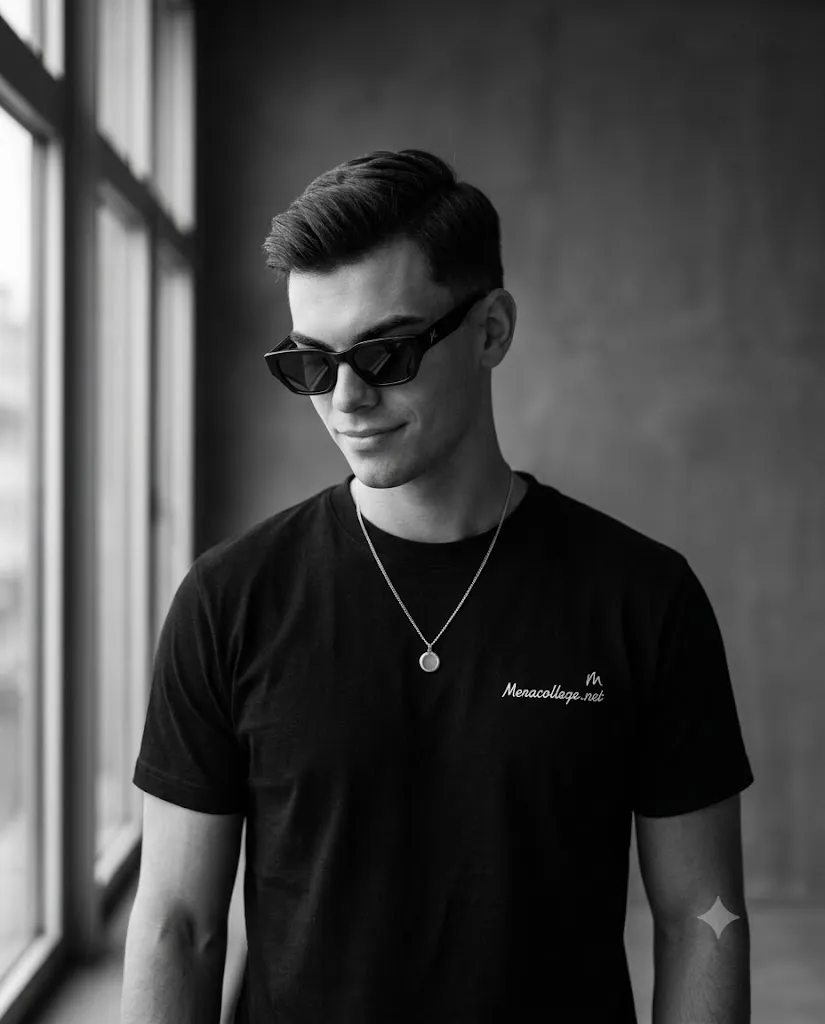
Create a photorealistic black-and-white editorial portrait of a stylish gentleman wearing angular black sunglasses, a fitted black crew-neck T-shirt, and a thin silver necklace with a polished circular pendant. Place him against a dark gray textured wall with large vertical windows allowing soft natural light from the left side. Pose him in a three-quarter bust composition cropped below the chest with his head slightly lowered while looking naturally toward the left and smiling subtly. Capture the image using an 85mm prime lens with soft focus, rich monochrome tonal range, realistic skin texture, cinematic lighting, fine analog grain, premium editorial composition, and ultra-detailed 8K quality. No text or watermark.
Black-and-white photography has always been associated with refinement because it directs attention toward emotion, texture, and form. By removing color distractions, every detail—from facial structure and clothing folds to lighting transitions and background textures—becomes more noticeable. This prompt captures that philosophy perfectly while combining modern fashion styling with contemporary editorial aesthetics.
The portrait features a stylish gentleman wearing angular black sunglasses, a fitted black crew-neck T-shirt, and a thin silver chain necklace with a polished circular pendant. The clean wardrobe creates a minimalist appearance while allowing facial features and lighting to remain the center of attention.
The environment is equally understated. A dark gray textured wall and tall vertical window frames establish a modern architectural backdrop. Soft natural window light enters from the left side, producing gentle highlights across the subject's face and subtle shadows that enhance depth without becoming dramatic.
The composition uses a three-quarter bust crop positioned just below the chest. The subject's head tilts slightly downward while looking calmly to the left with a relaxed half-smile. This natural pose creates confidence without appearing forced.
Photographed as though using a professional full-frame camera with an 85mm prime lens, the portrait delivers exceptional skin texture, realistic fabric detail, beautiful monochrome tonal separation, and premium editorial quality suitable for magazine covers, fashion campaigns, portfolio photography, and luxury branding.
How To Use Photo Editing?
Professional editing transforms a strong monochrome portrait into a polished editorial photograph.
Begin by adjusting exposure carefully to preserve highlight detail while maintaining rich black tones.
Convert the image into black and white using individual color channel adjustments rather than applying a simple grayscale filter.
Fine-tune contrast to produce clean separation between skin, clothing, and the background.
Retouch skin lightly while preserving natural pores and facial texture.
Increase clarity around sunglasses, hair, clothing seams, necklace details, and facial features.
Apply subtle dodging and burning techniques to sculpt facial contours naturally.
Finish the portrait with fine analog-inspired grain to reinforce the timeless editorial appearance.
Tools You Can Use For Prompt Copy and Create Photo
Modern AI generators and professional editing software simplify the process of creating premium monochrome portraits.
AI Image Generation Tools
ChatGPT
Excellent for writing highly detailed portrait prompts including lighting, composition, wardrobe, camera settings, and identity preservation.
Midjourney
Produces artistic editorial portraits with exceptional monochrome styling.
Leonardo AI
Ideal for photorealistic fashion portraits with realistic textures.
Ideogram
Suitable for modern editorial photography concepts.
Adobe Firefly
Generates professional-quality AI portraits integrated with Adobe software.
Professional Editing Software
Adobe Photoshop
Ideal for portrait retouching, frequency separation, and monochrome finishing.
Adobe Lightroom
Excellent for black-and-white conversion, exposure balancing, and tonal adjustments.
Capture One
Provides industry-leading monochrome rendering and skin tone control.
Affinity Photo
Offers professional editing tools suitable for editorial portrait work.
Snapseed
A practical mobile solution featuring black-and-white filters, contrast control, and grain effects.
How To Edit Photo?
Step 1: Upload the Portrait
Start with a high-resolution portrait showing sharp facial detail.
Step 2: Generate the Base Image
Create the editorial composition while maintaining realistic facial proportions.
Step 3: Balance Exposure
Preserve highlight detail while keeping deep, clean blacks.
Step 4: Convert to Monochrome
Use advanced black-and-white channel mixing instead of basic grayscale conversion.
Step 5: Preserve Skin Texture
Maintain realistic pores while removing temporary imperfections.
Step 6: Enhance Hair and Clothing
Increase definition in hair strands, fabric texture, and necklace details.
Step 7: Refine Lighting
Use gentle dodging and burning to enhance facial depth naturally.
Step 8: Improve Background
Keep the textured wall subtle while maintaining architectural lines.
Step 9: Apply Film Grain
Add fine monochrome grain to reinforce the classic editorial look.
Step 10: Verify Overall Balance
Ensure lighting, composition, facial expression, and contrast remain natural.
Step 11: Final Cleanup
Remove unwanted artifacts while preserving realistic textures.
Step 12: Export in High Resolution
Save the completed portrait as PNG or TIFF for magazines, fashion campaigns, portfolios, websites, or premium printing.
Conclusion
The Monochrome Editorial Gentleman Portrait Prompt demonstrates how simplicity often creates the strongest visual impact. Instead of depending on bold colors or elaborate backgrounds, this prompt relies on thoughtful lighting, refined composition, realistic textures, and timeless monochrome photography to produce an elegant portrait.
Every detail—from the clean wardrobe and natural facial expression to the soft window lighting, textured background, cinematic contrast, and realistic skin rendering—works together to create an image suitable for luxury fashion magazines and premium editorial campaigns. The restrained styling allows the viewer to focus on confidence, personality, and craftsmanship rather than unnecessary visual distractions.
While AI image generation provides an excellent foundation, achieving professional editorial quality still requires careful prompt writing and thoughtful post-processing. Proper exposure balancing, monochrome conversion, texture preservation, subtle retouching, and realistic contrast all contribute to a convincing final portrait.
Whether you are building a fashion portfolio, creating luxury branding content, designing magazine editorials, or producing timeless black-and-white portraits for social media or commercial use, the Monochrome Editorial Gentleman