Introduction
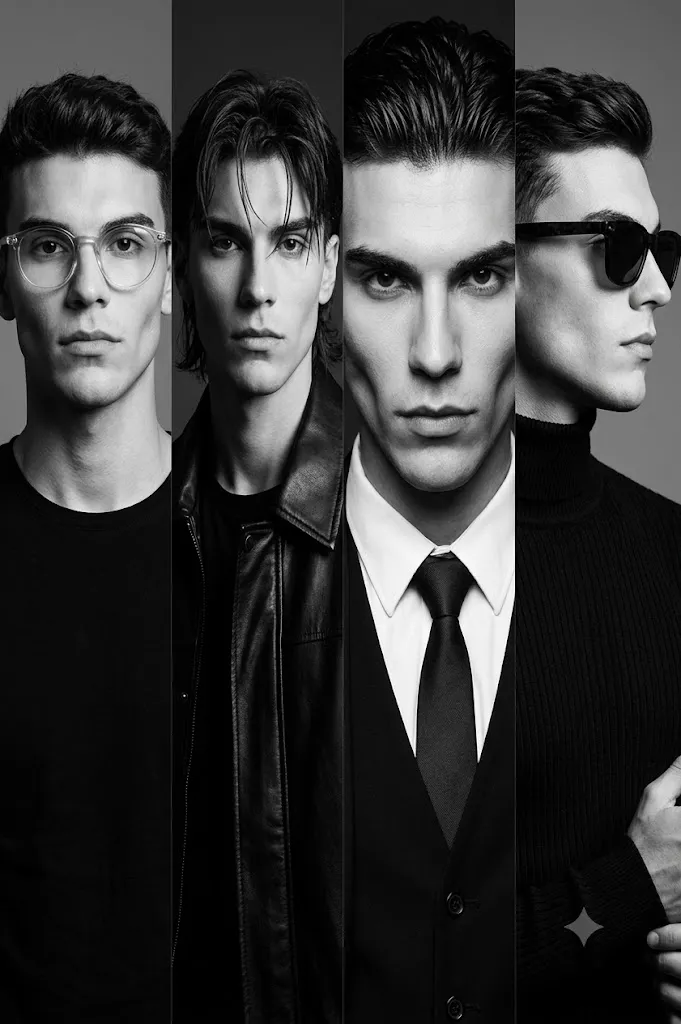
The Monochrome Four-Panel Editorial Portrait Prompt is inspired by the timeless elegance of black-and-white fashion photography and high-end magazine editorials. Instead of showcasing a single portrait, this concept presents four distinct portraits of the same individual arranged side by side in a clean horizontal layout. Each panel highlights a different pose, hairstyle, expression, outfit, or camera angle while preserving the subject's identity, creating a sophisticated visual narrative that feels both cinematic and artistic.
"Monochrome Four-Panel Editorial Portrait Prompt"
Create a photorealistic four-panel editorial portrait using the uploaded image strictly as the facial identity reference. Preserve the exact facial structure, skin tone, hairstyle, eyes, nose, lips, and proportions without beautification. Arrange four different studio portraits horizontally, each featuring unique styling, poses, and expressions while maintaining identical facial identity. Use high-contrast monochrome lighting with deep shadows and realistic highlights. Include premium black clothing, elegant accessories, dramatic hairstyles, professional eyewear, and cinematic studio backgrounds. Render in true black-and-white with fine analog film grain, sharp facial detail, editorial composition, and ultra-detailed 8K quality. No text or watermark.Black-and-white photography has long been associated with emotion, contrast, and timeless style. By removing color, attention naturally shifts toward facial expressions, lighting, clothing textures, and composition. This makes monochrome portraiture especially powerful for editorial fashion, personal branding, fine art photography, and luxury magazine features.
A defining feature of this prompt is complete facial identity preservation. When using an uploaded reference image, every facial characteristic—including facial structure, skin tone, eye shape, nose, lips, jawline, hairstyle, and expression—must remain exactly the same. The AI should not beautify, reshape, or reinterpret the subject's appearance. Only clothing, hairstyles, accessories, poses, and lighting may vary between the four panels.
Each portrait introduces a unique visual personality. One panel may feature round eyeglasses and a minimalist black shirt, while another introduces longer textured hair with a leather jacket. A close-up portrait emphasizes facial details, while a profile view wearing sunglasses adds variety and balance. Together, these four portraits create the feeling of an editorial fashion story rather than a collection of unrelated images.
Lighting plays an essential role in achieving the desired look. High-contrast studio lighting produces deep shadows, sculpted facial features, and crisp highlights. Controlled illumination enhances clothing textures, hairstyles, eyewear, and facial contours while maintaining a refined editorial appearance.
The monochrome palette enhances every detail without distraction. Carefully balanced blacks, whites, and grays produce rich tonal depth that highlights the subject's expression, fashion choices, and overall mood. The finished composition resembles the portrait spreads commonly found in luxury fashion magazines and creative portfolios.
How To Use Photo Editing?
Professional editing is essential for refining the four-panel composition while preserving realism.
Begin by balancing exposure across every portrait. Although lighting may vary slightly between panels, overall brightness should remain visually consistent.
Convert the portraits into true monochrome using professional black-and-white processing rather than simple desaturation. This preserves tonal separation and texture.
Maintain realistic skin texture. Avoid excessive smoothing that removes pores or natural facial details. Editorial portraits benefit from authentic realism.
Increase clarity slightly around clothing fabrics, hair, glasses, and accessories while keeping skin soft and natural.
Enhance local contrast carefully to emphasize facial structure without creating harsh transitions.
Refine shadows and highlights to maintain strong tonal range while preserving detail in both dark clothing and lighter facial areas.
Finish with subtle analog-inspired film grain to reinforce the timeless character of classic black-and-white photography.
Tools You Can Use For Prompt Copy and Create Photo
Modern AI generators and editing software make producing editorial monochrome portraits easier than ever.
AI Image Generation Tools
ChatGPT
Excellent for writing detailed prompts describing composition, identity preservation, fashion styling, lighting, and camera settings.
Midjourney
Produces dramatic editorial portraits with cinematic lighting and artistic quality.
Leonardo AI
Generates realistic portraits with strong facial consistency and detailed textures.
Ideogram
Suitable for creative portrait layouts and editorial concepts.
Adobe Firefly
Offers AI-powered image generation integrated with Adobe Creative Cloud.
Photo Editing Software
Adobe Photoshop
Ideal for arranging multiple panels, advanced retouching, and precise tonal adjustments.
Adobe Lightroom
Excellent for monochrome conversion, exposure balancing, and cinematic finishing.
Capture One
Provides professional monochrome processing and exceptional tonal control.
Affinity Photo
Offers advanced layer editing and professional retouching capabilities.
Snapseed
Useful for quick mobile editing, black-and-white conversion, and subtle contrast adjustments.
How To Edit Photo?
Step 1: Generate Individual Portraits
Create four separate portraits while preserving identical facial identity.
Step 2: Build the Horizontal Layout
Arrange each portrait evenly with balanced spacing and consistent framing.
Step 3: Balance Exposure
Ensure all four portraits share a harmonious tonal range.
Step 4: Convert to Professional Monochrome
Use advanced black-and-white processing instead of simple grayscale conversion.
Step 5: Preserve Natural Skin
Maintain realistic skin texture and facial details throughout the composition.
Step 6: Enhance Clothing Texture
Improve detail in leather, knitwear, shirts, and accessories without over-sharpening.
Step 7: Refine Hair and Eyewear
Increase clarity around hairstyles, glasses, and sunglasses while preserving realism.
Step 8: Apply Cinematic Contrast
Strengthen shadows and highlights to create an editorial studio appearance.
Step 9: Add Fine Film Grain
Introduce subtle analog grain that complements the monochrome style.
Step 10: Verify Facial Consistency
Confirm every panel accurately matches the uploaded reference photograph.
Step 11: Final Refinements
Remove distracting artifacts while preserving natural lighting transitions.
Step 12: Export in High Resolution
Save the finished composition as PNG or TIFF to maintain maximum quality for print, magazines, portfolios, or digital publication.
Conclusion
The Monochrome Four-Panel Editorial Portrait Prompt combines timeless black-and-white photography with contemporary editorial fashion design. Presenting four carefully styled portraits of the same subject within one cohesive composition creates visual variety while maintaining elegant consistency.
By emphasizing dramatic studio lighting, realistic facial preservation, premium fashion styling, and refined monochrome processing, this portrait style captures the sophistication associated with luxury magazines and professional fashion photography. Each panel contributes a unique perspective while collectively telling a unified visual story.
Although AI image-generation technology can produce highly realistic results, exceptional editorial portraits depend on carefully written prompts and thoughtful post-processing. Preserving facial identity, balancing tonal contrast, refining textures, and maintaining consistent lighting ensure the final composition feels authentic and professionally produced.
Whether creating personal portfolios, fashion campaigns, branding materials, magazine layouts, or artistic portrait collections, the Monochrome Four-Panel Editorial Portrait Prompt provides an excellent foundation for producing elegant, cinematic, and timeless black-and-white photography.