Introduction
Black-and-white photography has remained one of the most powerful forms of visual storytelling throughout the history of photography. Even in an era dominated by vibrant colors, cinematic grading, and advanced digital effects, monochrome portraits continue to captivate viewers through their simplicity, elegance, and emotional depth. The Monochrome Photographer Editorial Portrait Prompt is designed to create a sophisticated studio portrait that embodies professionalism, creativity, and timeless style.
"Monochrome Photographer Editorial Portrait Prompt"
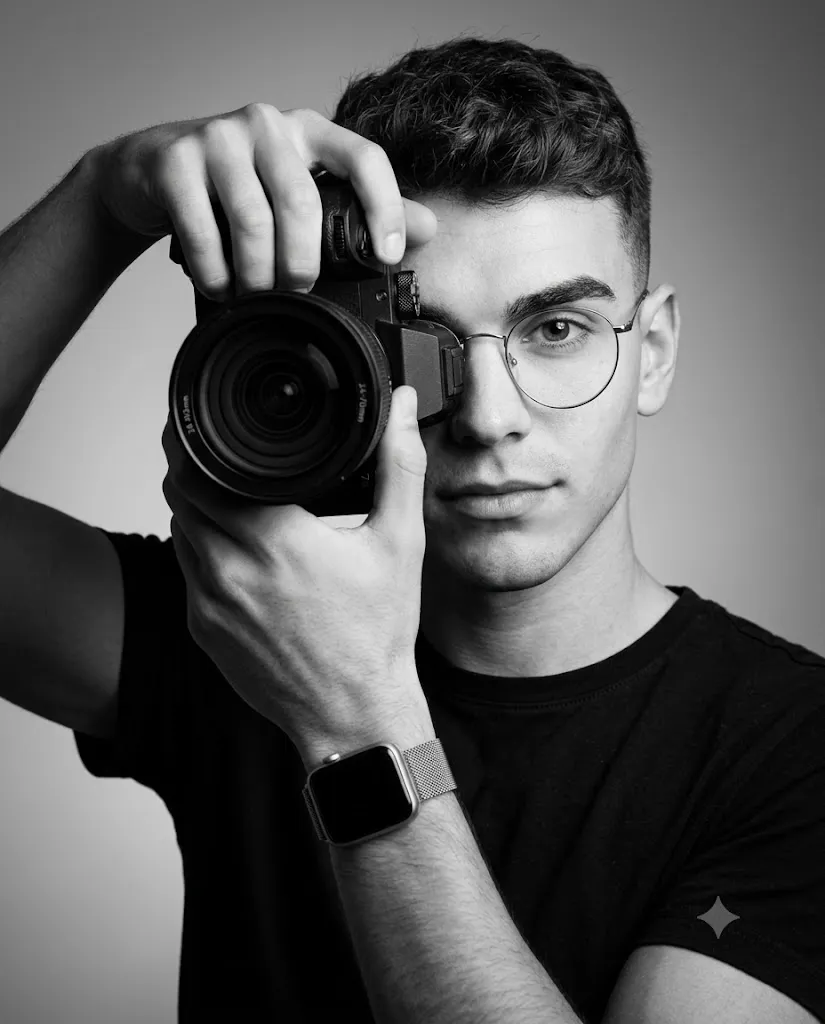
Create an ultra-realistic black-and-white editorial portrait of a young photographer holding a professional camera. Use the reference image strictly for facial identity preservation. The subject wears thin circular wire-rim glasses and a fitted black crew-neck t-shirt. Hair is neatly styled with subtle volume and side part. The subject faces three-quarters toward the camera, holding a DSLR camera to one eye while the visible eye looks directly into the lens. Soft short lighting from the right side creates smooth gradients across the face. Seamless gray studio background with subtle vignette. Shallow depth of field, professional commercial photography, monochrome tonal range, realistic skin texture, premium editorial quality, ultra-high-resolution.
This portrait concept focuses on a young photographer holding a professional camera while maintaining a calm, confident, and focused expression. The composition emphasizes the relationship between the artist and the tool of their craft, creating an image that feels authentic and meaningful. The camera becomes more than a prop—it serves as a visual symbol of creativity, vision, and artistic identity.
One of the most compelling aspects of black-and-white photography is its ability to remove distractions. Without color competing for attention, the viewer naturally focuses on facial expressions, lighting, composition, texture, and mood. Every detail, from skin texture and hair strands to the reflective surfaces of glasses and camera equipment, becomes more impactful.
The editorial style further elevates the portrait by incorporating professional studio lighting, premium composition techniques, and high-end commercial aesthetics. Short lighting, shallow depth of field, and monochrome tonal control work together to create a dramatic yet refined visual experience. The result is a portrait suitable for photography portfolios, magazine features, creative branding, social media profiles, and commercial promotional materials.
Modern AI image-generation platforms have made it easier than ever to produce studio-quality portraits with exceptional realism. Combined with professional editing software, photographers and content creators can achieve results that rival traditional studio photography. This article explores how to use photo editing effectively, the best tools for creating monochrome portraits, and step-by-step editing techniques for producing professional editorial-quality images.
How To Use Photo Editing?
Photo editing is a crucial step in transforming a generated portrait into a polished editorial masterpiece. Even the most realistic AI-generated image benefits from thoughtful refinements that enhance realism, consistency, and visual impact.
The first stage involves checking facial identity accuracy. If you are using a reference image, verify that facial proportions, skin texture, eye shape, jawline, and overall likeness remain consistent. Identity preservation is particularly important when creating professional portraits intended to represent a real individual.
Exposure balancing is another key component. Monochrome portraits rely heavily on tonal range rather than color. Proper exposure ensures that highlights remain clean while preserving detail in shadow areas. Avoid overexposed skin or crushed blacks that remove texture and depth.
Contrast adjustments help define the image. Black-and-white portraits often benefit from slightly increased contrast to emphasize facial features, camera details, and clothing textures. However, excessive contrast can create harsh transitions and reduce realism.
Texture enhancement plays an important role in editorial photography. Subtle clarity adjustments can improve the visibility of skin pores, hair strands, camera grip textures, and fabric details. Maintaining realistic texture contributes significantly to the premium appearance of the final image.
Background refinement should remain subtle. A seamless gray backdrop with a gentle vignette helps draw attention toward the subject without introducing distractions.
Selective sharpening is especially useful in monochrome photography. Focus sharpening on the visible eye, camera lens, glasses, and facial details while preserving smooth transitions in out-of-focus areas.
Finally, monochrome conversion should be carefully controlled. Rather than simply removing color, adjust luminance values to create a rich grayscale image with strong tonal separation and visual depth.
Tools You Can Use For Prompt Copy and Create Photo
Creating a professional monochrome editorial portrait requires a combination of AI image-generation tools and photo-editing software.
AI Image Generation Tools
ChatGPT Image Generation
ChatGPT helps creators develop detailed prompts that accurately describe lighting, camera equipment, composition, and facial identity requirements.
Midjourney
Midjourney is known for producing cinematic and highly artistic portrait imagery with excellent detail and mood.
Leonardo AI
Leonardo AI provides advanced realism controls and face consistency features that work well for professional portrait generation.
Ideogram
Ideogram offers strong prompt interpretation and can create realistic editorial-style portraits with impressive detail.
Adobe Firefly
Adobe Firefly integrates with professional creative workflows and produces commercial-quality visual outputs.
Professional Editing Software
Adobe Photoshop
Photoshop remains the industry standard for retouching, compositing, sharpening, and monochrome refinements.
Adobe Lightroom
Lightroom excels at tonal adjustments, contrast control, and black-and-white conversion.
Capture One
Capture One is highly regarded among professional photographers for its exceptional tonal rendering and image quality.
Snapseed
Snapseed offers powerful mobile editing features suitable for portrait enhancement.
PicsArt
PicsArt provides creative editing tools for social media and personal branding projects.
How To Edit Photo?
Once the portrait has been generated, follow these professional editing steps to refine the image.
Step 1: Import the Image
Open the generated portrait inside Photoshop, Lightroom, Capture One, or another professional editing application.
Step 2: Verify Identity Accuracy
Compare the portrait with the reference image and ensure facial features remain consistent.
Step 3: Adjust Exposure
Balance highlights and shadows while maintaining detail throughout the image.
Step 4: Convert to Monochrome
Create a rich black-and-white conversion with smooth tonal transitions and strong depth.
Step 5: Refine Contrast
Increase contrast carefully to emphasize facial structure and camera details.
Step 6: Enhance Textures
Use clarity and detail adjustments to improve hair strands, camera textures, skin pores, and clothing.
Step 7: Improve Eye Focus
Apply selective sharpening to the visible eye to strengthen viewer connection.
Step 8: Refine Background
Maintain a subtle gray gradient and gentle vignette for a clean editorial appearance.
Step 9: Final Sharpening
Sharpen key areas while preserving natural skin texture and smooth bokeh transitions.
Step 10: Export
Export the image in high resolution. PNG format is recommended to preserve maximum detail and image quality.
Conclusion
The Monochrome Photographer Editorial Portrait Prompt combines timeless black-and-white photography with modern editorial styling to create an image that feels professional, artistic, and visually compelling. Through careful composition, premium lighting, realistic textures, and identity preservation, this portrait style captures both the personality of the subject and the essence of photography itself.
Modern AI tools have made it possible to create studio-quality portraits without access to expensive equipment or large production teams. When combined with professional editing techniques, these tools allow photographers, creators, and artists to produce commercial-grade imagery suitable for portfolios, magazine features, branding campaigns, and social media platforms.
The key to success lies in maintaining realism, preserving authentic facial features, and focusing on the subtle details that elevate an image from ordinary to extraordinary. By mastering monochrome editing, studio lighting concepts, and editorial composition, creators can consistently produce portraits that communicate professionalism, creativity, and timeless visual elegance.