Introduction
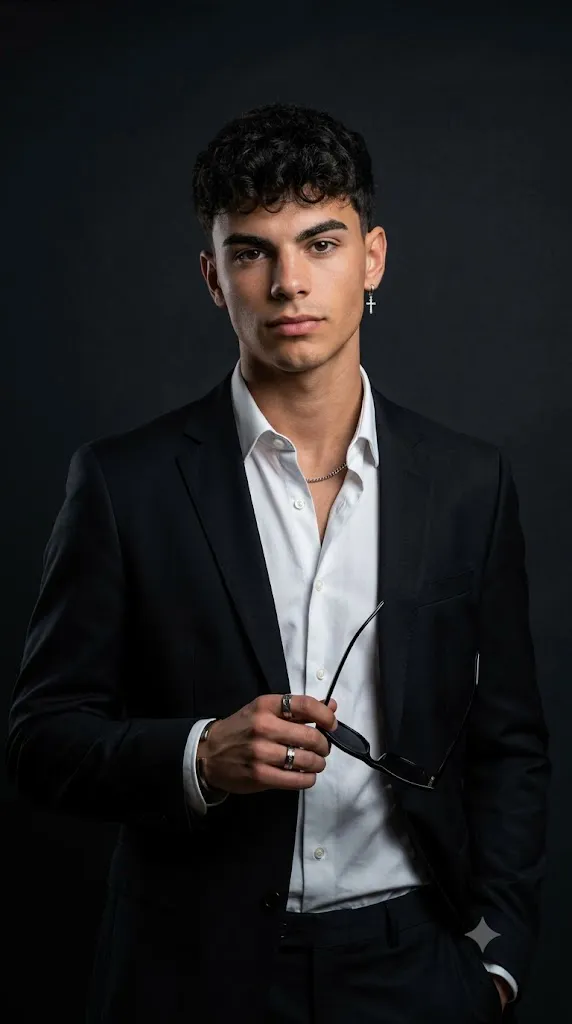
The Moody Elegance in Black and White Portrait style is one of the most timeless and sophisticated approaches in portrait photography. By removing color, the viewer's attention naturally shifts toward emotion, facial expression, lighting, texture, and composition. This creates portraits that feel cinematic, dramatic, and emotionally powerful while maintaining a refined editorial appearance.
"Moody Elegance in Black and White Portrait Prompt"
Use the uploaded face as the exact facial identity reference, preserving facial structure, skin tone, hairstyle, and expression. Create a hyper-realistic cinematic black-and-white portrait of a stylish young person wearing elegant formal clothing inside a luxury studio environment. Soft directional spotlight illuminates the face while rich shadows sculpt the jawline, cheekbones, and clothing. The background is deep matte black with subtle depth, creating strong subject separation. Capture realistic skin texture, natural hair detail, refined fabric textures, shallow depth of field, DSLR-quality sharpness, cinematic HDR lighting, smooth tonal transitions, premium editorial styling, high-fashion magazine atmosphere, soft film grain, monochrome color grading, ultra-realistic detail, masterpiece quality, and 8K resolution.
In AI image generation, black-and-white portrait prompts have become increasingly popular because they combine realism with artistic storytelling. A well-crafted prompt can transform an ordinary reference photo into a luxury fashion editorial featuring deep shadows, soft highlights, premium wardrobe styling, and elegant monochrome tones. Whether inspired by classic magazine photography or modern luxury campaigns, this style emphasizes simplicity without sacrificing visual impact.
One of the defining characteristics of a moody black-and-white portrait is its lighting. Soft directional light gently illuminates the face while shadows sculpt the jawline, cheekbones, and clothing. Combined with realistic skin texture, premium fabrics, and shallow depth of field, the final image appears natural and cinematic rather than artificially generated.
This portrait style is ideal for fashion portfolios, magazine covers, branding, social media content, professional headshots, and AI art collections. Whether you are a photographer, AI artist, blogger, or digital creator, mastering this prompt style allows you to create elegant portraits with exceptional realism and emotional depth.
In this guide, you'll learn how to use AI photo editing, discover the best tools for generating cinematic portraits, explore an example prompt, and understand the editing process needed to produce stunning 4K black-and-white editorial portraits.
How To Use Photo Editing?
Photo editing is the final stage that transforms a good AI-generated portrait into a premium editorial masterpiece. While AI creates the initial image, editing software enhances lighting, contrast, texture, and realism.
Step 1: Choose a High-Quality Reference Photo
Begin with a sharp portrait featuring good lighting and visible facial details. High-resolution images help preserve facial identity and improve overall realism.
Step 2: Copy a Detailed Prompt
Use a professionally written prompt describing the pose, wardrobe, background, lighting, camera settings, and cinematic mood.
Step 3: Upload the Reference Image
Import the photo into an AI image generator that supports image-to-image editing or facial reference guidance.
Step 4: Generate Multiple Variations
Create several versions and compare lighting, composition, facial accuracy, clothing realism, and overall visual impact.
Step 5: Select the Best Portrait
Choose the version with balanced contrast, natural skin texture, and a convincing editorial appearance.
Step 6: Refine the Final Image
Use professional editing software to sharpen details, improve lighting, reduce imperfections, and complete the monochrome finish.
Combining AI generation with thoughtful editing produces portraits that resemble professional studio photography.
Tools You Can Use For Prompt Copy and Create Photo
The following tools are excellent for producing luxury black-and-white editorial portraits.
ChatGPT
Generate detailed AI prompts describing lighting, wardrobe, expressions, camera angles, and artistic direction.
Midjourney
Excellent for creating cinematic editorial portraits with premium compositions and dramatic monochrome aesthetics.
Flux AI
Produces highly realistic portraits while maintaining facial identity and natural skin texture.
Stable Diffusion
Offers advanced image customization through image-to-image editing, style models, and prompt refinement.
GPT Image
Ideal for generating realistic black-and-white editorial portraits directly from descriptive prompts.
Adobe Photoshop
Perfect for professional retouching, skin refinement, sharpening, object removal, and finishing touches.
Adobe Lightroom
Useful for adjusting exposure, black-and-white conversion, contrast, highlights, shadows, clarity, and cinematic tone.
Canva
Great for designing magazine covers, posters, thumbnails, social media graphics, and promotional visuals using your completed portrait.
Using AI image generation alongside professional editing software delivers the highest level of realism and quality.
How To Edit Photo?
Professional editing helps transform an AI-generated portrait into a polished luxury editorial image.
Clean the Image
Remove minor imperfections, unwanted artifacts, or distractions while preserving realistic skin texture.
Improve Lighting
Adjust highlights and shadows to emphasize facial features without losing important details.
Refine Contrast
Increase contrast carefully to create dramatic depth while maintaining smooth transitions between light and shadow.
Enhance Skin Texture
Preserve pores and natural facial details to avoid an overly smooth or artificial appearance.
Sharpen Important Areas
Increase sharpness around the eyes, eyebrows, lips, hair, jewelry, and clothing textures while keeping the overall look natural.
Apply Monochrome Color Grading
Use balanced black-and-white conversion with rich blacks, clean whites, and soft gray tones to create a timeless editorial finish.
Export in High Resolution
Save the final portrait in 4K or higher resolution using maximum quality settings for websites, portfolios, prints, magazine layouts, or social media.
Conclusion
The Moody Elegance in Black and White Portrait style remains one of the most iconic forms of portrait photography because it combines simplicity, emotion, and luxury into a single visual composition. A carefully written prompt, supported by a high-quality reference image and professional editing, allows you to create portraits that feel cinematic, timeless, and remarkably realistic.
Success comes from balancing dramatic lighting, elegant styling, authentic facial details, and refined monochrome grading. Instead of relying on vibrant colors, this style emphasizes expression, texture, and composition to tell a compelling visual story.
As AI image generation continues to advance, experimenting with different lighting setups, fashion styles, poses, and editorial concepts will help you develop a distinctive creative identity. With consistent practice and careful post-processing, you can produce ultra-realistic black-and-white portraits that rival professional fashion photography and stand out across portfolios, blogs, social media, and creative projects.