Introduction
Nature-inspired portrait photography has always been admired for its ability to capture peace, beauty, and authentic human emotion. With the rapid advancement of Artificial Intelligence (AI), creating breathtaking outdoor portraits no longer requires expensive camera equipment or access to exotic locations. One of the most popular trends today is the Nature's Tranquility By The Waterfall Portrait, a cinematic style that blends realistic human portraits with stunning natural landscapes to create images that feel calm, luxurious, and emotionally engaging.
"Nature's Tranquility By The Waterfall Portrait Prompt"
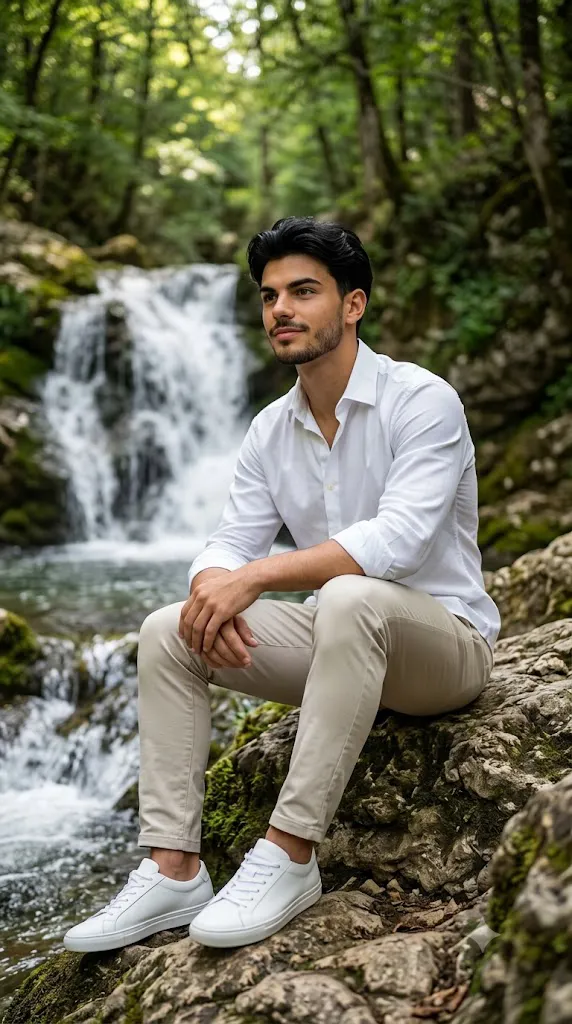
An ultra-realistic 8K (minimum 7680x4320 equivalent detail) vertical 9:16 serene outdoor portrait of a young adult man seated on natural rock formations beside a flowing waterfall in a lush forest setting, captured in a calm, contemplative moment; his facial features must match the reference image 100% with exact accuracy-medium-warm brown skin tone, expressive dark eyes, neatly shaped eyebrows, a well-groomed short beard and mustache, defined jawline, and a gentle, thoughtful smile, with thick black hair styled with soft volume and subtle texture; he is dressed in a minimalist, nature-inspired outfit consisting of a crisp white long-sleeve button-down shirt with sleeves casually rolled up, light beige slim-fit trousers, and clean white low-top sneakers, all with visible fabric texture and natural folds; his relaxed seated posture has one knee bent with arms loosely resting over it, body slightly angled while gazing off-camera, conveying peace and introspection;the background features a cascading waterfall flowing into a clear stream, surrounded by moss-covered rocks and dense green foliage, softly blurred with a shallow depth of field to maintain strong subject focus; lighting is soft natural daylight diffused by the forest canopy, producing gentle highlights, realistic skin texture, high dynamic range, true-to-life colors, cinematic clarity, and a tranquil, photorealistic atmosphere ideal for high-end professional Al image generation.
This portrait style typically features a subject seated peacefully beside a flowing waterfall, surrounded by lush greenery, moss-covered rocks, and soft natural light filtering through forest trees. The combination of relaxed poses, minimalist clothing, and scenic backgrounds creates an image that reflects serenity, mindfulness, and harmony with nature.
AI image generation has made it possible for creators to achieve this professional look simply by using a well-written prompt. Modern AI models understand complex details such as facial identity, realistic clothing textures, cinematic lighting, environmental depth, and natural color grading. With the right prompt, you can generate an ultra-realistic portrait that looks as though it was captured by a professional photographer using premium camera equipment.
Whether you're designing content for social media, personal branding, travel blogs, wallpapers, or creative portfolios, this style provides a timeless and elegant aesthetic. In this guide, you'll learn how to use AI prompts effectively, discover the best tools for image creation, and master the editing process to produce high-end waterfall portraits.
How To Use Photo Editing?
Photo editing plays a crucial role in transforming an AI-generated portrait into a polished, professional masterpiece. While AI can generate highly realistic images, subtle adjustments can enhance realism, improve color balance, and create a cinematic atmosphere.
Begin by importing your generated portrait into your preferred editing software. Carefully examine the overall exposure, ensuring that facial details remain visible while preserving highlights in the waterfall and surrounding foliage.
Natural outdoor portraits benefit from balanced contrast. Increase contrast slightly to improve depth without making shadows appear harsh. Waterfalls often contain bright white highlights, so avoid excessive brightness that may remove texture from the flowing water.
Color grading is one of the most important steps. Maintain the rich greens of the forest while enhancing warm skin tones. Soft earthy colors create a harmonious balance between the subject and the environment. Avoid over-saturating the image, as subtle tones produce a more realistic and premium appearance.
Retouch the skin minimally by removing temporary blemishes while preserving natural texture. Modern portrait photography values authenticity, making realistic skin details far more appealing than heavily airbrushed edits.
Sharpen key elements such as the eyes, hair, beard, clothing textures, and rock surfaces. Apply selective sharpening rather than global sharpening to preserve the soft background blur.
Finally, add subtle cinematic color grading, slight vignetting, and controlled highlights to create a tranquil atmosphere that draws attention to the subject while maintaining the beauty of the surrounding landscape.
Tools You Can Use For Prompt Copy and Create Photo
Creating a realistic waterfall portrait has become easier thanks to modern AI tools and professional editing software. Below are some of the most effective platforms for generating and refining cinematic nature portraits.
1. ChatGPT
ChatGPT is an excellent assistant for writing highly detailed AI prompts. It helps structure descriptions for facial features, lighting, clothing, poses, backgrounds, and camera settings to maximize image quality.
2. Midjourney
Midjourney is known for producing cinematic artwork with exceptional environmental detail. It excels at creating lush forests, dramatic waterfalls, realistic lighting, and artistic compositions.
3. Leonardo AI
Leonardo AI provides advanced prompt controls that generate highly realistic portraits with excellent facial consistency, detailed clothing textures, and natural scenery.
4. Flux AI
Flux AI specializes in ultra-realistic human portraits. It performs exceptionally well with natural lighting, realistic skin textures, and photorealistic outdoor environments.
5. Adobe Firefly
Adobe Firefly offers easy-to-use AI image generation integrated with Adobe Creative Cloud. It produces high-quality visuals suitable for professional and commercial projects.
6. Adobe Photoshop
Photoshop remains the industry standard for professional retouching and compositing.
Its features include:
- Layer editing
- Advanced masking
- Skin retouching
- Object removal
- Color grading
- Background refinement
- Detail enhancement
7. Lightroom
Lightroom is ideal for adjusting exposure, contrast, white balance, shadows, highlights, and color grading. It is especially useful for enhancing outdoor photography while preserving natural tones.
8. Canva
Canva is perfect for adding simple finishing touches, including typography, frames, and social media layouts, making it an excellent option for beginners.
How To Edit Photo?
Editing your waterfall portrait carefully can significantly improve its overall realism and cinematic appeal.
Step 1: Import the Highest-Resolution Image
Always begin with the highest-quality AI-generated image available. Higher resolution allows more flexibility during editing without losing detail.
Step 2: Correct Exposure
Adjust brightness so the face remains well-lit while maintaining texture in the waterfall and surrounding landscape.
Step 3: Balance Contrast
Increase contrast moderately to create depth while preserving the soft, peaceful atmosphere.
Step 4: Enhance Natural Colors
Strengthen green foliage slightly while keeping skin tones warm and realistic. Ensure the colors remain balanced and harmonious.
Step 5: Retouch Skin Naturally
Remove temporary imperfections while preserving realistic pores and facial texture. Avoid excessive smoothing that creates an artificial appearance.
Step 6: Sharpen Facial Features
Increase clarity around the eyes, eyebrows, beard, lips, and hair while keeping the background softly blurred.
Step 7: Improve Environmental Details
Enhance the waterfall, rocks, and forest textures with selective sharpening and subtle contrast adjustments.
Step 8: Add Cinematic Color Grading
Apply gentle warm highlights and cool shadows to create a premium outdoor cinematic look. Keep transitions smooth and natural.
Step 9: Maintain Depth of Field
Preserve the shallow depth of field so the subject remains the primary focus while the forest and waterfall provide beautiful background separation.
Step 10: Export the Final Image
Save your portrait in PNG or high-quality JPEG format with maximum resolution. Exporting in 8K or the highest available quality ensures excellent results for printing, digital portfolios, wallpapers, and social media.
Conclusion
The Nature's Tranquility By The Waterfall Portrait perfectly combines realistic portrait photography with the timeless beauty of nature. Soft natural lighting, peaceful surroundings, minimalist fashion, and thoughtful compositions create images that feel both cinematic and emotionally engaging.
Thanks to AI-powered image generation, anyone can create stunning outdoor portraits without traveling to remote waterfalls or investing in expensive photography equipment. A carefully written prompt serves as the blueprint for the entire image, while professional editing enhances realism, lighting, color harmony, and overall visual quality.
Whether you're an AI artist, photographer, content creator, travel blogger, or social media enthusiast, mastering this portrait style can elevate your creative projects and help your work stand out. By combining detailed prompts with thoughtful editing techniques, you can consistently produce breathtaking waterfall portraits that capture the beauty of both the subject and the natural world.