Introduction
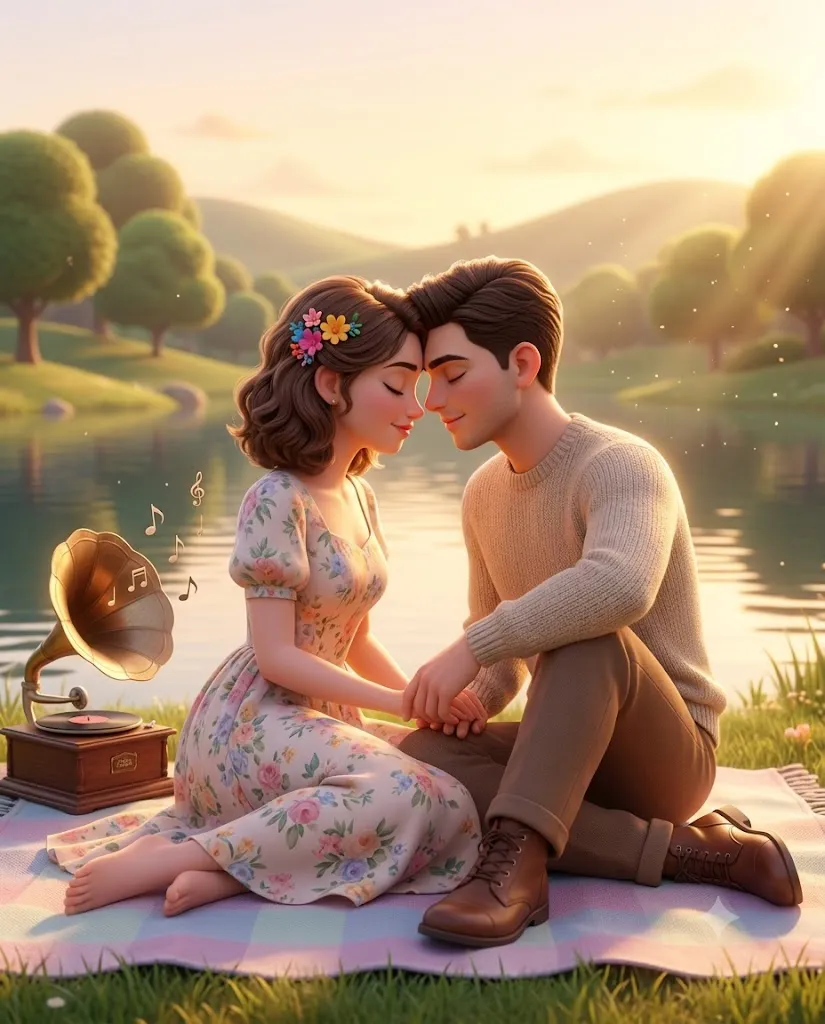
The Pixar Golden Hour Love Portrait is a beautiful AI photo editing style that transforms ordinary couple photos into emotional, cinematic 3D animated artwork. Inspired by the magical storytelling style of animated movies, this aesthetic combines realistic facial details, soft character design, warm lighting, and romantic environments to create a memorable visual experience.
"Pixar Golden Hour Love Portrait Prompt"
Create an ultra-HD Pixar-inspired 3D cinematic portrait of a young romantic couple sitting together on a pastel picnic blanket beside a calm lakeside during golden hour. Use vertical composition with mid-full-body framing and eye-level perspective. Preserve the exact facial identity, facial proportions, and natural expressions of both characters. The female character has a soft round face, delicate cheeks, small natural nose, expressive eyes, smooth skin, and a gentle peaceful smile. Her mid-length soft wavy brown hair has natural volume with small colorful floral accessories. The male character has a soft masculine face, gentle jawline, relaxed expression, natural skin texture, and softly styled brown hair. Both subjects are sitting closely facing each other with their foreheads gently touching. Their hands are naturally holding each other with fingers intertwined. Their eyes are closed, showing emotional warmth, trust, and romantic connection. The female wears a pastel floral vintage dress with soft fabric details, while the male wears a beige knitted sweater with brown trousers and leather boots. Add a peaceful lake, soft green grass, distant trees, rounded hills, glowing sunlight, floating dust particles, and magical atmospheric details.Place a vintage gramophone beside them on the blanket with soft musical notes floating nearby. Use warm golden-hour lighting, cinematic depth of field, volumetric light rays, soft shadows, realistic cloth texture, Pixar-quality 3D rendering, global illumination, subsurface scattering, ultra-detailed character design, pastel color harmony, emotional storytelling frame, 16K resolution, and 4:5 aspect ratio.
This style focuses on capturing emotions rather than just creating a simple image. The main goal is to show love, connection, comfort, and warmth between two people. The portrait usually features a couple sharing an intimate moment in a dreamy natural environment with cinematic golden-hour lighting.
Unlike traditional photography, Pixar-inspired 3D portraits use stylized realism. The characters maintain recognizable facial features while receiving a smooth animated appearance, expressive eyes, soft textures, and detailed clothing. The result feels like a scene from a romantic animated film.
The golden hour atmosphere plays an important role in this style. Warm sunset light creates soft highlights, glowing edges, gentle shadows, and a peaceful nostalgic mood. Natural backgrounds such as lakes, forests, gardens, and open landscapes enhance the magical storytelling feeling.
AI image generation tools make creating this style easier than ever. With a detailed prompt and a high-quality reference image, AI can transform a normal couple photo into a professional cinematic 3D portrait while preserving identity, expressions, and emotional connection.
This guide explains how to use photo editing, the best AI tools for creating Pixar-style romantic portraits, an example prompt, and the editing process to achieve a premium animated love story artwork.
How To Use Photo Editing?
Creating a Pixar Golden Hour Love Portrait starts with selecting the right reference image. A clear photo with visible faces and natural expressions provides the best foundation for AI transformation.
The purpose of editing is not to completely change the people but to enhance their appearance with a cinematic animated style while keeping their identity recognizable.
Step 1: Choose A Clear Reference Photo
Select a high-resolution couple photo where both faces are visible. Images with natural poses and emotional expressions usually create better results.
Step 2: Copy A Detailed Prompt
A detailed prompt helps the AI understand the desired style. The prompt should describe:
- Pixar-style 3D rendering
- Romantic couple interaction
- Golden-hour lighting
- Facial identity preservation
- Soft animated realism
- Natural environment
- Cinematic depth of field
Adding specific details improves the final image quality.
Step 3: Upload The Image
Upload your reference photo into an AI image editor that supports image transformation. The AI will analyze the image and apply the requested 3D animation style.
Step 4: Generate Multiple Results
Create multiple variations and compare facial similarity, lighting, background, and emotional expression.
Step 5: Select The Best Version
Choose the image that maintains the original couple’s identity while achieving a magical cinematic appearance.
Step 6: Final Enhancement
Use editing software to improve colors, sharpness, lighting, and overall presentation quality.
Combining AI generation with final editing creates a realistic and emotional Pixar-style portrait.
Tools You Can Use For Prompt Copy and Create Photo
Several AI and editing tools can help create Pixar-inspired romantic portraits.
ChatGPT
Useful for creating detailed AI prompts that describe characters, emotions, lighting, composition, and cinematic style.
Midjourney
Creates artistic 3D-style images with beautiful environments, creative storytelling, and animated aesthetics.
Flux AI
Generates realistic AI transformations while maintaining facial structure and detailed character appearance.
Stable Diffusion
Provides advanced customization through image-to-image workflows, control tools, and detailed style adjustments.
GPT Image
Helpful for creating AI-generated portraits with specific instructions for character design and cinematic effects.
Adobe Photoshop
A professional editing tool for refining AI-generated artwork. It can improve:
- Color grading
- Background adjustments
- Lighting effects
- Image details
- Final composition
- Adobe Lightroom
Useful for creating warm golden-hour tones, adjusting exposure, and improving cinematic color balance.
Canva
Great for adding text, creating posters, invitations, social media designs, and romantic artwork layouts.
Using AI tools together with professional editing software helps create high-quality animated portraits.
How To Edit Photo?
Editing helps improve the final Pixar-style portrait and makes the artwork look more professional.
Enhance Facial Details
Maintain realistic facial structure while smoothing the skin slightly to achieve a soft animated appearance.
Improve Lighting
Increase warm tones and create a golden sunset effect. Soft highlights around the face and hair help create a cinematic glow.
Adjust Colors
Use pastel colors, warm tones, and balanced contrast. Avoid harsh colors because animated romance scenes work best with soft color palettes.
Add Depth Of Field
Blur the background slightly while keeping the couple sharp. This creates a movie-like camera effect.
Improve Character Details
Enhance hair texture, clothing folds, and small environmental details to make the 3D render more realistic.
Create A Magical Atmosphere
Add subtle particles, soft glow, and light effects to increase the dreamy animated feeling.
Export High Quality
Save the final artwork in high resolution for wallpapers, social media posts, gifts, or printed designs.
Conclusion
The Pixar Golden Hour Love Portrait style combines AI creativity, cinematic lighting, and emotional storytelling to create beautiful romantic artwork. It transforms simple couple photos into magical 3D animated scenes filled with warmth, connection, and personality.
The success of this style depends on using a detailed prompt that explains facial features, pose, environment, lighting, and emotional mood. AI tools make the transformation simple, while editing software helps refine the final quality.
Whether you are creating a romantic memory, anniversary artwork, social media post, or personalized gift, Pixar-inspired portraits provide a unique way to capture love and emotions. The combination of golden-hour lighting, soft animation, and realistic details creates images that feel timeless and cinematic.
With the right prompt and creative approach, anyone can transform ordinary photos into professional-quality animated love story portraits that look like a scene from a beautiful cinematic world.