Introduction
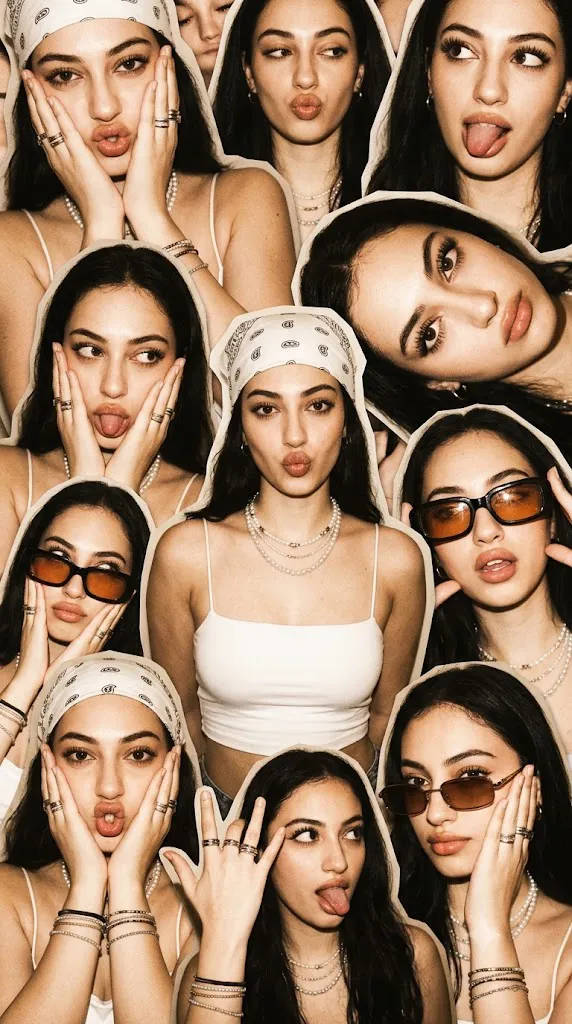
The Playful Retro Scrapbook Editorial Portrait Prompt blends nostalgic Y2K fashion, vintage flash photography, and modern AI portrait generation into one expressive visual style. Inspired by early-2000s party snapshots, scrapbook collages, fashion magazines, and handmade photo journals, this prompt transforms a single portrait into a lively composition filled with overlapping cutouts, playful expressions, and editorial energy.
"Playful Retro Scrapbook Editorial Portrait Prompt"
Create a photorealistic retro scrapbook editorial collage using the uploaded image strictly as the facial identity reference. Preserve the exact facial structure, skin tone, hairstyle, eyes, nose, lips, jawline, and proportions without beautification. Produce multiple playful portrait variations of the same subject using expressive poses, natural smiles, fun facial expressions, and relaxed styling. Crop every portrait as a clean magazine cutout without borders or frames. Arrange the portraits in an overlapping layered composition with slight rotations. Style the subject using Y2K-inspired fashion including white crop tops, paisley bandanas, layered jewelry, oversized sunglasses, and retro accessories. Illuminate the scene using bright direct flash photography with realistic skin texture, fine analog film grain, warm beige and sepia color grading, and ultra-detailed 8K realism. No text or watermark
Unlike a traditional portrait, this concept focuses on storytelling through multiple versions of the same subject. Each cutout portrait presents a different pose, facial expression, or styling variation while maintaining the same recognizable identity. The result feels spontaneous, artistic, and intentionally chaotic—similar to pages from a personal scrapbook or an indie fashion magazine.
The most important rule of this prompt is complete facial identity preservation. When using an uploaded reference image, every facial feature must remain exactly the same. Facial structure, skin tone, eyes, eyebrows, nose, lips, jawline, and natural proportions should never be altered. The AI may modify clothing, accessories, hairstyles, poses, and composition, but the subject's identity must remain fully recognizable.
The collage itself follows a magazine cutout aesthetic. Every portrait is cleanly cropped around the subject without rectangular borders or frames. Images overlap naturally, some rotated slightly to create movement and visual rhythm. The central portrait usually receives the highest visual priority while surrounding cutouts support the overall composition.
Fashion styling embraces the playful spirit of Y2K. White crop tops, paisley bandanas, layered pearl necklaces, metallic rings, slim bracelets, oversized sunglasses, glossy makeup, and retro accessories combine to create an expressive editorial look. Hair remains naturally long and slightly messy, complementing the carefree atmosphere.
Lighting resembles direct flash photography often associated with disposable cameras from the early 2000s. Bright frontal illumination creates smooth skin, crisp shadows, and strong highlights while preserving realistic textures. Warm beige, creamy brown, and soft sepia tones complete the nostalgic visual language.
The final result feels like an authentic editorial collage that celebrates youth, creativity, fashion, and personality through photorealistic AI image generation.
How To Use Photo Editing?
Professional editing helps transform AI-generated portraits into polished editorial scrapbook artwork.
Start by balancing exposure between all portrait layers. Every cutout should have similar brightness while preserving natural flash highlights.
Maintain realistic skin texture instead of excessive smoothing. Editorial beauty photography benefits from visible pores and natural facial details.
Carefully remove rectangular backgrounds around each portrait so every image becomes a clean body-shaped cutout.
Arrange portraits with intentional overlap while maintaining visual balance. Small rotations create movement without making the collage feel disorganized.
Enhance clothing textures, jewelry, sunglasses, and hair strands to reinforce realism.
Apply subtle analog-inspired film grain throughout the composition to strengthen the nostalgic Y2K atmosphere.
Finish with warm retro color grading using creamy beige, soft brown, and gentle sepia tones while preserving realistic skin colors.
Tools You Can Use For Prompt Copy and Create Photo
Several AI platforms and editing applications can help create scrapbook-style editorial portraits.
AI Image Generation Tools
ChatGPT
Excellent for writing detailed prompts describing layout, fashion, identity preservation, lighting, and collage composition.
Midjourney
Produces artistic editorial portraits with creative fashion styling.
Leonardo AI
Generates realistic portraits with excellent facial consistency.
Ideogram
Useful for lifestyle editorials and creative portrait layouts.
Adobe Firefly
Provides AI-powered image generation integrated with Adobe Creative Cloud.
Photo Editing Software
Adobe Photoshop
Ideal for building layered collages, masking portraits, retouching, and arranging magazine-style layouts.
Adobe Lightroom
Excellent for color grading, exposure balancing, and adding cinematic warmth.
Capture One
Offers professional color control and exceptional skin rendering.
Affinity Photo
Suitable for advanced layer editing and editorial retouching.
Snapseed
A practical mobile solution for grain, contrast, warmth, and detail adjustments.
How To Edit Photo?
Step 1: Generate Multiple Portraits
Create several different poses while preserving identical facial identity.
Step 2: Remove Backgrounds
Convert every portrait into a clean magazine-style cutout.
Step 3: Arrange the Collage
Place the central portrait first, then overlap surrounding portraits with slight rotations.
Step 4: Balance Exposure
Maintain consistent brightness throughout the composition.
Step 5: Preserve Natural Skin
Keep realistic skin texture without excessive retouching.
Step 6: Refine Clothing Details
Enhance crop tops, bandanas, jewelry, sunglasses, and hair textures naturally.
Step 7: Apply Warm Retro Color Grading
Balance creamy beige, warm brown, and soft sepia tones while maintaining realistic skin color.
Step 8: Add Analog Film Grain
Introduce subtle vintage grain across the entire collage.
Step 9: Improve Layer Separation
Ensure overlapping portraits remain visually distinct without appearing disconnected.
Step 10: Verify Facial Consistency
Confirm every portrait matches the uploaded reference photograph exactly.
Step 11: Final Refinements
Remove visual artifacts while preserving realistic lighting and textures.
Step 12: Export in High Resolution
Save the completed collage as PNG or TIFF to preserve maximum quality for magazines, portfolios, digital publishing, or social media.
Conclusion
The Playful Retro Scrapbook Editorial Portrait Prompt captures the joyful energy of Y2K fashion through layered magazine cutouts, expressive posing, nostalgic flash photography, and carefully crafted editorial composition. By combining multiple portraits into one lively arrangement, the prompt transforms a simple photograph into an artistic visual story.
Soft retro color grading, authentic facial preservation, playful styling, realistic textures, and subtle analog grain create images that feel timeless while celebrating one of fashion's most recognizable eras. Every overlapping portrait contributes personality and movement, making the finished composition both dynamic and memorable.
Although AI image generation simplifies the creative process, exceptional editorial collages still depend on thoughtful prompt writing and careful editing. Preserving facial identity, balancing exposure, refining textures, arranging layered cutouts, and applying cinematic finishing techniques ensure the final image feels polished and believable.
Whether you're creating fashion editorials, social media artwork, portfolio projects, mood boards, or creative AI collections, the Playful Retro Scrapbook Editorial Portrait Prompt provides an outstanding foundation for producing energetic, photorealistic portraits inspired by the unforgettable spirit of the Y2K era.