Introduction
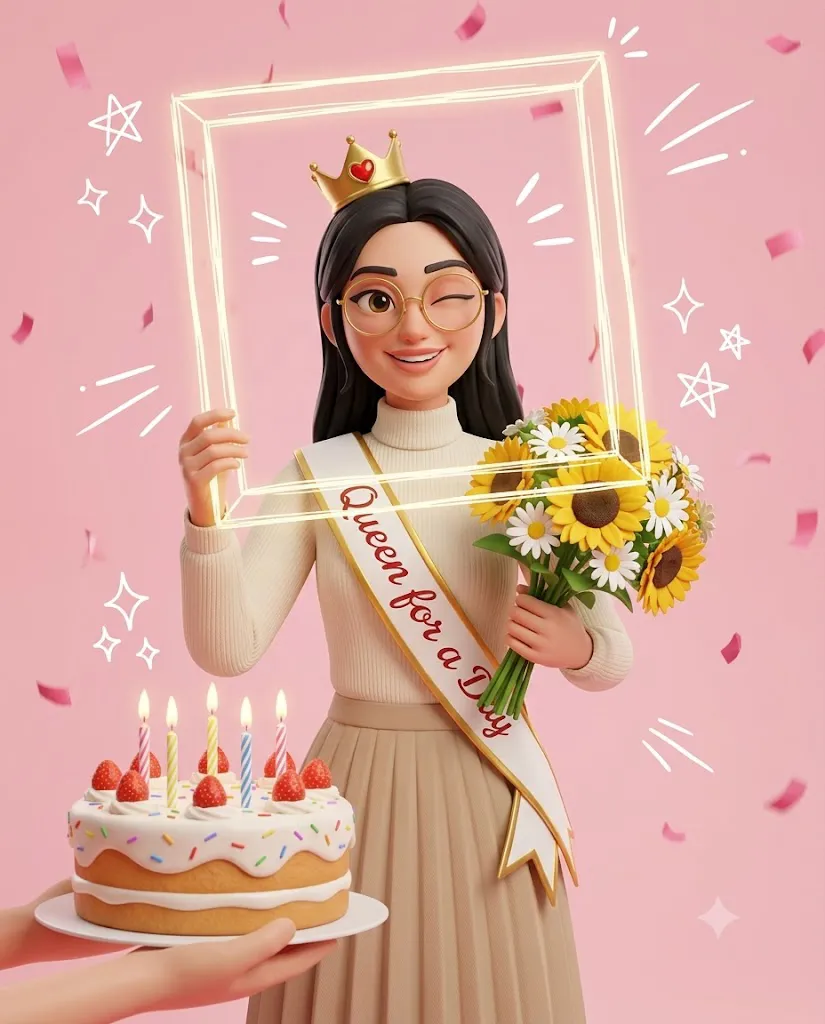
Artificial Intelligence has transformed digital art, making it possible to create stunning 3D character portraits without advanced design skills. One of the most popular trends in AI image generation is the Queen for a Day Pixar-Style 3D Birthday Portrait, a cheerful and heartwarming illustration style inspired by modern animated films. This creative concept combines charming character design, soft studio lighting, vibrant colors, and birthday-themed elements to produce an image that feels playful, elegant, and memorable.
"Queen for a Day Pixar-Style 3D Birthday Portrait Prompt"
Create a whimsical, high-quality 3D animated portrait using the uploaded reference image for face matching. The character should preserve the same facial identity, hairstyle, glasses, proportions, and expression as the reference image, rendered in a Pixar-inspired stylized 3D illustration style. A cheerful woman with fair skin, natural dark-brown hair, and round gold-rimmed glasses, winking and smiling playfully. She wears: a small gold crown with a red heart jewel a cream ribbed turtleneck sweater a beige pleated skirt a white sash with gold trim reading “Queen for a Day” in red cursive text Pose and props: Standing upright facing forward Holding a thin white sketch-style rectangular frame (transparent center) in front of her face with one hand, as if posing inside a photo booth frame The rectangular frame should look hand-drawn, slightly glowing, and floating in front of the face Holding a bouquet of sunflowers and white daisies Foreground hands presenting a birthday cake with white frosting, rainbow sprinkles, strawberries, and five lit candles Background: Light pink backdrop White doodle graphics (stars, sparkles, motion lines) Falling Pink confetti Lighting and rendering: Soft high-key studio lighting Bright diffused front-facing key light Subtle soft rim lighting separating subject from background Very gentle shadows with even illumination Clay-style 3D render Smooth shading Detailed fabric textures Clean composition Cinematic depth of field Vibrant colors Ultra-detailed 3D illustration Composition: Eye-level camera Medium portrait framing Centered subject Aspect ratio: 4:5.
The beauty of this portrait style lies in its ability to preserve a person's facial identity while reimagining them as a stylized 3D character. AI can match facial features such as hairstyle, glasses, expressions, and proportions while applying smooth clay-like textures and expressive cartoon details. The result is a portrait that looks handcrafted by a professional animation studio while still capturing the personality of the original subject.
The "Queen for a Day" theme adds an extra layer of celebration. A small golden crown, elegant birthday sash, bouquet of flowers, glowing doodles, confetti, and a delicious birthday cake all work together to create a joyful composition that is perfect for birthdays, social media posts, greeting cards, invitations, or personalized gifts.
This portrait style is especially popular because it combines the warmth of hand-crafted illustration with the precision of AI image generation. The clean composition, pastel backgrounds, cinematic depth of field, and vibrant color palette create a premium appearance that stands out on platforms like Instagram, Pinterest, Facebook, and YouTube.
In this guide, you'll learn how to create your own Queen for a Day Pixar-style birthday portrait, which AI tools work best, and how to edit the final image for a polished, professional finish.
How To Use Photo Editing?
Photo editing is an important step in transforming an AI-generated portrait into a polished birthday masterpiece. Even when AI produces excellent results, thoughtful editing enhances lighting, colors, textures, and overall presentation.
Start with a high-quality reference image. The clearer the original photograph, the better the AI can preserve facial identity, hairstyle, glasses, and expressions. Well-lit portraits with minimal blur typically produce the most accurate results.
Once your 3D portrait has been generated, import it into your preferred editing software. Begin by adjusting brightness and contrast to create a soft, cheerful atmosphere. Birthday-themed illustrations generally use high-key lighting with bright highlights and gentle shadows to maintain a playful appearance.
Next, refine the color balance. Pastel pink backgrounds, golden accessories, cream-colored clothing, and colorful birthday decorations should appear vibrant without becoming overly saturated. Keep skin tones natural while allowing decorative elements to stand out.
Add or enhance subtle glow effects around confetti, sparkles, and doodles. Soft lighting around the crown and birthday candles can create a magical feeling that complements the Pixar-inspired aesthetic.
If necessary, remove minor visual imperfections using retouching tools. Preserve the smooth clay-like textures while avoiding excessive sharpening that could reduce the stylized appearance.
Finally, enhance overall composition by balancing decorative elements. Make sure the flowers, birthday cake, sketch-style frame, and doodles guide the viewer's attention toward the subject's smiling face.
Tools You Can Use For Prompt Copy and Create Photo
Creating Pixar-inspired birthday portraits has become easier thanks to modern AI platforms and professional editing software. Here are some of the most useful tools available.
1. ChatGPT
ChatGPT is ideal for writing detailed image prompts. It can help describe poses, facial expressions, clothing, accessories, lighting, backgrounds, and animation styles in a structured format that AI image generators understand easily.
Benefits include:
- Professional prompt writing
- Creative scene descriptions
- Character styling ideas
- Lighting and composition guidance
2. Midjourney
Midjourney is one of the leading AI image generators for artistic and cinematic illustrations. It produces highly detailed characters with beautiful lighting and expressive facial features.
3. Leonardo AI
Leonardo AI offers strong controls for character consistency and facial identity preservation. It performs particularly well when generating detailed cartoon and animated portraits.
4. Flux AI
Flux AI has become a popular choice for creating realistic yet stylized character portraits. It produces impressive lighting, smooth shading, and detailed facial rendering.
5. Adobe Firefly
Adobe Firefly provides intuitive AI image generation integrated with Adobe Creative Cloud, making it easy to refine and enhance illustrations.
6. Adobe Photoshop
Photoshop remains the industry standard for advanced image editing and retouching.
7. Lightroom
Lightroom is excellent for refining exposure, contrast, white balance, and color harmony before sharing the final portrait.
8. Canva
Canva is perfect for adding birthday text, decorative graphics, stickers, and social media layouts. It offers easy-to-use templates that complement Pixar-style portraits.
How To Edit Photo?
Professional editing helps transform a good AI-generated portrait into an unforgettable birthday illustration. Follow these steps for the best results.
Step 1: Import the Image
Open your generated portrait in Photoshop, Lightroom, or another editing application. Always use the highest-resolution version available.
Step 2: Improve Exposure
Increase brightness slightly while preserving highlights. The goal is to create a cheerful, high-key appearance with soft, even lighting.
Step 3: Balance Colors
Adjust white balance and color saturation to enhance pastel pink backgrounds, golden accessories, and colorful birthday decorations without overpowering the portrait.
Step 4: Enhance Facial Details
Sharpen the eyes, glasses, and smile while preserving the smooth clay-style textures that define the Pixar-inspired look.
Step 5: Refine Clothing
Increase clarity on the sweater, skirt, sash, and crown so that fabric textures remain crisp and visually appealing.
Step 6: Add Glow Effects
Enhance candles, sparkles, doodles, and confetti with subtle glow effects to create a magical birthday atmosphere.
Step 7: Improve Depth
Use gentle background blur to strengthen the cinematic depth of field while keeping the character perfectly sharp.
Step 8: Organize Decorative Elements
Position flowers, birthday cake, sketch-style frame, and confetti so the composition feels balanced and uncluttered.
Step 9: Final Color Grading
Apply soft pastel tones with warm highlights and smooth shadows to create a polished, animation-inspired finish.
Step 10: Export
Save the final image in high resolution using PNG or high-quality JPEG format. This ensures excellent quality for social media, greeting cards, posters, digital invitations, or printed keepsakes.
Conclusion
The Queen for a Day Pixar-Style 3D Birthday Portrait is a delightful combination of modern AI technology, playful animation, and elegant birthday celebration. By preserving facial identity while transforming the subject into a charming stylized character, this portrait style creates memorable artwork that feels both personal and professionally designed.
A successful result begins with a detailed prompt describing the subject, outfit, accessories, lighting, composition, and birthday decorations. AI image generators then bring those ideas to life with vibrant colors, smooth clay textures, and expressive character design. Finally, thoughtful photo editing refines every detail, producing a polished illustration worthy of sharing or gifting.
Whether you are creating birthday surprises for friends and family, designing social media content, or exploring AI-assisted digital art, mastering this workflow opens endless creative possibilities. With the right tools, a carefully written prompt, and a few finishing edits, you can create a joyful Pixar-inspired birthday portrait that captures attention and celebrates the occasion in a fun, imaginative, and unforgettable way.