Introduction
The Rainy Airport Departure Cinematic Travel Portrait Prompt is perfect for creating an emotional travel scene that combines realism, storytelling, and luxury photography. Inspired by modern travel editorials and cinematic airport photography, this prompt captures the excitement of beginning a new journey while embracing the beauty of rainy weather. Instead of dramatic visual effects, it focuses on natural lighting, authentic reflections, realistic airport surroundings, and genuine human emotion.
"Rainy Airport Departure Cinematic Travel Portrait Prompt"
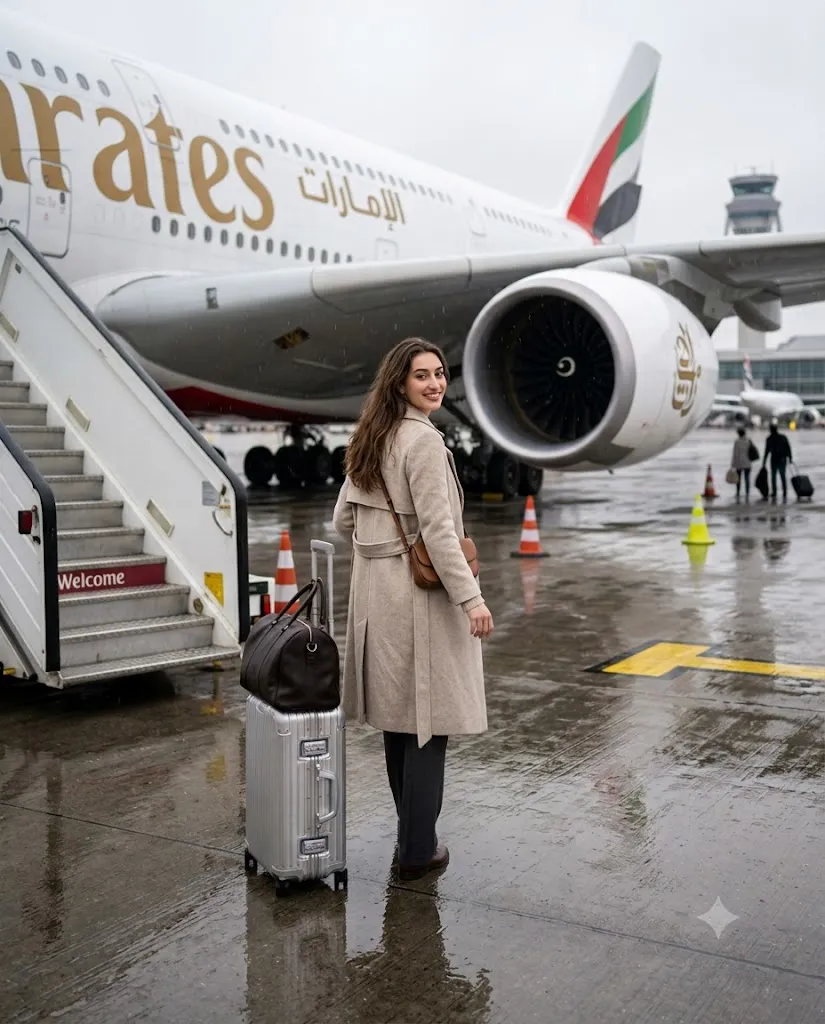
Create an ultra-realistic cinematic travel portrait using the uploaded reference image while preserving the exact facial identity. Capture a young adult walking away from the camera toward an Emirates airplane parked beside the boarding stairs on a rainy airport runway. The subject carries a hard-shell suitcase with a travel bag placed on top and wears a casual travel outfit with a small shoulder sling bag. Use a smartphone eye-level perspective with soft diffused overcast lighting, realistic wet tarmac reflections, subtle puddles, shallow depth of field, slight cinematic grain, natural walking posture, visible airplane engine, runway cones, faint airport control tower, and highly detailed editorial-quality travel photography in 8K resolution.
The portrait features a young adult walking confidently toward an Emirates airplane parked beside the boarding stairs. The camera follows from behind, creating a storytelling perspective that allows viewers to imagine themselves beginning an unforgettable adventure. The subject carries a hard-shell suitcase with a travel bag placed neatly on top, while a small sling bag rests comfortably over one shoulder. Their relaxed posture, natural walking motion, and flowing hair create an effortless travel aesthetic.
The airport environment plays an equally important role. Wet tarmac reflects the soft overcast sky, while subtle puddles and runway markings enhance realism. The Emirates aircraft, visible engine, boarding stairs, traffic cones, and a distant control tower complete the authentic airport atmosphere. Combined with shallow depth of field, smartphone-style perspective, soft diffused lighting, and slight cinematic grain, the result is a premium travel portrait that feels both modern and emotionally engaging.
How To Use Photo Editing?
Photo editing transforms a good AI-generated image into a professional travel editorial. Start by adjusting the exposure to preserve the soft overcast lighting without losing details in the clouds or reflections on the wet runway.
Increase contrast slightly to separate the subject from the background while maintaining a realistic appearance. Enhance the wet asphalt reflections carefully, making them visible but not exaggerated. Fine-tune the white balance using cool gray and soft blue tones to emphasize the rainy atmosphere.
Sharpen important elements like the suitcase, clothing, hair, airplane, and runway markings while keeping the distant background softly blurred. Apply subtle film grain to recreate the appearance of professional travel photography captured with a high-end smartphone camera.
Avoid excessive saturation or unrealistic HDR effects. The objective is to maintain authentic documentary-style realism while giving the portrait a polished editorial finish suitable for magazines, travel blogs, and social media.
Tools You Can Use For Prompt Copy and Create Photo
Several AI image generation platforms can accurately recreate this realistic airport travel scene.
1. ChatGPT Image Generation
ChatGPT creates highly realistic travel portraits with accurate facial identity, natural lighting, realistic airport environments, and cinematic storytelling.
2. Midjourney
Midjourney excels at travel photography, dramatic compositions, weather effects, and premium editorial-quality visuals.
3. Flux AI
Flux AI produces photorealistic portraits with natural facial details, realistic clothing textures, and lifelike environmental lighting.
4. Leonardo AI
Leonardo AI offers advanced prompt customization, making it easy to control pose, composition, weather conditions, and camera perspective.
5. Google Gemini
Google Gemini generates realistic portraits with balanced lighting, detailed environments, and strong prompt understanding.
6. Adobe Firefly
Adobe Firefly combines AI image generation with Adobe's editing ecosystem, making post-processing fast and professional.
7. Ideogram AI
Ideogram AI delivers clean, detailed images with realistic textures, natural proportions, and excellent travel photography quality.
How To Edit Photo?
Follow these simple steps to create a premium cinematic airport travel portrait.
Step 1: Copy the Prompt
Copy the complete AI prompt and paste it into your preferred AI image generator, such as ChatGPT, Midjourney, Flux AI, Leonardo AI, or Google Gemini.
Step 2: Generate the Portrait
Generate the image using the highest available quality settings. If necessary, regenerate until the walking pose, airport composition, lighting, and reflections appear natural.
Step 3: Download the Image
Download the final image in high resolution, preferably 4K or 8K, to preserve every detail during editing.
Step 4: Open in a Photo Editing App
Import the image into Adobe Lightroom, Adobe Photoshop, Snapseed, PicsArt, or another professional editing application.
Step 5: Adjust Lighting
Increase exposure slightly, reduce highlights, raise shadows, and fine-tune contrast while maintaining the soft rainy atmosphere.
Step 6: Enhance Wet Reflections
Increase clarity and texture on the wet runway to emphasize realistic reflections. Adjust blue and gray tones to create a calm cinematic mood.
Step 7: Sharpen the Subject
Enhance the subject's hair, clothing, suitcase, airplane details, and runway markings while preserving natural skin texture and realistic background blur.
Step 8: Export the Final Image
Save the edited portrait in high-quality JPG or PNG format with maximum resolution. Your cinematic rainy airport departure portrait is now ready for Instagram, travel blogs, portfolio presentations, or editorial publications.
Conclusion
The Rainy Airport Departure Cinematic Travel Portrait Prompt combines realistic travel photography with emotional storytelling and professional editorial composition. From the reflective wet runway and overcast sky to the elegant Emirates aircraft and natural walking pose, every detail contributes to a cinematic image that captures the excitement of travel.
Whether you are an AI artist, travel content creator, photographer, or digital designer, this prompt provides an excellent foundation for producing premium travel portraits. By pairing a powerful AI image generator with thoughtful photo editing techniques, you can create realistic airport scenes that feel authentic, inspiring, and ready for professional portfolios, travel websites, or social media platforms.