Introduction
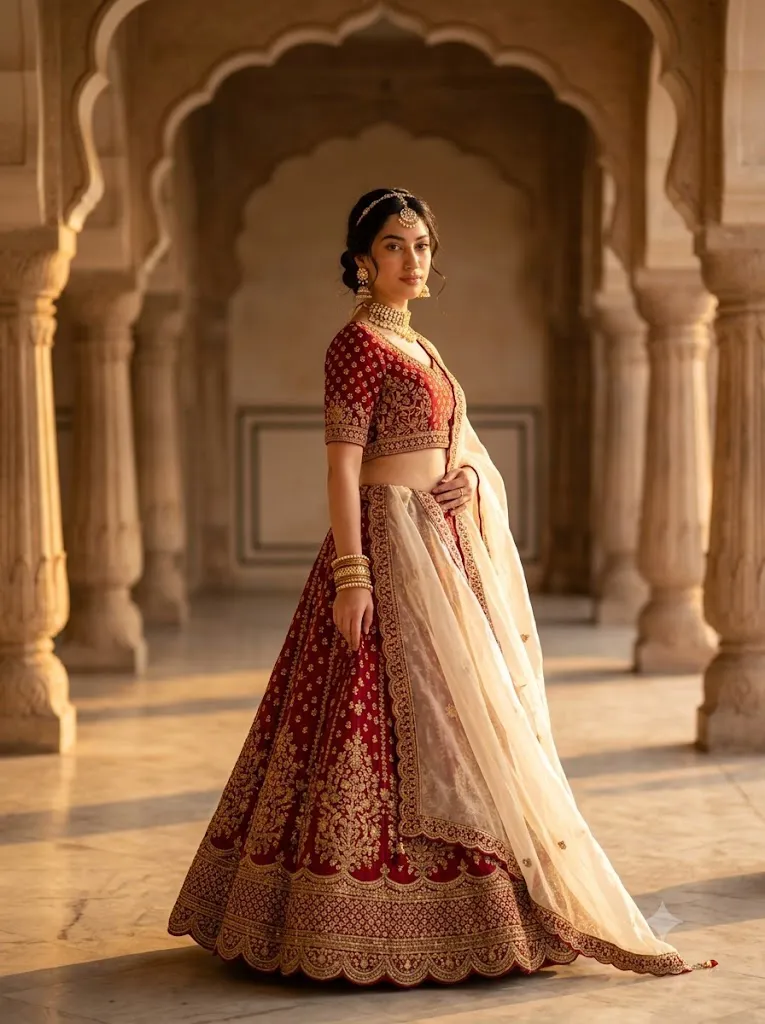
A Royal Crimson Lehenga Editorial Portrait is one of the most elegant and timeless styles in AI portrait photography. Inspired by luxury Indian fashion editorials, this look combines traditional craftsmanship with cinematic photography to create breathtaking portraits that feel worthy of a premium fashion magazine. Rich crimson fabrics, intricate gold embroidery, regal jewelry, and warm golden-hour lighting come together to produce a sophisticated visual experience.
"Royal Crimson Lehenga Editorial Portrait Prompt"
Use the uploaded face strictly as the facial identity reference without changing facial structure, proportions, skin tone, eye shape, or natural expression. Create a hyper-realistic editorial portrait of a young Indian woman standing gracefully in a warm marble courtyard during golden hour. She wears a deep crimson embroidered lehenga with intricate gold detailing, paired with a soft ivory organza dupatta draped elegantly over one shoulder. Her hair is styled in a low side bun adorned with a pearl maang tikka, complemented by a traditional kundan choker, polki jhumkas, and stacked gold bangles. She stands in a refined three-quarter editorial pose with one hand resting on her waist while the other gently holds the edge of the dupatta, maintaining calm and confident eye contact with the camera. The background features carved stone arches and heritage-style pillars softly fading into a warm golden bokeh. Captured with an 85mm lens, shallow depth of field, cinematic HDR lighting, ultra-realistic fabric textures, natural skin, editorial magazine quality, premium color grading with rich crimson and gold tones, masterpiece detail, 4K ultra-realistic photography, aspect ratio 3:4.
Unlike ordinary AI portrait prompts, this editorial style emphasizes realism, graceful posing, luxurious wardrobe details, and professional lighting. Every element—from the embroidered lehenga and heritage-inspired architecture to the shallow depth of field and warm cinematic color grading—contributes to an image that appears authentic and visually striking.
Whether you are an AI artist, fashion enthusiast, photographer, blogger, or content creator, mastering this prompt style allows you to create premium-quality portraits for portfolios, social media, digital art collections, and editorial projects. A carefully written prompt ensures consistent facial identity, realistic skin texture, balanced lighting, and detailed fabric rendering.
This guide explains how to use AI photo editing, which tools work best for creating editorial portraits, provides a sample prompt structure, and outlines the editing workflow needed to achieve professional 4K results.
How To Use Photo Editing?
Photo editing is the finishing process that transforms an AI-generated portrait into a polished editorial masterpiece. While AI creates the base image, editing enhances realism, color balance, texture, and visual impact.
Follow these simple steps:
Step 1: Select a High-Quality Reference Photo
Choose a sharp portrait with natural lighting and clearly visible facial features. A clean reference image helps preserve facial identity during AI generation.
Step 2: Copy a Detailed Prompt
Use a descriptive prompt that includes facial preservation, wardrobe details, pose, background, camera settings, lighting, and mood. The more specific the prompt, the more consistent the final portrait will be.
Step 3: Upload the Reference Image
Import your photo into an AI platform that supports reference images or image-to-image generation.
Step 4: Paste the Prompt
Insert the complete prompt and adjust settings such as aspect ratio, quality, and style strength according to your preferred AI tool.
Step 5: Generate Multiple Versions
Create several outputs and compare facial accuracy, lighting, clothing details, and composition before selecting the best image.
Step 6: Final Editing
Refine the portrait using professional editing software to improve sharpness, color grading, skin texture, and overall presentation.
Tools You Can Use For Prompt Copy and Create Photo
Using the right combination of AI generators and editing software significantly improves image quality.
ChatGPT
Useful for writing highly detailed prompts with realistic descriptions of clothing, jewelry, architecture, lighting, camera settings, and poses.
Midjourney
Produces artistic and luxurious editorial portraits with cinematic composition and rich visual detail.
Flux AI
Known for creating realistic faces, natural lighting, and detailed clothing textures while maintaining facial identity.
Stable Diffusion
Offers advanced image customization through image-to-image workflows and prompt control.
GPT Image
An excellent option for generating realistic editorial portraits directly from descriptive prompts.
Adobe Photoshop
Ideal for professional skin retouching, sharpening, object removal, and advanced finishing.
Adobe Lightroom
Perfect for adjusting exposure, contrast, warmth, highlights, shadows, and cinematic color grading.
Canva
Helpful for creating magazine covers, blog banners, Pinterest pins, and social media graphics using your completed portrait.
Combining AI image generation with professional editing software produces publication-quality results.
How To Edit Photo?
After generating the AI portrait, editing is the final step that creates a truly premium result.
Clean the Portrait
Remove unwanted artifacts or imperfections while preserving realistic facial texture and natural skin details.
Improve Lighting
Enhance highlights and shadows to create depth while maintaining the warm golden-hour atmosphere.
Refine Colors
Increase richness in crimson fabrics and gold embroidery without oversaturating the image. Balanced color grading creates a luxury editorial appearance.
Enhance Details
Sharpen the eyes, jewelry, embroidery, and hair strands while preserving a natural look.
Improve the Background
Keep architectural elements clean and elegant. Apply subtle background blur to emphasize the subject.
Apply Cinematic Color Grading
Adjust warmth, contrast, and tonal balance to create an editorial magazine finish with deep reds, glowing gold accents, and soft highlights.
Export in High Resolution
Save the completed portrait in 4K or higher resolution with maximum quality settings for printing, blogging, or professional portfolios.
Conclusion
The Royal Crimson Lehenga Editorial Portrait style beautifully combines traditional Indian fashion with modern editorial photography. Through detailed prompts, realistic lighting, luxurious wardrobe styling, and thoughtful editing, you can create portraits that appear elegant, timeless, and professionally produced.
Success with this style comes from paying attention to every detail—from preserving the subject’s facial identity and describing intricate embroidery to choosing cinematic lighting and balanced color grading. The combination of AI image generation and professional editing enables creators to produce stunning visuals suitable for fashion editorials, digital portfolios, creative campaigns, and social media.
Experiment with different heritage-inspired locations, jewelry combinations, poses, and lighting conditions to build a unique collection of editorial portraits. With practice and creativity, you can consistently produce high-quality images that celebrate classic elegance while showcasing the capabilities of modern AI-assisted photography.