Introduction
Fashion photography is more than simply capturing clothing—it is about creating emotion, atmosphere, and visual storytelling. One of the most elegant and artistic styles in modern editorial photography is the Sculptural Hat Couture Editorial Portrait. This concept combines high-fashion styling, dramatic light patterns, architectural design elements, and timeless elegance to create an image that feels worthy of the pages of a luxury fashion magazine.
"Sculptural Hat Couture Editorial Portrait Prompt"
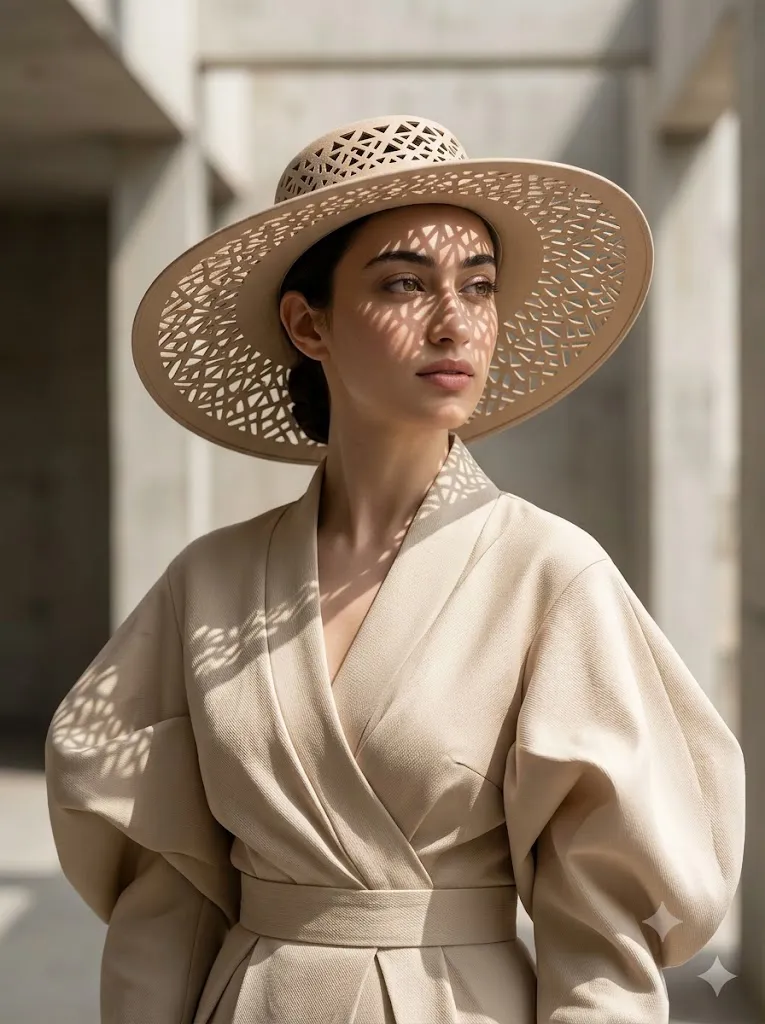
Use the face from the uploaded reference image and preserve the same facial features without alteration. Create an ultra-realistic high-fashion editorial portrait of a woman wearing a sculptural beige couture ensemble with voluminous sleeves and a textured wrap-style design. She wears a wide-brimmed hat featuring intricate cut-out patterns that cast geometric shadows across her face and clothing. Soft natural sunlight filters through the hat, creating artistic light patterns. Muted beige and ivory color palette. Serene yet powerful expression, gazing thoughtfully into the distance. Minimalistic background, cinematic atmosphere, Vogue-style composition, 85mm portrait lens, shallow depth of field, soft directional lighting, photorealistic skin texture, couture fabric details, luxury editorial photography, ultra-detailed, 8K resolution.
The centerpiece of this portrait is a sophisticated woman wearing a sculptural beige couture ensemble paired with a wide-brimmed hat featuring intricate cut-out patterns. Unlike traditional fashion portraits, the hat becomes more than an accessory—it transforms into a creative lighting tool. As sunlight passes through the lace-like openings, geometric shadows are projected across the face, clothing, and surrounding environment, creating a stunning interplay between light and form.
The neutral palette of beige, ivory, and soft cream tones adds a sense of calm sophistication. Without bright colors competing for attention, the viewer naturally focuses on textures, shapes, and subtle details. Every fold of fabric, every woven thread, and every shadow pattern contributes to the artistic narrative.
This portrait style draws inspiration from luxury editorials commonly seen in high-end publications such as Vogue, Harper’s Bazaar, and Elle. The mood is serene yet powerful. The subject gazes thoughtfully into the distance, expressing confidence, wisdom, and grace. The result is a portrait that feels cinematic, timeless, and emotionally engaging.
Modern AI image-generation platforms make it possible to create this sophisticated look without a large production budget. However, achieving truly professional results requires carefully crafted prompts, thoughtful styling descriptions, and precise editing techniques. Understanding how light interacts with texture and how shadows shape a composition is essential.
In this article, you will learn how to use photo editing to enhance couture portraits, discover the best tools for generating and refining images, and follow a professional workflow for transforming a simple image into a breathtaking editorial masterpiece.
How To Use Photo Editing?
Photo editing plays a critical role in transforming a good portrait into an exceptional editorial image. While AI can generate impressive compositions, professional refinement ensures the final result appears polished, realistic, and publication-ready.
The first area to focus on is lighting enhancement. Since the artistic shadow patterns are one of the defining features of this portrait style, they must remain crisp and natural. Editing allows you to improve contrast between illuminated areas and shadowed regions while preserving realistic transitions.
Exposure balancing is equally important. Soft directional sunlight should illuminate the subject without overexposing delicate details in the fabric or skin. Highlights should appear luminous but controlled, maintaining texture throughout the image.
Texture enhancement is another essential step. Couture garments often feature intricate weaving, embroidery, or layered construction. Selective sharpening helps emphasize these details while maintaining a soft and luxurious overall appearance.
Skin retouching should remain subtle. High-fashion editorials typically preserve natural skin texture, pores, and facial characteristics rather than creating an artificial airbrushed look. Gentle corrections are enough to enhance realism while maintaining authenticity.
Color grading is particularly important in a beige-toned portrait. Soft warm neutrals should feel rich and elegant rather than flat or dull. Small adjustments to warmth, highlights, and tonal balance can dramatically improve the visual mood.
Background refinement can further strengthen the composition. Minimal distractions ensure the viewer’s attention remains focused on the subject, the couture styling, and the beautiful patterns of light and shadow.
Finally, adding a subtle cinematic finish through gentle contrast adjustments and soft tonal depth can elevate the image from a standard portrait to a luxury editorial photograph.
Tools You Can Use For Prompt Copy and Create Photo
Creating a premium couture editorial portrait becomes much easier when using the right AI generation and photo editing tools.
AI Image Generation Platforms
ChatGPT
ChatGPT helps generate detailed prompts that accurately describe clothing, lighting, mood, camera settings, textures, and composition.
Midjourney
Midjourney is excellent for producing artistic editorial imagery with stunning light effects and sophisticated fashion styling.
Leonardo AI
Leonardo AI offers impressive realism and fine control over textures, making it ideal for couture fashion photography.
Ideogram
Ideogram creates detailed fashion portraits with strong prompt interpretation and excellent composition control.
Adobe Firefly
Adobe Firefly integrates smoothly with professional creative workflows and produces high-quality commercial imagery.
Professional Photo Editing Software
Adobe Photoshop
Photoshop remains the industry standard for detailed retouching, shadow refinement, compositing, and texture enhancement.
Adobe Lightroom
Lightroom is ideal for exposure adjustments, color grading, tonal control, and cinematic finishing touches.
Capture One
Capture One provides advanced color management and exceptional image quality for professional fashion photographers.
Snapseed
Snapseed offers powerful mobile editing tools suitable for quick enhancements and portrait refinement.
PicsArt
PicsArt provides accessible editing features for content creators and social media artists.
How To Edit Photo?
Follow these professional editing steps to achieve a polished couture editorial look.
Step 1: Import the Image
Open your generated portrait in Photoshop, Lightroom, Capture One, or your preferred editing software.
Step 2: Correct Exposure
Balance highlights and shadows to maintain detail throughout the image while preserving the artistic lighting.
Step 3: Enhance Shadow Patterns
Carefully increase contrast in the projected hat shadows so they remain visually striking yet realistic.
Step 4: Improve Fabric Texture
Apply selective sharpening to emphasize the couture garment’s weave, folds, and sculptural structure.
Step 5: Refine Skin Texture
Preserve natural skin details while gently removing distractions and maintaining realistic pores.
Step 6: Adjust Color Balance
Enhance warm beige and ivory tones while keeping the overall palette soft and elegant.
Step 7: Create Depth
Use subtle dodge-and-burn techniques to enhance facial contours and garment dimension.
Step 8: Refine the Background
Reduce distractions and soften background elements to strengthen subject separation.
Step 9: Apply Cinematic Color Grading
Introduce gentle tonal richness and premium editorial contrast without oversaturating the image.
Step 10: Add Subtle Vignette
A soft vignette helps guide attention toward the face and couture details.
Step 11: Final Sharpening
Sharpen the eyes, fabric textures, and hat details while maintaining smooth transitions elsewhere.
Step 12: Export in High Resolution
Save the final image in PNG or TIFF format to preserve maximum quality and detail.
Conclusion
The Sculptural Hat Couture Editorial Portrait Prompt represents a perfect blend of fashion, art, and storytelling. By combining architectural shadow patterns, sophisticated couture styling, and cinematic lighting, this portrait style creates images that feel both timeless and contemporary.
The wide-brimmed hat becomes more than a fashion accessory—it transforms into a creative design element that shapes light and adds visual intrigue. Paired with soft beige tones, luxurious fabrics, and thoughtful composition, the result is a portrait filled with elegance, mystery, and sophistication.
Whether you are a photographer, digital artist, content creator, or fashion enthusiast, this style offers endless creative opportunities. It is ideal for luxury editorials, fashion campaigns, portfolio projects, magazine covers, and social media content that seeks a refined and premium aesthetic.
With the help of modern AI tools and professional editing techniques, creating a couture-inspired editorial portrait has never been more accessible. By carefully crafting prompts, refining lighting, and enhancing textures, you can produce stunning imagery that rivals the quality of high-end fashion publications.
Mastering this style allows you to create portraits that celebrate beauty, craftsmanship, and the extraordinary relationship between light and design—turning a simple fashion image into a true work of art.