Introduction
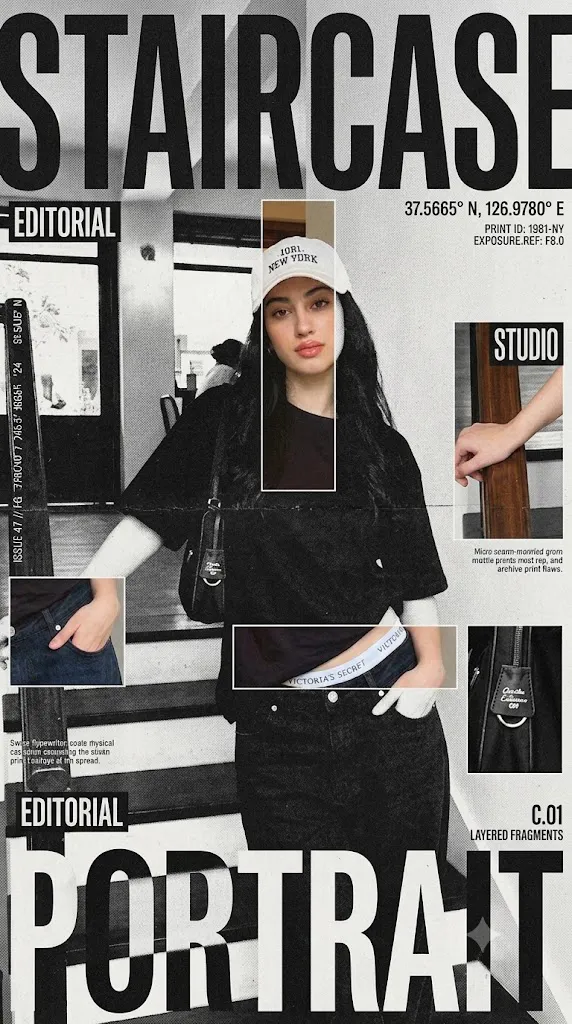
The Brutalist Reveal Editorial Poster is a modern AI photo editing style inspired by luxury magazine covers, Swiss graphic design, brutalist architecture, and experimental fashion campaigns. This style transforms ordinary photographs into high-impact editorial posters by combining bold typography, monochrome printing, selective color highlights, and raw industrial textures.
"The Brutalist Reveal Editorial Poster Prompt"
Transform the uploaded image into a premium brutalist editorial magazine poster. Convert the entire poster into high-contrast black-and-white with a monochrome newspaper print aesthetic. Apply gritty editorial grain, matte paper texture, photocopy texture, magazine print imperfections, rough print noise, halftone grain, subtle paper fibers, archive print quality, and high ISO film grain.The black-and-white treatment should dominate approximately 75-85% of the composition. Create multiple rectangular crop windows across the layout where selected fragments preserve the original image colors. Use vertical crop strips, horizontal crop strips, offset rectangles, overlapping image fragments, and editorial cutout windows.Reveal important color details such as eyes, hands, clothing, accessories, and key focal points while keeping the rest of the poster monochrome. Add massive oversized condensed sans-serif typography, magazine cover style hierarchy, brutalist editorial design, Swiss-inspired layout, huge headline, issue numbers, micro typography, coordinates, technical annotations, and editorial metadata.Create a structured grid system with intentional asymmetry, layered rectangles, luxury magazine design, creative agency portfolio aesthetic, heavy print grain, visible paper texture, photocopied poster feel, slight ink spread, scanned publication appearance, and physical print imperfections.The final artwork should look like a premium fashion magazine cover where selective color slices reveal the original photograph beneath a gritty black-and-white printed surface.
Unlike traditional colorful poster designs, brutalist editorial artwork focuses on simplicity, structure, and visual impact. The main concept is to convert the image into a strong black-and-white composition while revealing only specific areas of original color through carefully placed crop windows. These selective color fragments create a dramatic contrast between the printed monochrome surface and the hidden original image beneath.
This aesthetic uses elements such as high-contrast black-and-white photography, newspaper print texture, photocopy effects, halftone grain, matte paper surfaces, and magazine-style layouts. The result feels like a premium fashion publication, creative agency portfolio piece, or limited-edition art magazine cover.
The selective color reveal technique makes the design unique. Instead of keeping the whole image colorful, only important details like eyes, clothing, accessories, hands, or objects appear through rectangular color windows. These fragments look like cut-out sections revealing another layer underneath the printed poster.
Modern AI image tools make it easy to create this style. With a detailed prompt and a good reference photo, AI can transform a simple portrait into a professional brutalist editorial design while maintaining the subject’s identity and composition.
This guide explains how to use photo editing, the best tools for creating brutalist posters, an example prompt, and the editing process needed to achieve a high-end magazine aesthetic.
How To Use Photo Editing?
Creating a Brutalist Reveal Editorial Poster starts with choosing the correct reference image. A strong portrait with clear details works best because the AI needs enough information to maintain the original subject while applying the new design style.
The goal is not to create a normal photograph. The image should become a graphic poster with strong contrast, print textures, and editorial composition.
Step 1: Select A High-Quality Photo
Choose an image with clear facial features, interesting composition, and visible details. Portraits with strong expressions usually create better editorial results.
Step 2: Copy A Detailed Prompt
A detailed prompt helps AI understand the design direction. The prompt should include:
- High-contrast black-and-white conversion
- Brutalist magazine layout
- Selective color reveal windows
- Newspaper print texture
- Halftone grain
- Photocopy effects
- Matte paper texture
- Oversized typography
- Editorial grid system
The more specific the prompt, the more accurate the final artwork becomes.
Step 3: Upload The Image
Upload the reference photo into an AI image editor that supports image transformation. The AI will analyze the subject and apply the brutalist poster style.
Step 4: Generate Multiple Versions
Create different versions and compare the placement of color windows, typography, texture quality, and overall composition.
Step 5: Choose The Best Design
Select the image that maintains the original identity while achieving the desired editorial magazine appearance.
Step 6: Final Refinement
Use editing software to improve grain, contrast, typography placement, and print effects.
Combining AI generation with professional editing creates a more realistic and premium brutalist poster.
Tools You Can Use For Prompt Copy and Create Photo
Several AI and design tools can help create Brutalist Reveal Editorial Posters.
ChatGPT
Useful for creating detailed prompts that describe composition, typography, textures, and selective color effects.
Midjourney
Creates artistic editorial images with strong visual styles, bold compositions, and magazine-inspired layouts.
Flux AI
Generates realistic image transformations while preserving facial structure and important details.
Stable Diffusion
Provides advanced customization through image-to-image generation, control tools, and detailed style adjustments.
GPT Image
Helpful for generating creative poster designs with specific instructions for layout, texture, and artistic direction.
Adobe Photoshop
A professional editing tool for refining brutalist poster designs. It can improve:
- Black-and-white conversion
- Color masking
- Typography
- Grain effects
- Paper textures
- Layout adjustments
- Adobe Lightroom
Useful for creating dramatic monochrome tones, contrast adjustments, and editorial-style color grading.
Canva
Great for arranging magazine layouts, adding typography, creating posters, and preparing social media designs.
Using AI generation with professional editing software helps achieve a realistic print-based editorial appearance.
How To Edit Photo?
Editing helps improve the final poster and creates a more realistic printed magazine effect.
Convert To Black And White
Start by converting the image into a strong monochrome style. Increase contrast so the dark areas become deeper and highlights become sharper.
Add Print Texture
Apply newspaper grain, photocopy noise, paper fibers, and halftone patterns. These textures make the poster look physically printed.
Create Color Reveal Windows
Use rectangular selections or masks to reveal original color areas. Keep these sections limited so the black-and-white design remains dominant.
Improve Typography
Add oversized condensed fonts that interact with the image. Allow text to crop naturally at the edges for a modern magazine-cover appearance.
Build Editorial Layout
Arrange text blocks, labels, numbers, and graphic elements using a structured grid. Maintain balance between empty space and visual elements.
Add Paper Imperfections
Include subtle scratches, ink spread, dust, and scanned print effects to create an authentic archive poster feel.
Export High Resolution
Save the final artwork in high quality for printing, social media, posters, or creative projects.
Conclusion
The Brutalist Reveal Editorial Poster style combines photography, graphic design, and AI creativity to produce powerful magazine-inspired artwork. By mixing high-contrast monochrome printing with selective color reveal techniques, this style creates a unique balance between simplicity and visual impact.
The strength of this aesthetic comes from controlled imperfections. Grain, photocopy textures, paper fibers, and print errors make the artwork feel physical and authentic. The limited color windows create a dramatic effect by showing only the most important details of the original image.
Creating a successful brutalist poster requires a detailed prompt, a strong reference image, and careful editing. AI tools make the transformation faster, while professional design software helps refine the final composition.
Whether you are creating fashion posters, portfolio artwork, social media designs, or creative magazine covers, the Brutalist Reveal Editorial style provides endless possibilities. With the right techniques, you can transform ordinary photos into premium editorial designs that look bold, artistic, and professionally crafted.