Introduction
Fashion photography is constantly evolving, with photographers and digital artists exploring new ways to express emotion, movement, and personality. One of the most captivating trends in modern portrait photography is the Cinematic Motion Blur Fashion Portrait. Unlike traditional portraits that focus on perfect sharpness, this style intentionally embraces blur as an artistic tool. The result is a sophisticated image that feels emotional, mysterious, and full of life.
"Ultra-Realistic Cinematic Motion Blur Fashion Portrait Prompt"
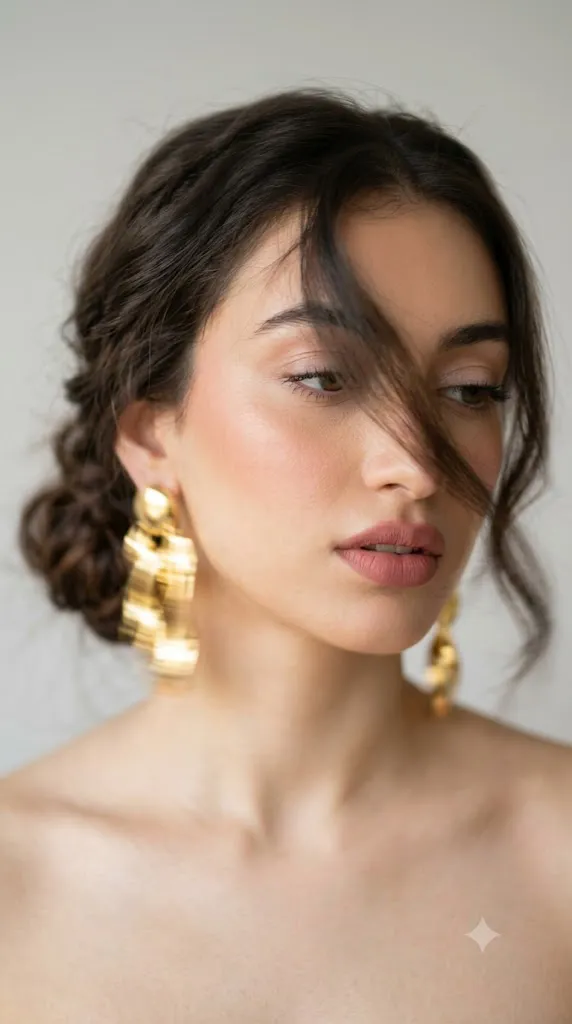
Não mudar o rosto, semelhança 100%. Retrato artístico intencionalmente desfocado, fotografado com smartphone ou câmera em longa exposição, usando movimento consciente durante a captura como recurso criativo. Na foto, uma mulher com o cabelo preso em um coque baixo despojado com trança, com uma longa mecha solta cobrindo metade do rosto. O olhar está direcionado para baixo e para o lado — um dos olhos fica quase totalmente escondido pela mecha. Os lábios estão levemente entreabertos. As joias são grandes e marcantes — brincos dourados volumosos. Os ombros estão à mostra. A pele é lisa, com blush suave em tom rosado-pêssego nas maçãs do rosto e iluminador. A maquiagem é delicada — cílios destacados, sombras leves, lábios volumosos com batom matte em tom rosa queimado, e contorno labial um tom mais escuro que o batom. O enquadramento é feito aproximadamente na altura dos olhos ou um pouco abaixo, em um retrato extreme close-up, capturando até os ombros e a parte superior do peito, em orientação vertical. O rosto ocupa a maior parte da imagem, levemente deslocado para a direita do centro. O fundo é uma parede lisa em tom cinza-claro ou branco, totalmente neutra, sem detalhes. A luz é natural, difusa, suave e uniforme — provavelmente vindo de uma janela lateral, criando uma modelagem delicada no rosto, sem sombras duras. O equilíbrio tonal geral é quente, cremoso e dourado; o dourado das joias conversa com o tom da pele e dos cabelos. O desfoque é forte e intencional — todo o quadro apresenta movimento, especialmente as joias e as pontas do cabelo, que aparecem borradas em traços dourados característicos. O centro do rosto mantém um pouco mais de nitidez em comparação com as bordas. O efeito cria a sensação de um frame cinematográfico ou de um editorial de moda com desfoque proposital. Ruído mínimo. Pós-produção leve — tonalidade quente e contraste suave. A sensação geral é de uma foto fashion misteriosa, artística e muito atmosférica, em que o desfoque não é um erro, mas sim um recurso que cria sensação de movimento, fugacidade e uma beleza cara, elegante e naturalmente despreocupada. Formato 9:16.
Motion blur photography transforms a simple portrait into a visual story. Instead of freezing a moment in time, it captures movement and atmosphere, creating the impression that the subject exists between reality and imagination. This technique is widely used in luxury fashion editorials, high-end beauty campaigns, magazine covers, and social media content because it conveys elegance and artistic depth.
The beauty of cinematic motion blur lies in its balance. Certain parts of the image remain relatively sharp—usually the center of the face—while hair, jewelry, and outer edges dissolve into soft movement. This contrast creates visual interest and directs attention toward the subject's expression. Combined with warm lighting, professional styling, and minimalist backgrounds, the effect becomes timeless and emotionally engaging.
Today, AI image generation platforms and advanced editing software allow creators to produce stunning motion blur portraits without requiring expensive studio equipment. By combining a detailed prompt with professional editing techniques, artists can create images that resemble luxury fashion campaigns photographed by world-class photographers.
This guide explores how to use photo editing effectively, which tools can help generate cinematic motion blur portraits, and how to refine your images into premium editorial-quality artwork.
How To Use Photo Editing?
Photo editing is one of the most important steps in creating a realistic motion blur fashion portrait. While AI generators can create impressive foundations, editing helps control the balance between sharpness and movement.
The first step is understanding blur placement. Motion blur should feel intentional rather than accidental. Typically, the center of the face remains slightly sharper while the edges, hair strands, earrings, and shoulders display stronger movement. This creates a cinematic effect without losing the subject's identity.
Lighting adjustments are equally important. Motion blur portraits often feature soft natural lighting that wraps gently around the face. Warm highlights and subtle shadows help maintain depth while preserving a luxurious atmosphere.
Color grading plays a major role in establishing mood. Warm beige, golden, cream, and peach tones work particularly well because they enhance skin tones and create a premium editorial appearance. Avoid overly saturated colors, which can distract from the emotional quality of the image.
Skin retouching should remain minimal. Modern fashion photography celebrates realistic skin texture rather than excessive smoothing. Preserving pores, natural highlights, and subtle imperfections contributes to authenticity.
Hair movement can be enhanced selectively during editing. Loose strands often create beautiful blur patterns that emphasize motion and elegance. Similarly, reflective jewelry can produce dynamic streaks of light that strengthen the artistic effect.
Finally, contrast should remain moderate. Excessive contrast can make the image feel harsh, while softer transitions between highlights and shadows support the dreamy cinematic aesthetic.
Tools You Can Use For Prompt Copy And Create Photo
Several AI image generators and editing applications are capable of creating high-quality motion blur portraits.
AI Image Generation Tools
ChatGPT Image Generation
ChatGPT can generate highly detailed portrait concepts using advanced descriptive prompts. It performs particularly well with realistic fashion photography and cinematic aesthetics.
Midjourney
Midjourney is popular among artists and photographers for its ability to create visually striking editorial-style images with creative motion effects.
Leonardo AI
Leonardo AI provides excellent control over lighting, composition, and portrait realism, making it suitable for luxury fashion concepts.
Ideogram
Ideogram offers strong prompt accuracy and can generate realistic portraits with impressive visual consistency.
Adobe Firefly
Adobe Firefly integrates into professional creative workflows and produces commercial-quality image outputs.
Photo Editing Software
Adobe Photoshop
Photoshop remains the industry standard for advanced retouching, motion blur effects, compositing, and color grading.
Adobe Lightroom
Lightroom is ideal for exposure adjustments, skin tone refinement, and cinematic color correction.
Snapseed
A powerful mobile editing app that offers professional tools for portrait enhancement and tonal adjustments.
PicsArt
Popular among social media creators for creative effects, overlays, and artistic editing options.
Capture One
A professional photography editing platform known for exceptional color management and image quality.
How To Edit Photo?
After generating your portrait, follow these steps to create a professional editorial result.
Step 1: Import The Image
Open the image in Photoshop, Lightroom, Snapseed, or your preferred editing software.
Step 2: Adjust Exposure
Balance highlights and shadows while preserving the soft, natural lighting.
Step 3: Refine Color Temperature
Introduce warm golden tones to enhance skin color and create a luxury editorial mood.
Step 4: Enhance Motion Blur
Apply selective motion blur to hair strands, earrings, and outer edges while keeping the central facial area more defined.
Step 5: Improve Skin Realism
Retouch gently while maintaining pores, texture, and natural facial details.
Step 6: Enhance Jewelry Highlights
Increase subtle reflections and light streaks on metallic accessories to emphasize movement.
Step 7: Strengthen Background Simplicity
Ensure the neutral background remains clean and distraction-free.
Step 8: Apply Cinematic Color Grading
Use warm highlights, soft shadows, and balanced contrast for a magazine-quality look.
Step 9: Add Final Finishing Effects
Introduce subtle film grain and gentle softness to reinforce the editorial atmosphere.
Step 10: Export The Final Image
Save the image in high resolution. PNG format is recommended for maximum quality and detail preservation.
Conclusion
The Ultra-Realistic Cinematic Motion Blur Fashion Portrait represents a perfect fusion of fashion photography, artistic expression, and modern visual storytelling. By embracing intentional blur rather than avoiding it, creators can produce images that feel emotional, luxurious, and visually unforgettable.
With the help of AI image generators and professional editing software, producing high-end motion blur portraits has become accessible to artists, photographers, designers, and content creators alike. A carefully crafted prompt, thoughtful lighting choices, and strategic editing workflow can transform an ordinary portrait into a cinematic masterpiece.
Whether you are creating fashion editorials, beauty campaigns, portfolio work, Pinterest content, or social media imagery, mastering the motion blur portrait style can elevate your visual storytelling and help you create images that capture both movement and emotion in a truly elegant way.