Introduction
Photography has always been about preserving memories, emotions, and special moments. In recent years, the nostalgic charm of instant film photography has made a remarkable comeback, inspiring photographers, designers, and AI artists around the world. One of the most popular visual trends today is the Ultra-Realistic Cinematic Polaroid Collage, a creative style that combines vintage instant-photo aesthetics with modern editorial photography and advanced AI image generation.
"Ultra-Realistic Cinematic Polaroid Collage Prompt"
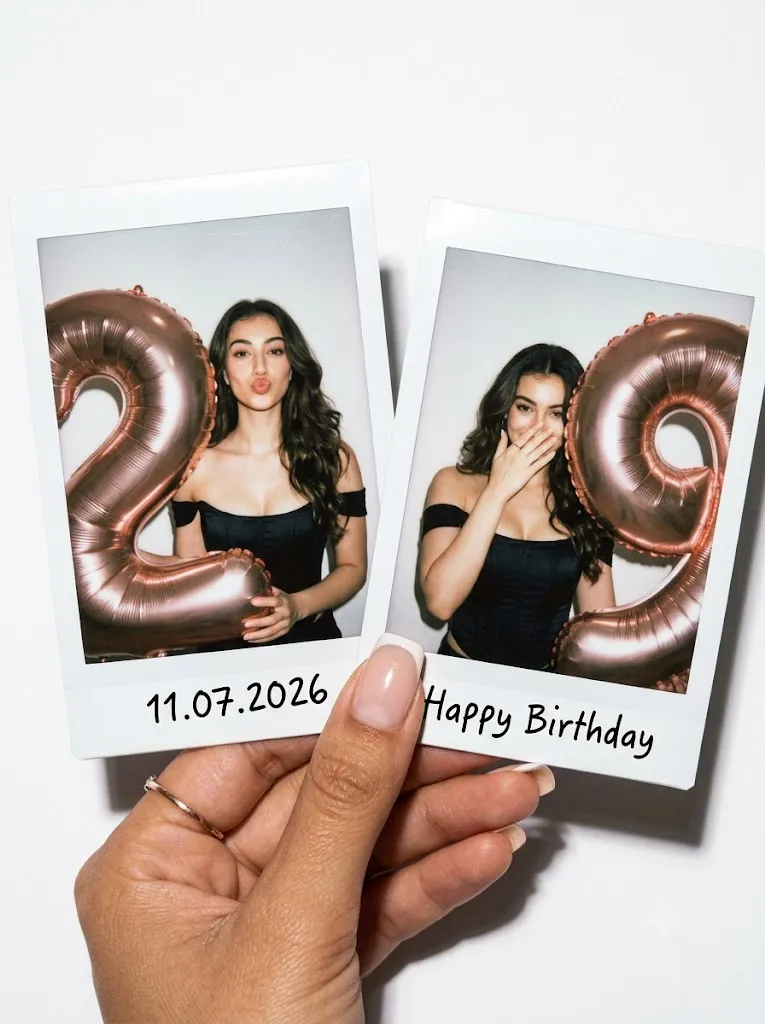
Use my reference photo, transfer the face from the photo without changing it, exact facial identity preserved. Hyper-realistic cinematic close-up portrait on a clean white background: beautiful tanned feminine hand holding two instant Polaroid photos in front of camera. Hand highly detailed with warm skin tone, elegant slim fingers, glossy light square French manicure, delicate ring. Strong direct flash, soft shadows, subtle analog film grain, authentic instant-photo aesthetic, festive luxury birthday mood.Inside the two Polaroids: the same girl with loose flowing hair and a seamless black corset with open shoulders, sculpting fit, smooth matte fabric emphasizing décolleté and waist. LEFT Polaroid: she holds one enormous metallic rose-gold balloon shaped as number "2", the balloon is larger than her body and dominates the frame, she makes playful duck lips. RIGHT Polaroid: she holds one enormous metallic rose-gold balloon shaped as number "g", the balloon is larger than her body and placed beside her, she smiles softly while partly covering lower face with her hand. Only one balloon in each Polaroid, no extra balloons. Hair styling only: smooth loose polished strands naturally cascading around shoulders, soft volume, glossy texture. Bottom border of LEFT Polaroid handwritten: "11.07.2026". Bottom border of RIGHT Polaroid handwritten: "Happy Birthday". High detail skin texture, glossy balloon reflections, realistic paper texture, flash shadows and film imperfections.
Unlike traditional portraits, a Polaroid collage tells a story through multiple frames. The iconic white borders, handwritten notes, authentic flash lighting, subtle film grain, and realistic paper textures create a timeless look that instantly feels personal and emotional. Whether used for birthdays, celebrations, fashion editorials, lifestyle campaigns, or social media content, Polaroid collages provide a unique visual experience that blends nostalgia with luxury aesthetics.
The cinematic version of this style takes the concept even further by incorporating professional fashion photography techniques. Strong flash lighting, realistic skin textures, detailed clothing, glossy reflections, and carefully designed compositions create images that feel like premium magazine editorials while maintaining the authenticity of instant photography.
Thanks to modern AI image generation technology, creating ultra-realistic Polaroid collages is now easier than ever. With a detailed prompt and proper editing techniques, anyone can produce stunning photo collages that look as though they were captured on real instant film cameras.
This guide explains how to use photo editing, which tools are best for generating Polaroid-style images, and how to refine your collage for a professional, cinematic appearance.
How To Use Photo Editing?
Photo editing plays a vital role in achieving a realistic Polaroid collage. While AI image generators can create highly detailed images, editing helps enhance authenticity and ensures that every element works together cohesively.
The first area to focus on is lighting. Instant film photography often uses direct flash, which creates bright highlights, natural shadows, and a distinctive snapshot appearance. Adjusting contrast and highlights can help replicate this effect while maintaining realistic skin tones.
Color correction is equally important. Polaroid photographs typically feature slightly warm tones, soft contrast, and subtle color shifts that create their nostalgic appearance. Carefully balancing colors helps preserve realism while maintaining the classic instant-photo feel.
Film grain is another essential component. Adding fine grain can mimic the texture of traditional instant film and increase the authenticity of the final image. Avoid excessive grain because it can reduce clarity and detail.
Paper texture enhancement can further strengthen the Polaroid aesthetic. Slight variations in brightness and subtle imperfections make the images feel printed rather than digitally generated.
Skin retouching should remain minimal. High-end editorial photography emphasizes natural beauty, realistic pores, and authentic facial details. Maintaining skin texture is essential for achieving photorealism.
Handwritten text elements such as dates, captions, and personal messages can be enhanced using realistic ink effects and slight imperfections to mimic genuine handwriting.
Finally, applying consistent color grading across all frames ensures the collage appears unified and professionally designed.
Tools You Can Use For Prompt Copy And Create Photo
Several AI image generators and editing applications are capable of creating stunning Polaroid collages with realistic details.
AI Image Generation Tools
ChatGPT Image Generation
ChatGPT can generate highly detailed cinematic portraits and creative Polaroid-style compositions using descriptive prompts.
Midjourney
Midjourney is known for producing visually striking editorial imagery with exceptional artistic quality and realistic lighting.
Leonardo AI
Leonardo AI offers advanced customization options and realistic rendering capabilities for fashion and lifestyle photography.
Ideogram
Ideogram excels at prompt accuracy and generating realistic portraits with detailed compositions.
Adobe Firefly
Adobe Firefly integrates with professional creative workflows and produces commercial-quality visual content.
Photo Editing Software
Adobe Photoshop
Photoshop remains the industry standard for creating collages, adding realistic Polaroid borders, enhancing textures, and applying professional retouching.
Adobe Lightroom
Lightroom is ideal for color grading, exposure balancing, and maintaining consistency across multiple images.
Snapseed
A powerful mobile editing app suitable for quick portrait enhancements and stylistic adjustments.
PicsArt
Popular among content creators for overlays, typography, and creative effects.
Canva
Canva provides user-friendly tools for collage layouts, design elements, and social media-ready presentations.
How To Edit Photo?
After generating your Polaroid collage, follow these steps to create a professional final result.
Step 1: Import The Images
Open the generated images in Photoshop, Lightroom, or your preferred editing software.
Step 2: Balance Exposure
Adjust highlights and shadows to recreate the bright flash-photography appearance while preserving details.
Step 3: Refine Color Tones
Apply warm color grading and subtle vintage adjustments to emulate instant-film photography.
Step 4: Add Realistic Film Grain
Introduce fine grain carefully to create texture without sacrificing image quality.
Step 5: Enhance Skin Details
Maintain realistic skin texture while performing light retouching to remove distractions.
Step 6: Create Polaroid Frames
Design authentic white borders with slight imperfections and realistic paper shadows.
Step 7: Add Handwritten Text
Include dates, captions, or personal messages using natural handwriting-style typography.
Step 8: Improve Reflections and Highlights
Enhance balloon reflections, flash highlights, and glossy surfaces for greater realism.
Step 9: Apply Final Color Grading
Ensure all frames share consistent tones and contrast to create a unified collage.
Step 10: Export
Save the final design in high resolution. PNG format is recommended for preserving maximum image quality.
Conclusion
The Ultra-Realistic Cinematic Polaroid Collage combines nostalgia, storytelling, fashion photography, and modern digital artistry into a single creative format. The blend of instant-film aesthetics, realistic lighting, handwritten details, and cinematic presentation creates images that feel both timeless and contemporary.
With the help of AI image generation tools and professional editing software, anyone can create premium-quality Polaroid collages without expensive equipment or traditional film cameras. A detailed prompt, thoughtful composition, and strategic editing workflow are all that is needed to transform an idea into a visually stunning masterpiece.
Whether you are designing birthday memories, fashion campaigns, social media content, lifestyle editorials, or personal projects, mastering the cinematic Polaroid collage style can help you create unforgettable visuals that capture attention and evoke emotion.