Introduction
Luxury celebration portraits have become one of the most sought-after styles in modern photography and AI image generation. Whether it's a birthday, anniversary, engagement, graduation, or milestone event, people want images that capture the elegance, excitement, and emotion of special occasions. An Ultra-Realistic Luxury Celebration Portrait combines professional photography techniques, premium styling, cinematic lighting, and detailed visual storytelling to create a memorable image that feels both glamorous and authentic.
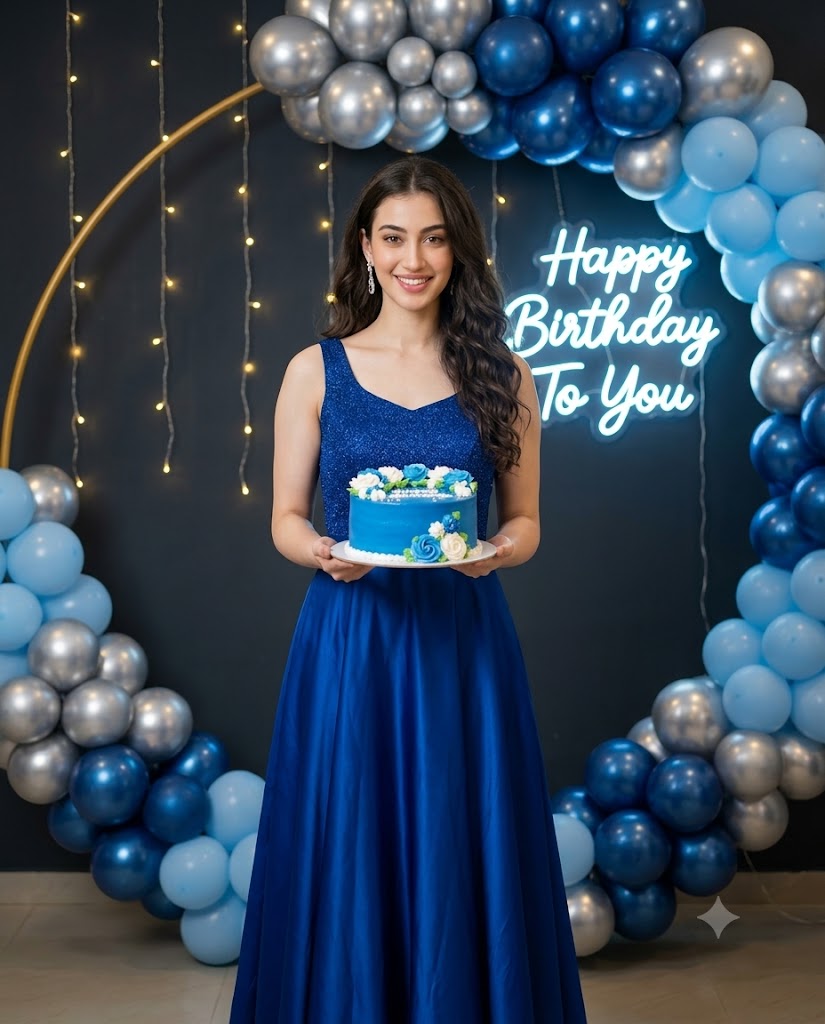
Use the uploaded image strictly only for face and identity reference. Preserve the subject’s real facial identity, face shape, skin tone, hairstyle, natural smile, and overall likeness accurately. Create an ultra-realistic 4:5 vertical birthday celebration portrait of a young woman standing indoors in front of a luxury birthday decoration setup. She is centered in the frame, shown from head to full dress, smiling naturally while holding a round blue birthday cake with white and blue cream flowers on top. The woman wears an elegant royal-blue sleeveless party gown with a glittery fitted bodice and a flowing satin skirt. Add realistic fabric shine, soft folds, premium stitching, and a graceful party look. She has long, softly curled hair styled over one shoulder, elegant earrings, subtle glam makeup, and a warm confident expression. Background: dark charcoal wall decorated with warm fairy lights hanging vertically, surrounded by a large balloon arch made of metallic silver, deep blue, and light blue balloons. Behind the subject, place a glowing neon sign that clearly reads “Happy Birthday To You” in bright soft blue-white light. Keep the sign slightly behind her head but readable. Lighting should be soft cinematic party lighting with a gentle glow from the neon sign and fairy lights, realistic skin texture, natural shadows, shallow depth of field, polished DSLR photography look, high detail, clean composition, premium birthday photoshoot mood. Avoid distorted hands, extra fingers, unreadable text, plastic skin, cartoon look, over-smoothing, messy balloons, wrong cake shape, extra people, harsh shadows, or AI-generated artifacts.
Unlike ordinary event photographs, luxury celebration portraits focus on creating a polished and sophisticated atmosphere. Every element contributes to the final result, including wardrobe selection, background decoration, lighting design, posing, and color harmony. Elegant gowns, decorative balloon arches, glowing neon signs, fairy lights, and carefully styled accessories work together to create a premium visual experience.
With the advancement of AI-powered image generation tools, creators can now transform reference photos into stunning celebration portraits while preserving facial identity, skin tone, and personal characteristics. These portraits often resemble images captured during professional photoshoots using high-end DSLR or mirrorless cameras.
Whether you are creating content for social media, personal memories, digital portfolios, birthday invitations, or special gifts, an ultra-realistic luxury celebration portrait provides a beautiful way to commemorate life's most important moments.
How To Use Photo Editing?
Photo editing is a crucial step in achieving a professional luxury portrait appearance. While AI image-generation platforms can create impressive images, editing helps refine details, improve realism, and enhance the overall visual quality.
The editing process usually starts with a high-quality reference image. AI systems analyze facial features, skin tone, hairstyle, and expressions to preserve the subject's identity throughout the transformation process. Once the portrait is generated, editing software can be used to improve various aspects of the image.
Photo editing can help with:
- Enhancing facial details
- Preserving natural skin texture
- Improving lighting balance
- Refining background decorations
- Enhancing clothing textures
- Adjusting color grading
- Correcting exposure
- Improving depth of field
- Enhancing jewelry details
- Creating visual consistency
One of the most important goals is maintaining realism. Luxury portraits should feel elegant and polished without appearing artificial. Over-editing often results in unrealistic skin, unnatural colors, and a loss of authenticity. The best results come from subtle enhancements that maintain the subject's natural beauty.
Modern photo editing tools allow creators to combine realism and glamour while preserving the emotional connection within the image.
Tools You Can Use For Prompt Copy and Create Photo
Many AI image-generation and photo-editing tools can help create ultra-realistic luxury celebration portraits.
1. ChatGPT
ChatGPT is an excellent tool for writing detailed image prompts. Users can describe clothing, decorations, poses, lighting, and composition, and ChatGPT can generate professional prompts optimized for AI image-generation platforms.
2. Flux AI
Flux AI is known for creating highly realistic portraits with detailed facial features, natural skin textures, and professional lighting effects.
3. Midjourney
Midjourney excels at generating cinematic and artistic images. It is particularly useful for creating luxury environments and visually striking portrait compositions.
4. Leonardo AI
Leonardo AI offers strong facial consistency and realistic image quality, making it ideal for portrait-focused projects.
5. Adobe Photoshop
Photoshop remains the industry standard for image editing. It can be used to refine AI-generated images, improve lighting, adjust colors, and enhance fine details.
6. Canva
Canva provides beginner-friendly editing tools and templates for creating social media posts, invitations, posters, and photo layouts.
7. Ideogram
Ideogram is useful for generating realistic compositions with balanced layouts and strong visual storytelling.
8. Google Gemini
Gemini can assist with prompt creation, creative ideas, and image-generation concepts for celebration-themed photography.
Many creators combine multiple tools for the best results. For example, ChatGPT can generate the prompt, Flux AI can create the image, and Photoshop can be used for final refinements.
How To Edit Photo?
Creating an ultra-realistic luxury celebration portrait involves several important steps that ensure a professional and polished final image.
Step 1: Choose a High-Quality Reference Image
Select a clear image with visible facial features and good lighting. A strong reference photo helps maintain accurate facial identity and improves generation quality.
Step 2: Create a Detailed Prompt
A successful prompt should include:
- Facial preservation instructions
- Outfit description
- Decoration details
- Lighting preferences
- Background design
- Camera settings
- Color palette
- Pose instructions
- Image quality requirements
Detailed prompts provide better control over the final result.
Step 3: Generate Multiple Versions
Most AI platforms can create several variations from the same prompt. Generate multiple versions and compare them carefully before selecting the best one.
Step 4: Verify Identity Accuracy
Compare the generated image with the original reference photograph. Ensure that facial structure, hairstyle, skin tone, and expressions remain consistent.
Step 5: Enhance the Celebration Setup
Luxury portraits often include decorative elements such as:
- Balloon arches
- Fairy lights
- Floral arrangements
- Neon signs
- Event decorations
Refine these elements while maintaining a clean and elegant composition.
Step 6: Improve Lighting
Soft cinematic lighting is essential for luxury portraits.
Focus on:
- Smooth highlights
- Gentle shadows
- Warm glow effects
- Balanced exposure
- Natural skin tones
Avoid harsh shadows or excessive contrast.
Step 7: Refine Clothing Details
Premium outfits should display realistic fabric qualities.
Enhance:
- Satin reflections
- Glitter textures
- Fabric folds
- Stitching details
- Dress movement
These details contribute significantly to realism.
Step 8: Apply Cinematic Color Grading
Luxury portraits often benefit from subtle color grading.
Popular adjustments include:
- Warm highlights
- Soft shadows
- Rich blue accents
- Natural skin tones
- Slightly muted backgrounds
These color choices create a sophisticated visual appearance.
Step 9: Adjust Depth of Field
A shallow depth of field helps separate the subject from the background.
Maintain:
- Sharp focus on the face
- Soft background blur
- Realistic bokeh
- Balanced composition
This creates a premium DSLR-style photography look.
Step 10: Export in High Resolution
Save the final image in 4K or 8K quality. High-resolution exports preserve fine details and ensure excellent results for printing, social media, and professional presentations.
Conclusion
The Ultra-Realistic Luxury Celebration Portrait Prompt combines modern AI technology with the timeless elegance of professional event photography. By blending realistic facial preservation, sophisticated styling, premium decorations, and cinematic lighting, creators can produce images that feel both glamorous and authentic.
The beauty of this style lies in its ability to transform special moments into lasting visual memories. From elegant gowns and decorative balloon arches to glowing fairy lights and personalized celebration themes, every detail contributes to a polished and memorable portrait.
With the right prompt, a high-quality reference image, and careful editing techniques, anyone can create stunning celebration portraits that rival professional photography. Whether you are documenting a birthday, creating social media content, designing invitations, or preserving personal memories, luxury celebration portraits offer a beautiful way to capture joy, confidence, and unforgettable moments.
As AI image-generation technology continues to evolve, the possibilities for creating breathtaking celebration photography will only continue to expand, giving creators even more opportunities to bring their artistic visions to life.