Introduction
Ultra-realistic outdoor fashion editorial portraits have become one of the most sought-after styles in AI image generation and digital photography. This photography style blends premium fashion, breathtaking natural landscapes, cinematic lighting, and professional camera settings to create images that look as though they belong in a luxury fashion magazine. Unlike ordinary portraits, editorial photography tells a visual story through styling, composition, lighting, and emotion.
"Ultra-Realistic Outdoor Fashion Editorial Portrait Prompt"
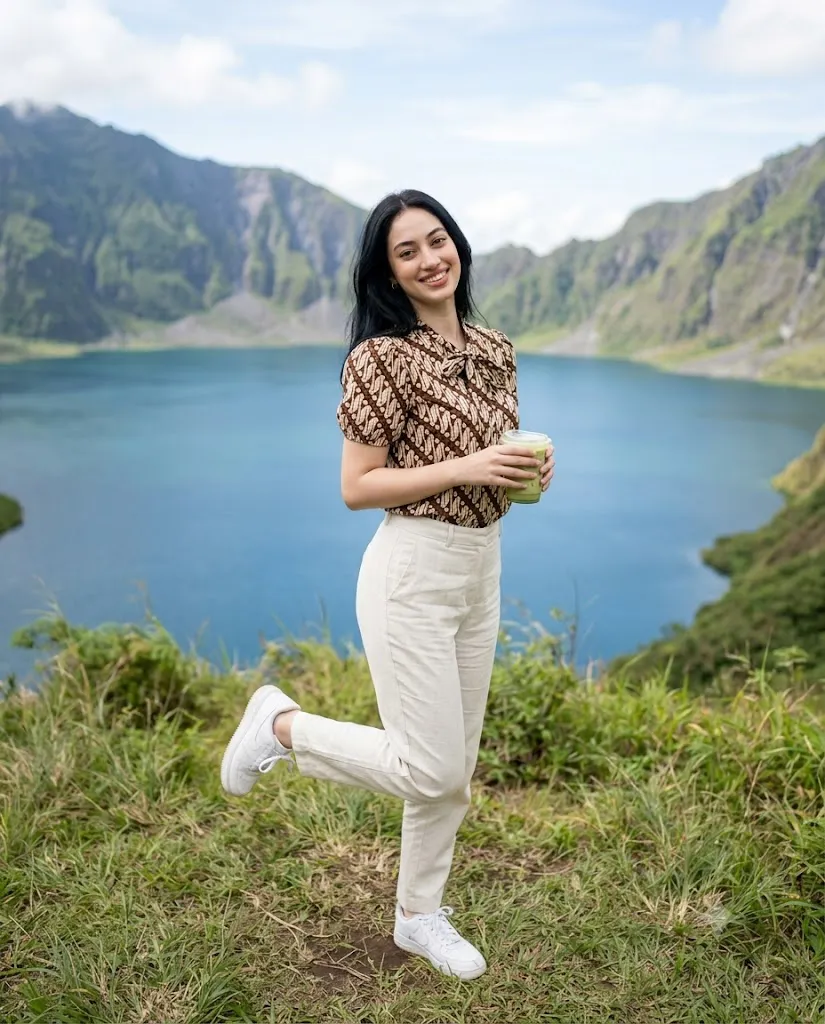
Use the uploaded image strictly as the facial identity reference without changing facial structure, proportions, or expression. Create a photorealistic full-body editorial portrait of an adult standing naturally on a grassy hilltop overlooking a breathtaking blue crater lake surrounded by lush green mountains beneath a bright sky with soft clouds. The subject wears a fashionable patterned puff-sleeve top, tailored high-waisted linen trousers, and clean white sneakers while holding a clear iced matcha latte. The pose is playful and confident with the body slightly angled, one leg lifted naturally behind, and direct eye contact with a friendly smile. Capture the scene using soft diffused daylight with balanced exposure and realistic skin tones. Camera settings simulate a Sony A1 paired with an 85mm f/1.4 lens at f/1.8, ISO 100, and 1/1000 shutter speed. The image features shallow depth of field, creamy natural bokeh, razor-sharp subject detail, HDR realism, ultra-detailed fabric textures, realistic facial features, premium editorial composition, 8K quality, no warm color cast, aspect ratio 4:5.
Modern AI image generators make it possible to produce stunning outdoor portraits by using detailed prompts. A carefully written prompt describes every important element, including facial identity, pose, clothing, lighting, camera settings, location, and image quality. When combined with a high-quality reference photo, AI can generate highly realistic images that closely preserve facial identity while placing the subject in a completely new environment.
Outdoor editorial portraits are ideal for fashion campaigns, travel-inspired content, social media branding, portfolio photography, blogs, and commercial advertising. Scenic mountain landscapes, crater lakes, rolling hills, forests, beaches, and open skies create dramatic backgrounds that enhance the subject without overpowering them.
This guide explains how to use AI photo editing, the best tools for creating editorial portraits, a professional example prompt, and the complete editing process for producing stunning 4K and 8K outdoor fashion portraits.
How To Use Photo Editing?
Photo editing plays an important role in creating premium editorial-quality portraits. AI generates the base image, while editing software refines the final details for a polished, realistic finish.
Step 1: Select a High-Quality Reference Photo
Choose a clear portrait with good lighting and visible facial details. Higher-quality images help AI preserve facial identity more accurately.
Step 2: Copy a Professional Prompt
Use a detailed editorial prompt that includes the desired pose, wardrobe, background, lighting, camera settings, and artistic style.
Step 3: Upload Your Image
Upload your reference photo into an AI image generator that supports face reference or image-to-image editing.
Step 4: Paste the Prompt
Insert the complete prompt and configure settings such as aspect ratio, quality, creativity level, and image size.
Step 5: Generate Multiple Versions
Generate several images and compare them to select the version with the most accurate face, lighting, and composition.
Step 6: Enhance the Image
Use professional editing software to improve sharpness, contrast, skin texture, and overall realism before exporting the final portrait.
Tools You Can Use For Prompt Copy and Create Photo
Professional AI portraits require both high-quality prompt generation and reliable editing software.
ChatGPT
Excellent for creating detailed AI prompts with realistic descriptions of fashion, landscapes, lighting, and camera settings.
Midjourney
Ideal for premium editorial compositions with cinematic lighting and artistic fashion styling.
Flux AI
Produces highly realistic portraits with excellent facial accuracy and natural-looking skin textures.
Stable Diffusion
Offers advanced customization through image-to-image editing, prompt weighting, and ControlNet support.
GPT Image
Generates photorealistic portraits directly from descriptive prompts while maintaining impressive visual quality.
Adobe Photoshop
Perfect for advanced retouching, object removal, skin refinement, sharpening, and professional finishing.
Adobe Lightroom
Useful for adjusting exposure, contrast, highlights, shadows, clarity, texture, and natural color balance.
Canva
A simple platform for designing social media posts, posters, banners, and magazine-style layouts using the completed portrait.
Combining AI image generation with professional editing software creates publication-quality fashion portraits suitable for both digital and print use.
How To Edit Photo?
Professional editing transforms an AI-generated portrait into a polished editorial image.
Remove Imperfections
Clean minor artifacts or distractions while preserving realistic facial features and natural skin texture.
Balance the Exposure
Adjust highlights and shadows to create soft, evenly distributed outdoor lighting without overexposed areas.
Improve Color Accuracy
Maintain realistic colors with neutral white balance and avoid excessive warmth or oversaturation.
Sharpen Important Details
Increase sharpness around the eyes, hair, clothing, and accessories while keeping the background softly blurred.
Enhance the Landscape
Refine the mountain scenery, lake, sky, and grassy foreground to create a vibrant yet natural environment.
Apply Professional Color Grading
Use subtle cinematic grading that complements the outdoor atmosphere without making the image appear artificial.
Export the Final Image
Save the portrait in 4K or 8K resolution using maximum-quality settings for websites, portfolios, advertising, or social media.
Conclusion
Ultra-realistic outdoor fashion editorial portraits combine beautiful natural landscapes with premium styling and advanced AI image generation. By using a detailed prompt, selecting a high-quality reference image, and applying professional editing techniques, you can create striking portraits that rival commercial fashion photography.
Success comes from paying attention to every detail, including accurate facial identity, natural poses, realistic clothing textures, balanced daylight, cinematic composition, and thoughtful post-processing. These elements work together to create portraits that feel authentic, elegant, and visually engaging.
Whether you are an AI artist, fashion enthusiast, photographer, blogger, or content creator, mastering outdoor editorial portrait prompts will help you produce premium-quality images suitable for magazines, portfolios, travel campaigns, and social media branding. Continue experimenting with different landscapes, outfits, lighting conditions, and creative concepts to develop a unique visual style that stands out while maintaining photorealistic quality.