Introduction
The world of fashion photography is constantly evolving, but few trends have achieved the timeless appeal and sophistication of the Quiet Luxury aesthetic. Unlike flashy designer branding or extravagant styling, Quiet Luxury focuses on refined elegance, premium craftsmanship, and effortless confidence. It communicates wealth and status through subtle details rather than obvious logos, making it one of the most sought-after visual styles in modern fashion editorials.
"Ultra-Realistic Quiet Luxury Street Fashion Editorial Portrait Prompt"
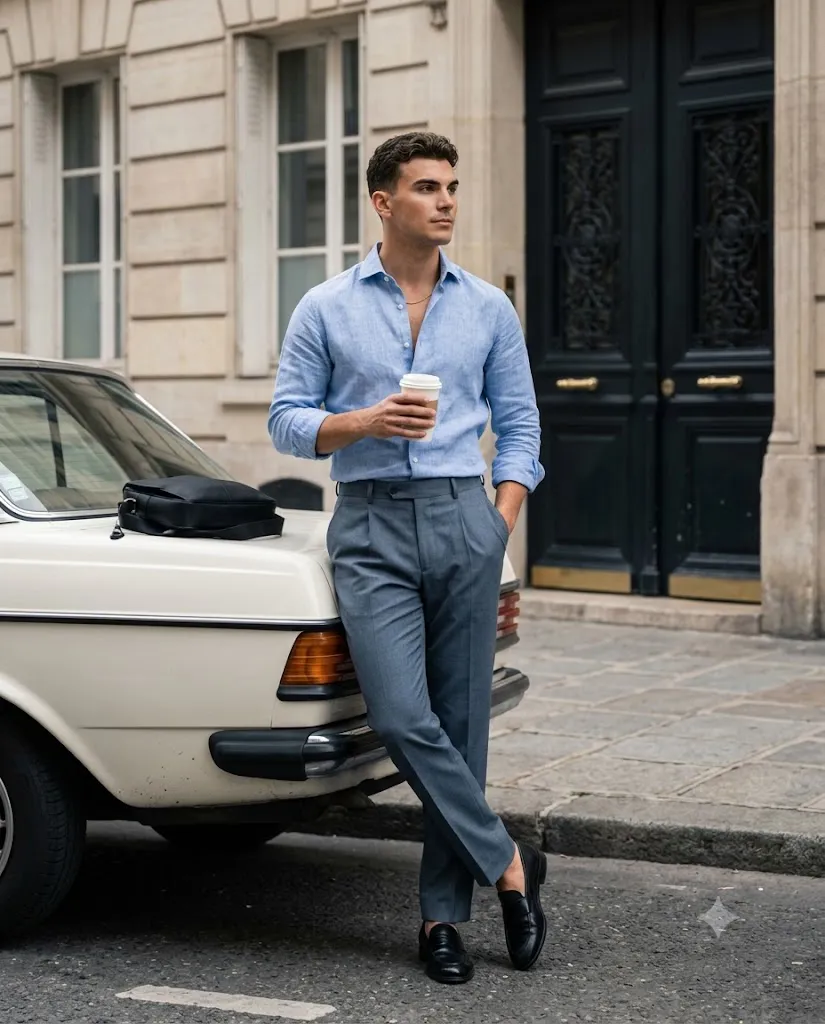
Create an ultra-realistic full-body fashion editorial portrait of a handsome man embodying a premium Quiet Luxury aesthetic. He wears a light blue linen button-down shirt with rolled sleeves, tailored slate-gray pleated trousers, black loafers, and a subtle gold chain. He leans casually against a vintage cream-white European sedan while holding a coffee cup. Elegant European architecture forms the background. Soft natural daylight, shallow depth of field, cinematic editorial color grading, realistic skin texture, luxury menswear campaign photography, 8K resolution.
An Ultra-Realistic Quiet Luxury Street Fashion Editorial Portrait combines this sophisticated fashion philosophy with cinematic photography techniques. The result is an image that feels luxurious, authentic, and editorial-worthy. This style often features tailored clothing, neutral color palettes, natural lighting, and elegant European-inspired environments that create a polished yet relaxed atmosphere.
The portrait concept centers around a confident gentleman dressed in carefully selected luxury-inspired clothing. A light blue linen shirt, tailored pleated trousers, leather loafers, and understated accessories create an appearance that is both modern and timeless. Rather than appearing overly posed, the subject embodies effortless elegance through relaxed posture and natural body language.
The setting plays a crucial role in the storytelling process. European architecture, historic stone facades, classic automobiles, and minimalist streets provide the perfect backdrop for the Quiet Luxury aesthetic. These elements contribute to an atmosphere of sophistication while maintaining realism.
Modern AI image-generation platforms make it possible to create highly detailed editorial portraits that rival professional magazine campaigns. When combined with advanced editing techniques, creators can achieve stunning visual results suitable for portfolios, social media, branding projects, and commercial advertisements.
This guide explains how to use photo editing effectively, explores useful tools for creating luxury editorial portraits, and provides practical steps for refining images into professional-quality masterpieces.
How To Use Photo Editing?
Photo editing is an essential part of creating a successful Quiet Luxury portrait. Even the most impressive AI-generated image benefits from professional refinement and careful adjustments.
The first step is exposure balancing. Editorial portraits often rely on soft natural light and subtle shadows. Correct exposure ensures that facial features, clothing textures, and environmental details remain visible without losing depth.
Color correction is equally important. Quiet Luxury photography typically uses neutral and slightly desaturated tones. Warm skin tones should remain natural while clothing and architecture maintain realistic colors. Avoid excessive saturation, which can diminish the premium appearance.
Skin retouching should be minimal and realistic. Luxury fashion photography celebrates authentic skin texture, visible pores, and natural facial features. Gentle retouching can remove temporary imperfections while preserving realism.
Clothing enhancement is another important editing step. Linen fabrics, wool trousers, leather belts, and polished shoes should display visible texture and detail. Selective sharpening helps emphasize these premium materials.
Background refinement contributes significantly to the final result. Soft blur and depth-of-field adjustments help isolate the subject while maintaining the elegance of the surrounding architecture.
Shadow control also plays a major role. Soft shadows create dimensionality and visual depth without appearing dramatic or artificial. Smooth transitions between highlights and shadows help preserve the natural editorial atmosphere.
Finally, cinematic color grading unifies all elements of the image, creating a sophisticated visual style that resembles luxury fashion campaigns.
Tools You Can Use For Prompt Copy And Create Photo
Numerous AI image-generation tools and editing applications are capable of producing high-quality Quiet Luxury portraits.
AI Image Generation Tools
ChatGPT Image Generation
ChatGPT helps generate highly detailed prompts that accurately describe clothing, environments, poses, lighting, and camera settings.
Midjourney
Midjourney is widely used for creating cinematic fashion editorials with exceptional artistic quality and realism.
Leonardo AI
Leonardo AI offers advanced controls for realistic portrait creation, fashion styling, and environmental details.
Ideogram
Ideogram excels at interpreting complex prompts and producing detailed photorealistic images.
Adobe Firefly
Adobe Firefly integrates seamlessly into professional creative workflows and generates commercial-quality visuals.
Photo Editing Software
Adobe Photoshop
Photoshop remains the industry standard for retouching, compositing, and advanced editorial enhancements.
Adobe Lightroom
Lightroom specializes in color grading, exposure correction, and professional image refinement.
Capture One
Capture One is favored by professional fashion photographers due to its outstanding color accuracy and detail rendering.
Snapseed
Snapseed provides powerful editing tools for mobile devices and is ideal for quick professional adjustments.
PicsArt
PicsArt offers creative editing features and social-media-ready enhancements.
How To Edit Photo?
Once your image is generated, follow these editing steps to achieve a professional editorial finish.
Step 1: Import the Image
Open the image inside Photoshop, Lightroom, Capture One, or another professional editing application.
Step 2: Adjust Exposure
Balance highlights and shadows while maintaining the natural open-shade lighting.
Step 3: Refine White Balance
Ensure skin tones remain realistic and clothing colors appear natural.
Step 4: Enhance Skin Texture
Apply subtle retouching while preserving pores and realistic facial details.
Step 5: Improve Clothing Details
Increase clarity on linen fabric, wool textures, leather accessories, and footwear.
Step 6: Refine Background Blur
Maintain strong subject separation while preserving environmental context.
Step 7: Apply Cinematic Color Grading
Use slightly desaturated tones, rich shadows, and soft highlights to create a luxury editorial appearance.
Step 8: Fine-Tune Contrast
Add depth without introducing harsh transitions or unnatural shadows.
Step 9: Sharpen Key Areas
Focus sharpening on the eyes, clothing textures, and accessories while keeping the background soft.
Step 10: Export
Export the final image in high resolution. PNG format is recommended for preserving maximum detail and image quality.
Conclusion
The Ultra-Realistic Quiet Luxury Street Fashion Editorial Portrait represents the perfect balance between sophistication, realism, and visual storytelling. Through carefully selected clothing, refined locations, natural lighting, and thoughtful composition, this style creates imagery that feels timeless and effortlessly elegant.
With the help of modern AI image-generation tools and professional editing software, creators can now produce fashion portraits that rival luxury magazine editorials and commercial campaigns. The key lies in focusing on subtle luxury, authentic textures, realistic lighting, and restrained color grading rather than relying on excessive effects.
Whether you are building a personal brand, creating social media content, developing a photography portfolio, or designing marketing materials, mastering the Quiet Luxury aesthetic can help you create visually compelling images that communicate confidence, refinement, and modern elegance. By combining strong prompts with professional editing techniques, anyone can achieve premium editorial results that stand out in today's highly visual digital landscape.