Introduction
The Vintage 90s Flower Wall Portrait Prompt combines nostalgic fashion, classic film photography, and cinematic storytelling into a timeless editorial portrait. Inspired by iconic 1990s magazine covers, retro street photography, and vintage lifestyle aesthetics, this prompt recreates the effortless beauty and charm of an unforgettable era while maintaining modern photorealistic quality.
"Vintage 90s Flower Wall Portrait Prompt"
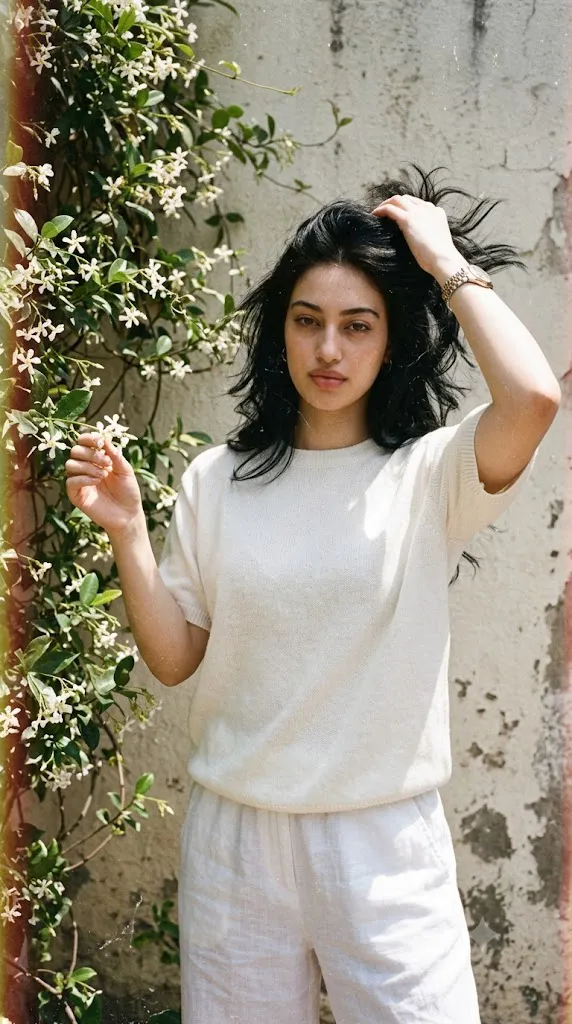
Create a photorealistic vintage portrait using the uploaded image strictly as the facial identity reference. Preserve the exact facial structure, skin tone, hairstyle, eyes, eyebrows, nose, lips, jawline, and proportions without beautification. Dress the subject in a loose white wool T-shirt, matching trousers, and a luxury formal wristwatch. Style the hair with soft windswept movement inspired by iconic 1990s movie fashion. Position the subject standing beside a flowering vine wall, gently plucking flowers with one hand while the other rests naturally near the head, looking directly into the camera. Capture the portrait using a professional DSLR with an 85mm lens, natural sunlight, soft shadows, realistic skin texture, cinematic vintage color grading, authentic analog film grain, and ultra-detailed 8K quality. No text or watermark.
At the heart of this concept is a relaxed young woman standing naturally beside a flower-covered wall. The blooming vines create a vibrant organic backdrop that contrasts beautifully with her minimalist outfit, producing a composition that feels both elegant and nostalgic. Every visual element—from the soft sunlight to the grainy film texture—works together to recreate the atmosphere of classic analog photography.
A crucial instruction within this prompt is complete facial identity preservation. When using an uploaded reference image, every facial feature must remain exactly the same. The AI should preserve the original facial proportions, eye shape, eyebrows, nose, lips, jawline, hairstyle, skin tone, and overall identity without beautifying or altering them. Only the clothing, environment, lighting, styling, and pose should be transformed.
The wardrobe embraces understated elegance. A loose white wool T-shirt paired with matching trousers creates a clean silhouette that allows the colorful flowers to become a natural visual complement rather than competing for attention. A luxury formal wristwatch introduces subtle sophistication without distracting from the overall vintage mood.
The hairstyle captures the confident beauty associated with memorable 1990s movie heroines. Long, softly windswept hair creates graceful movement throughout the composition while reinforcing the relaxed outdoor atmosphere.
The pose is simple yet expressive. One hand gently reaches toward blooming flowers on the vine while the other rests naturally near the head. Direct eye contact with the camera creates emotional connection while maintaining a calm editorial expression.
Natural sunlight illuminates the scene with soft shadows that enhance depth without creating harsh contrast. Combined with subtle analog grain, warm color grading, and slight environmental movement from the breeze, the portrait feels authentic rather than digitally constructed.
Captured using a professional DSLR or mirrorless camera with a portrait lens, the final image resembles a treasured photograph from the late 1990s while maintaining the sharpness and realism expected from contemporary photography.
How To Use Photo Editing?
Professional editing plays an essential role in transforming a beautiful AI-generated portrait into a convincing vintage editorial image.
Begin by balancing exposure carefully. Outdoor sunlight should remain soft while preserving details throughout both highlights and shadows.
Adjust white balance toward warm daylight while keeping skin tones natural and realistic.
Retain realistic skin texture. Minor blemishes may be softened, but natural pores and facial characteristics should remain visible.
Enhance flower colors gently without making them appear oversaturated.
Increase clarity selectively around the clothing fabric, luxury watch, and hair strands while maintaining overall softness.
Introduce realistic analog-inspired grain to recreate authentic 1990s film photography.
Finish the portrait using subtle vintage color grading with slightly faded highlights and balanced contrast.
Tools You Can Use For Prompt Copy and Create Photo
Modern AI generators and editing software simplify the creation of nostalgic editorial portraits.
AI Image Generation Tools
ChatGPT
Ideal for writing highly detailed prompts that describe facial preservation, wardrobe, lighting, environment, and camera settings.
Midjourney
Excellent for vintage fashion editorials and cinematic lifestyle photography.
Leonardo AI
Produces realistic portrait generation with consistent facial identity.
Ideogram
Useful for editorial-style portrait concepts and artistic compositions.
Adobe Firefly
Provides AI image generation integrated into Adobe Creative Cloud.
Professional Editing Software
Adobe Photoshop
Perfect for portrait retouching, environmental refinement, and advanced lighting adjustments.
Adobe Lightroom
Excellent for exposure balancing, cinematic color grading, and vintage finishing.
Capture One
Offers industry-leading skin tone rendering and natural color management.
Affinity Photo
Provides professional portrait editing features with detailed control.
Snapseed
Convenient mobile editing software for brightness, warmth, structure, and contrast adjustments.
How To Edit Photo?
Step 1: Generate the Base Portrait
Create the complete floral wall portrait while preserving the uploaded facial identity exactly.
Step 2: Balance Exposure
Protect bright sunlight while maintaining detail throughout shadows and clothing.
Step 3: Preserve Natural Skin
Maintain realistic facial textures with only subtle retouching.
Step 4: Refine Hair
Increase detail within flowing hair while preserving natural movement.
Step 5: Enhance Flower Detail
Improve the clarity of blossoms and foliage while maintaining soft realism.
Step 6: Improve Clothing Texture
Sharpen the wool fabric subtly without making it appear artificial.
Step 7: Refine Accessories
Increase clarity around the luxury watch while preserving realistic reflections.
Step 8: Apply Vintage Color Grading
Create slightly faded highlights, warm tones, and gentle analog contrast.
Step 9: Add Authentic Film Grain
Introduce realistic grain inspired by 1990s photographic film.
Step 10: Verify Facial Consistency
Ensure every facial feature remains identical to the uploaded reference image.
Step 11: Final Refinements
Remove unwanted artifacts while preserving realistic lighting transitions and environmental depth.
Step 12: Export in High Resolution
Save the finished portrait as PNG or TIFF to preserve maximum quality for portfolios, magazines, social media, or print.
Conclusion
The Vintage 90s Flower Wall Portrait Prompt combines nostalgic fashion, cinematic portrait photography, and timeless editorial storytelling into one elegant composition. With its blooming floral backdrop, minimalist wardrobe, luxurious accessories, windswept hairstyle, and authentic analog atmosphere, the prompt recreates the unmistakable charm of classic 1990s photography.
By emphasizing complete facial identity preservation alongside realistic skin texture, soft sunlight, vintage grain, and carefully balanced environmental details, this prompt produces portraits suitable for fashion editorials, lifestyle campaigns, personal portfolios, artistic prints, and nostalgic social media content.
Although AI image generation provides an excellent starting point, outstanding results always depend on careful prompt writing and thoughtful editing. Maintaining authentic facial identity, refining natural lighting, balancing floral colors, preserving realistic textures, and applying subtle vintage color grading are all essential for creating believable retro imagery.
Whether your goal is producing nostalgic editorial photography, lifestyle portraits, fashion campaigns, or timeless creative artwork, the Vintage 90s Flower Wall Portrait Prompt offers a strong foundation for creating elegant, photorealistic images filled with warmth, personality, and classic cinematic beauty.