Introduction
The Vintage 90s Streetlight Book Portrait Prompt is a beautifully crafted AI photo prompt designed to recreate the nostalgic atmosphere of classic 1990s movies. Combining retro fashion, cinematic lighting, soft film grain, and a romantic street scene, this prompt helps generate portraits that feel timeless and artistic. It transforms an ordinary reference photo into a professional-looking vintage masterpiece while preserving the person's facial identity, hairstyle, and outfit.
"Vintage 90s Streetlight Book Portrait Prompt"
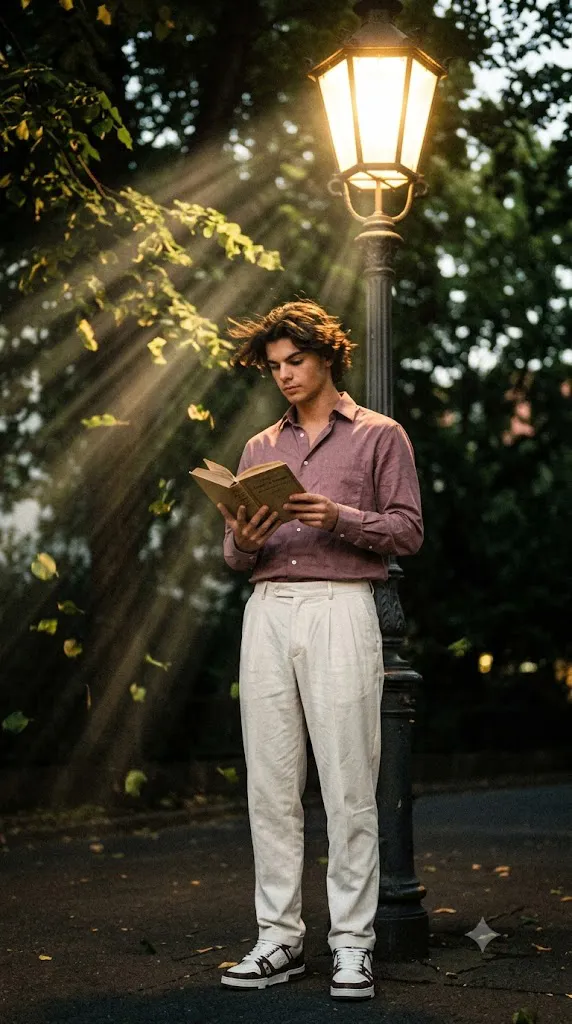
Create a retro, vintage-inspired image - grainy yet bright with little sun rays based on the reference picture. The boy should be wearing a light maroon shirt, paired with plated off-white pants styled in a Pinterest-inspired aesthetic. The vibe must capture the essence of a 90s movie dark-brown-haired baddie, hair waving by a windy, romantic atmosphere. Standing under the aesthetic street light and reading a book as a few leaves blow in the air, while dramatic contrasts add mystery and artistry to the scene, creating a moody yet enchanting atmosphere.
This prompt features a boy standing beneath an aesthetic streetlight while reading a book on a quiet evening. Wearing a light maroon shirt paired with pleated off-white pants, the subject reflects a stylish Pinterest-inspired fashion trend. The wind gently moves his dark brown hair as a few leaves float through the air, creating a peaceful yet dramatic scene. Warm sunlight rays, subtle grain, and soft color grading complete the nostalgic 90s movie look.
Unlike standard AI image prompts, this one focuses on storytelling. Every detail—from the clothing and lighting to the pose and environment—works together to create an emotional and cinematic atmosphere. Whether you're creating social media content, digital artwork, portfolio images, or wallpapers, this prompt offers a unique blend of vintage aesthetics and modern AI realism.
How To Use Photo Editing?
Creating a vintage portrait with AI is much easier than traditional photo editing. The first step is choosing a high-quality reference photo with a clear face and good lighting. Since AI uses the uploaded image to maintain facial identity, better-quality reference photos usually produce more realistic results.
After selecting your reference image, open your preferred AI image generator and upload the photo. Copy the complete Vintage 90s Streetlight Book Portrait Prompt and paste it into the prompt box. Make sure the prompt includes important details such as the vintage streetlight, romantic windy atmosphere, film grain, soft sunlight rays, light maroon shirt, off-white pleated pants, dramatic shadows, and cinematic composition.
Most AI generators allow users to adjust image quality, prompt strength, or face consistency. Increasing these settings helps preserve the original facial features while applying the desired cinematic environment. Once the image is generated, carefully examine the result. If necessary, regenerate the image with small prompt adjustments until you achieve the perfect balance of realism and vintage aesthetics.
The beauty of AI photo editing lies in experimentation. Slight changes in lighting, camera angle, or color grading can completely transform the final portrait while maintaining the overall retro theme.
Tools You Can Use For Prompt Copy and Create Photo
Many AI image generation platforms support detailed prompts and reference photos. Below are some of the best tools for creating cinematic vintage portraits.
ChatGPT Image Generation provides realistic image creation with detailed prompt understanding and excellent facial consistency.
Midjourney is one of the most popular AI art platforms, producing cinematic visuals with beautiful lighting, textures, and artistic depth.
Leonardo AI offers advanced customization features, making it ideal for highly detailed portrait photography and cinematic compositions.
Flux AI is known for producing ultra-realistic images with impressive lighting effects and natural skin textures.
Google Gemini helps generate creative prompt ideas and supports AI-powered visual creation workflows.
Adobe Firefly is beginner-friendly and offers commercial-safe AI image generation with simple editing controls.
Ideogram AI produces high-quality portraits and supports realistic artistic styles with strong prompt interpretation.
Recraft AI is another useful platform for creating visually appealing portraits, illustrations, and editorial-style images.
These tools support detailed prompts, allowing users to recreate professional-quality vintage portraits with only a reference image and a well-written prompt.
How To Edit Photo?
Creating the perfect Vintage 90s Streetlight Book Portrait only takes a few simple steps.
Step 1: Select a Clear Reference Photo
Choose a high-resolution portrait where the face is visible and well-lit. Avoid blurry or low-quality images because facial accuracy depends heavily on the uploaded reference.
Step 2: Upload the Image
Open your preferred AI image generator and upload the reference photo. This helps the AI preserve the person's face, hairstyle, clothing, and body proportions.
Step 3: Paste the Prompt
Copy the complete Vintage 90s Streetlight Book Portrait Prompt and paste it into the prompt field. Ensure the prompt contains all important visual elements, including:
- Vintage streetlight
- Reading a book
- Romantic windy atmosphere
- Film grain
- Soft sunlight rays
- Light maroon shirt
- Pleated off-white pants
- Pinterest-inspired styling
- Dramatic cinematic lighting
- Falling leaves
- Ultra-photorealistic quality
Step 4: Adjust AI Settings
Enable high-quality rendering, identity preservation, realistic lighting, and maximum image resolution whenever these options are available. These settings improve realism and maintain facial consistency.
Step 5: Generate the Portrait
Click the Generate button and allow the AI to create your image. Depending on the platform, this usually takes a few seconds to a minute.
Step 6: Refine the Image
If necessary, regenerate the image with slight prompt modifications. You can increase the film grain, strengthen the sunset lighting, add more wind effects, or improve the streetlight glow for a stronger cinematic feel.
Step 7: Final Touches
Use editing software such as Adobe Lightroom, Photoshop, or Canva to enhance brightness, contrast, shadows, color grading, and sharpness. Small adjustments can make the portrait appear even more authentic and professionally edited.
Conclusion
The Vintage 90s Streetlight Book Portrait Prompt is perfect for anyone who loves nostalgic photography, cinematic storytelling, and retro fashion. Inspired by classic 90s films, this prompt combines vintage streetlights, soft film grain, dramatic lighting, windy weather, and stylish clothing to produce stunning AI-generated portraits.
Whether you are an AI artist, content creator, photographer, or social media enthusiast, this prompt offers an easy way to create eye-catching images with professional quality. By using a clear reference photo, a detailed prompt, and powerful AI image generation tools like ChatGPT Image Generation, Midjourney, Leonardo AI, Flux AI, and Adobe Firefly, you can transform ordinary portraits into timeless vintage works of art. Experiment with different lighting, poses, and camera angles to develop your own signature style while preserving the nostalgic charm that makes 90s-inspired portraits so memorable.