Introduction
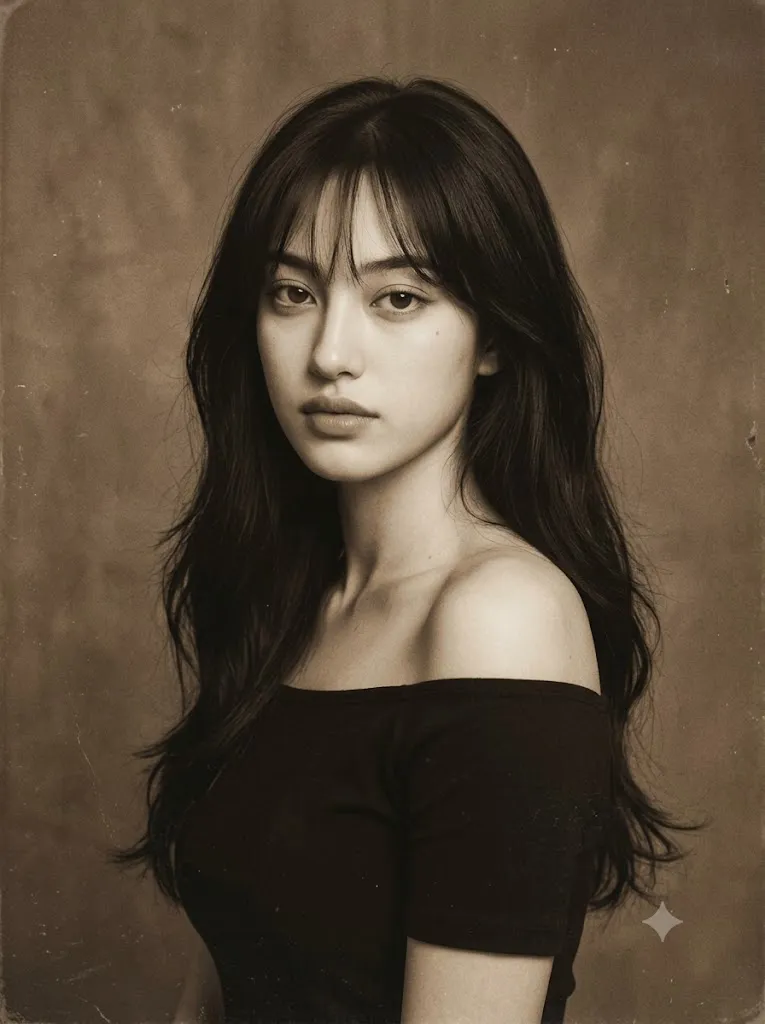
The Vintage Sepia Korean Indie Album Cover Portrait style captures the nostalgic beauty of late 1990s and early 2000s Korean indie music photography. Instead of emphasizing modern perfection, this aesthetic celebrates softness, subtle emotion, and the timeless character of analog film. Warm sepia tones, faded paper textures, gentle film grain, and low-contrast lighting combine to create portraits that feel like scanned CD album covers preserved for decades.
"Vintage Sepia Korean Indie Album Cover Portrait Prompt"
Create a hyper-realistic portrait inspired by a late 1990s Korean indie album cover. Use the reference image to preserve facial identity and realistic proportions while presenting the subject in a quiet studio environment with a warm sepia monochrome palette. The portrait features soft side lighting, faded highlights, gentle shadows, subtle film grain, paper texture, matte finish, slight vignette, and realistic print imperfections. The subject wears a simple off-shoulder dark top with minimal styling and natural makeup. The expression remains calm, introspective, and emotionally restrained with a soft downward gaze. The background is a textured sepia studio backdrop with a timeless analog atmosphere and no modern elements. The overall composition resembles a scanned vintage CD jacket portrait with low contrast, muted tones, realistic skin texture, DSLR realism softened by analog printing, masterpiece quality, and a vertical 3:4 aspect ratio.
Unlike contemporary fashion editorials, vintage indie portraits avoid glossy skin, saturated colors, and dramatic retouching. Their beauty comes from simplicity—a calm expression, understated styling, and an atmosphere that feels quiet and emotionally restrained. The result is a portrait that appears authentic, intimate, and cinematic, inviting viewers to imagine a story beyond the frame.
Today, AI image generators make it possible to recreate this nostalgic style with remarkable realism. A carefully written prompt can guide the AI to reproduce analog photography characteristics such as faded highlights, matte finishes, subtle dust marks, aged paper textures, and soft monochrome grading. Combined with professional photo editing, these prompts can produce stunning portraits suitable for album-inspired artwork, digital portfolios, social media, blogs, and creative design projects.
This guide explains how to use AI photo editing, the best tools for generating vintage portraits, an example prompt, and professional editing techniques that help achieve an authentic Korean indie album cover aesthetic.
How To Use Photo Editing?
Photo editing is the final step that transforms an AI-generated portrait into a convincing vintage photograph. While AI creates the overall composition, editing software adds realistic aging effects and refines the analog appearance.
Step 1: Choose a Clear Reference Photo
Start with a high-resolution portrait featuring natural lighting and visible facial details. Clear reference images help maintain realistic facial proportions throughout the generation process.
Step 2: Use a Detailed Prompt
Write or copy a prompt that specifies the desired mood, composition, clothing, expression, camera angle, lighting, and vintage characteristics such as paper grain, faded sepia tones, and film texture.
Step 3: Upload the Reference Image
Use an AI image generator that supports image references or image-to-image generation to preserve facial identity while applying the vintage style.
Step 4: Generate Multiple Variations
Create several versions of the portrait. Compare facial realism, lighting, expression, and texture before selecting the most natural-looking result.
Step 5: Finish with Photo Editing
Open the selected portrait in editing software and carefully enhance the analog atmosphere using grain, sepia grading, vignette, and faded contrast.
Tools You Can Use For Prompt Copy and Create Photo
Several AI and editing tools work exceptionally well for creating vintage portrait photography.
ChatGPT
An excellent tool for writing detailed prompts describing vintage lighting, analog textures, expressions, clothing, and photographic style.
Midjourney
Produces artistic portraits with cinematic composition and beautiful analog-inspired aesthetics.
Flux AI
Creates highly realistic faces while preserving identity and maintaining natural skin textures.
Stable Diffusion
Offers advanced customization for users who want complete control over image generation and vintage styling.
GPT Image
Suitable for generating photorealistic portraits from descriptive prompts with impressive consistency.
Adobe Photoshop
Ideal for adding paper textures, dust, scratches, faded edges, grain, and authentic print imperfections.
Adobe Lightroom
Useful for adjusting sepia tones, exposure, shadow softness, matte contrast, and vintage color grading.
Canva
Perfect for designing nostalgic album covers, posters, blog images, and social media graphics using the finished portrait.
Combining AI generation with professional editing software produces the most convincing vintage results.
How To Edit Photo?
Professional editing plays a major role in creating an authentic vintage album-cover appearance.
Reduce Digital Sharpness
Lower excessive sharpness to recreate the softer look of analog photography without losing important facial details.
Apply Sepia Color Grading
Use warm brown tones throughout the image while maintaining balanced skin tones and subtle monochrome depth.
Add Film Grain
Introduce realistic fine grain instead of digital noise. The grain should remain soft and evenly distributed.
Create Paper Texture
Overlay subtle paper or canvas textures to imitate aged photographic prints.
Fade the Contrast
Reduce harsh blacks and bright highlights. Vintage photographs usually feature softer tonal transitions.
Add Dust and Print Imperfections
Light dust particles, faint scratches, and worn edges help the portrait resemble an old printed album cover.
Apply a Gentle Vignette
Darken the edges slightly to guide attention toward the subject while enhancing the nostalgic mood.
Export at High Resolution
Save the final portrait in 4K resolution while preserving fine textures and analog details for printing or digital publishing.
Conclusion
The Vintage Sepia Korean Indie Album Cover Portrait style beautifully combines nostalgic storytelling with modern AI image generation. Through careful prompt writing and thoughtful editing, you can recreate the emotional atmosphere of classic Korean indie album photography while preserving realistic facial features and natural expressions.
Rather than relying on dramatic effects or glamorous styling, this aesthetic celebrates simplicity, quiet confidence, and timeless elegance. Soft sepia grading, film grain, faded paper textures, and restrained lighting work together to produce portraits that feel authentic and emotionally rich.
Whether you are creating album-inspired artwork, photography projects, creative portfolios, blog illustrations, or AI-generated art collections, mastering this vintage style will help your work stand out with subtle sophistication. Continue experimenting with analog textures, understated expressions, and gentle lighting to develop portraits that capture the enduring charm of classic Korean indie photography in a beautifully modern AI workflow.