Introduction
The world of digital art is constantly evolving, and one of the most charming trends gaining popularity across social media, children's books, home décor, and AI-generated artwork is the Whimsical Paper-Cut Diorama Illustration style. Inspired by handcrafted papercraft, layered shadow boxes, and laser-cut paper art, this artistic approach transforms ordinary images into delightful three-dimensional scenes filled with warmth, creativity, and storytelling.
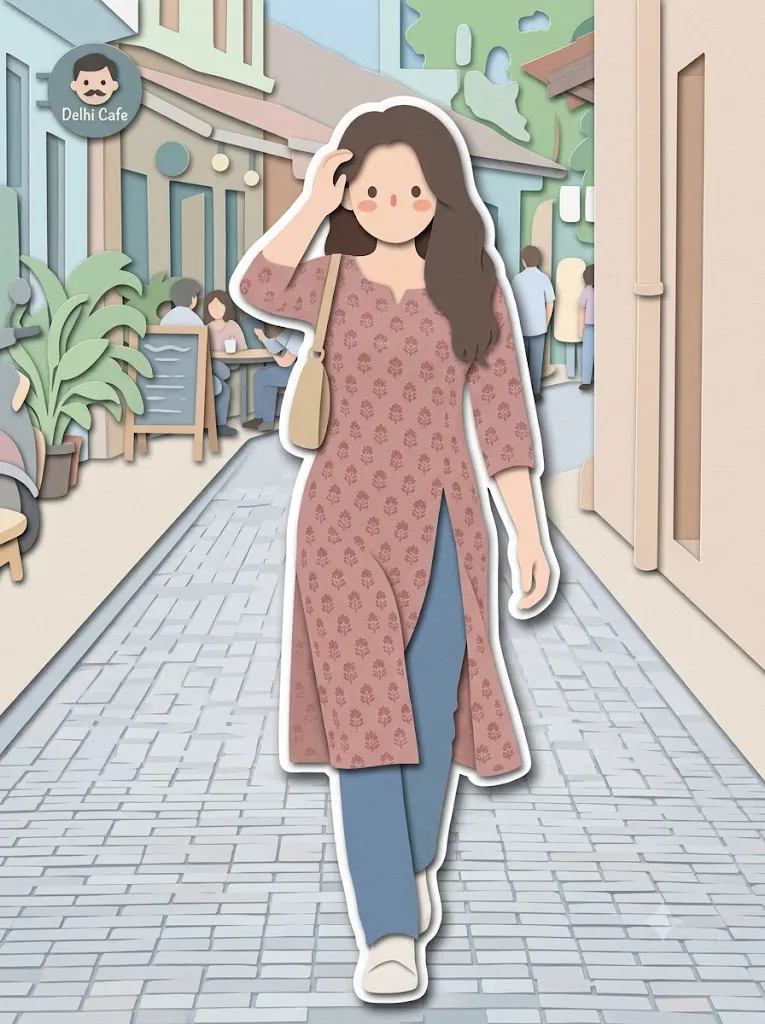
"Whimsical Paper-Cut Diorama Illustration Prompt"
Convert this image into a soft, handcrafted paper-cut layered illustration style, inspired by papercraft diorama aesthetics. Use smooth rounded shapes, simplified cute character proportions, and minimal facial details (dot eyes, blush cheeks) to create a warm, charming look. Apply stacked paper layers with visible depth, subtle shadows between layers, and clean cut edges that resemble laser-cut cardstock Add a distinct white outer outline layer surrounding each main character, resembling a thick sticker border or white cut-paper backing, clearly separating the characters from the background. This white layer should feel like an intentional paper layer, not a glow. Use a pastel color palette with muted blues, greens, and warm neutrals, balanced and calming. Lighting should feel soft, diffused, and even, enhancing the dimensional paper layers without harsh contrast. Textures should appear matte and tactile, like thick art paper or craft foam. Overall mood: cozy, wholesome, gentle, and storybook-like, with a playful yet polished handcrafted feel suitable for modern illustration, children's books, or decorative art.
Unlike traditional digital illustrations, paper-cut diorama artwork focuses on visible layers, soft shadows, tactile textures, and simplified character designs. Each element appears to be carefully cut from colored cardstock and stacked on top of one another, creating depth and dimension. The result feels handcrafted, cozy, and visually engaging.
One of the defining characteristics of this style is its ability to simplify complex images into clean, rounded shapes while preserving personality and emotion. Characters often feature minimal facial details such as dot eyes, blush cheeks, and gentle smiles. Combined with pastel color palettes and matte paper textures, these illustrations evoke the nostalgic charm of storybooks and handmade crafts.
This aesthetic has become increasingly popular on Pinterest, Instagram, Etsy, and design platforms because it appeals to audiences of all ages. Whether used for children's books, decorative prints, greeting cards, social media graphics, or AI-generated art projects, paper-cut illustrations provide a unique visual language that feels both modern and timeless.
Thanks to AI image generation tools and advanced editing software, creating whimsical paper-cut diorama illustrations is easier than ever. With a carefully written prompt and thoughtful editing process, artists can transform photographs into beautiful handcrafted-looking compositions with realistic paper depth and charming storybook appeal.
In this guide, you'll learn how to use photo editing effectively, explore useful tools for creating paper-cut artwork, and discover techniques for refining your illustration into a professional-quality masterpiece.
How To Use Photo Editing?
Photo editing plays a crucial role in achieving an authentic paper-cut diorama appearance. Even if an AI image generator creates a strong foundation, editing helps refine layers, textures, shadows, and overall visual consistency.
The first step is simplifying shapes. Traditional paper-cut artwork relies on clean silhouettes rather than intricate details. Simplifying backgrounds, clothing, and facial features helps recreate the handcrafted aesthetic.
Layer separation is one of the most important aspects of the editing process. Each object should appear as an individual paper layer stacked above or below others. Trees, clouds, characters, flowers, and scenery should all have clearly defined levels of depth.
Shadows are essential for creating dimensionality. Soft shadows placed between layers help simulate the appearance of stacked cardstock. The shadows should remain subtle and consistent rather than dramatic.
Color adjustment is equally important. Paper-cut illustrations often use muted pastel tones rather than highly saturated colors. Soft blues, sage greens, warm creams, dusty pinks, and gentle browns create a calming and cohesive visual palette.
Adding realistic paper textures can dramatically improve the final result. Matte surfaces, slight fiber textures, and subtle imperfections help the illustration feel handcrafted rather than digitally rendered.
A thick white outline surrounding main characters is another key feature. This border resembles a sticker edge or an additional paper backing layer, helping the characters stand out clearly from the background.
Finally, applying gentle lighting and soft contrast ensures the artwork maintains its cozy and storybook-inspired atmosphere.
Tools You Can Use For Prompt Copy And Create Photo
Several AI image generators and editing programs can help create stunning paper-cut diorama illustrations.
AI Image Generation Tools
ChatGPT Image Generation
ChatGPT can generate highly detailed papercraft-style artwork using descriptive prompts and visual transformation instructions.
Midjourney
Midjourney excels at producing artistic and imaginative illustrations with layered compositions and storybook aesthetics.
Leonardo AI
Leonardo AI provides strong customization capabilities and excellent rendering for decorative art styles.
Ideogram
Ideogram offers reliable prompt interpretation and can generate visually appealing paper-cut illustrations.
Adobe Firefly
Adobe Firefly integrates seamlessly with professional creative workflows and produces commercial-quality visual designs.
Photo Editing Software
Adobe Photoshop
Photoshop remains the industry standard for creating layered artwork, adding shadows, refining textures, and building paper-cut effects.
Adobe Illustrator
Illustrator is excellent for creating smooth vector shapes and clean cut-paper designs.
Canva
Canva provides simple tools for creating layered graphic compositions and decorative illustrations.
Procreate
Procreate is a favorite among illustrators for creating handcrafted digital artwork and textured paper effects.
PicsArt
Useful for quick editing, sticker creation, and creative overlays.
How To Edit Photo?
After generating the artwork, follow these editing steps to enhance realism and achieve a polished paper-cut look.
Step 1: Import The Image
Open the generated artwork in Photoshop, Illustrator, Procreate, or another editing platform.
Step 2: Simplify Details
Reduce unnecessary visual complexity and emphasize clean, rounded shapes.
Step 3: Separate Layers
Create distinct layers for foreground, middle ground, and background elements.
Step 4: Add Paper Shadows
Apply soft shadows between layers to simulate stacked cardstock depth.
Step 5: Refine Character Design
Enhance simplified facial features such as dot eyes, blush cheeks, and subtle expressions.
Step 6: Create White Outline Borders
Add thick white paper-like borders around characters and important objects.
Step 7: Apply Paper Textures
Introduce matte paper surfaces and subtle fiber textures for realism.
Step 8: Adjust Colors
Use soft pastel tones and muted hues to create a calming visual atmosphere.
Step 9: Enhance Lighting
Apply gentle diffused lighting that highlights dimensional layers without creating harsh contrast.
Step 10: Export
Save the final illustration in high resolution. PNG format is recommended for preserving details and transparency.
Conclusion
The Whimsical Paper-Cut Diorama Illustration style beautifully combines traditional craftsmanship with modern digital creativity. Through layered paper effects, soft textures, pastel color palettes, and charming character designs, this artistic approach creates visuals that feel warm, nostalgic, and inviting.
With the help of AI image generation tools and professional editing software, artists can easily transform photographs and concepts into stunning handcrafted-looking illustrations. By focusing on layered depth, paper textures, simplified forms, and thoughtful color choices, you can create artwork that captures the timeless appeal of storybook design.
Whether you're designing children's books, decorative prints, greeting cards, social media content, educational materials, or personal art projects, mastering the paper-cut diorama aesthetic can help you create memorable and visually delightful illustrations that resonate with audiences of all ages.