Introduction
Artificial Intelligence has transformed digital photography and image creation into something extraordinary. Today, you no longer need an expensive camera, a professional studio, or a team of photographers to create magazine-quality portraits. With advanced AI image generators such as Midjourney, Flux AI, Ideogram, Stable Diffusion, and ChatGPT Image Generator, you can create breathtaking editorial-style portraits by simply entering a detailed prompt.
"White Saree Flower Garden Editorial Portrait AI Prompt"
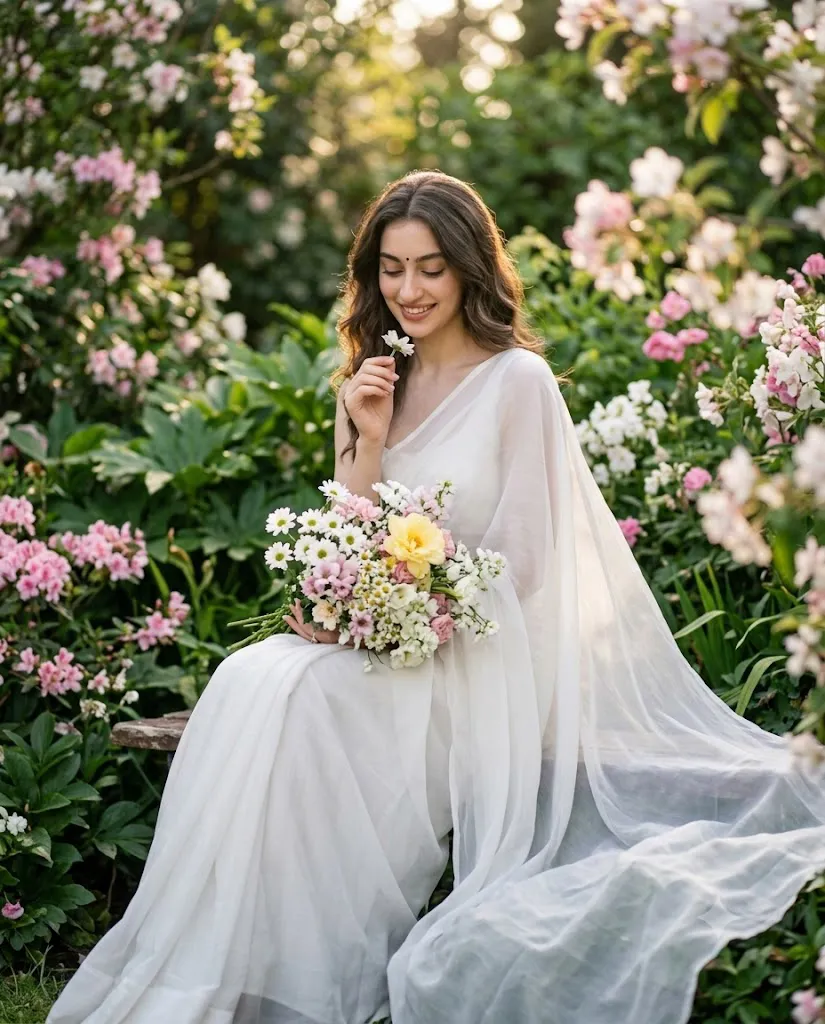
A photorealistic, vertical (4:5) editorial portrait of a graceful woman seated in a lush flowering garden, looking downwards with a peaceful, subtle smile. She has natural hair (middle part), a small black bindi, and natural makeup. She wears an elegant, flowing white saree with a sheer translucent pallu draped softly over her shoulder. She is seated naturally, holding a large bouquet of white daisies, pink blooms, and a prominent yellow flower in her lap. With her right hand, she delicately holds a small white flower near her face. The background is a dense, dreamy garden filled with foliage, pink/white flowers, and soft bokeh (f/1.8), illuminated by warm natural golden light filtering through the trees. The woman is positioned slightly right of center; the saree flows gracefully in the foreground. The image is a sharp, high-resolution portrait with natural film grain, cinematic color grading, 85mm f/1.8 lens, 8K resolution, capturing delicate details in her face, hair, and the textures of the saree and flowers. She is seated comfortably on a rustic stone bench amidst the blooming flora.
One of the most elegant portrait concepts currently trending is the White Saree Flower Garden Editorial Portrait AI Prompt. This style combines the timeless beauty of a flowing white saree with the peaceful atmosphere of a lush flowering garden. The result is a soft, romantic, and cinematic portrait that looks like it belongs on the cover of a luxury fashion magazine.
The beauty of this prompt lies in its fine details. It describes everything the AI needs to generate a realistic masterpiece—from the model's gentle expression and natural makeup to the soft golden sunlight filtering through trees. Every small detail, including the translucent saree fabric, delicate bouquet of flowers, dreamy bokeh background, and realistic skin texture, contributes to producing an ultra-photorealistic image.
Whether you are a photographer looking for inspiration, a digital artist, a content creator, or someone who simply loves creating beautiful AI portraits, this prompt offers endless creative possibilities. With just one carefully written prompt, you can generate elegant, editorial-quality portraits in 8K resolution that appear professionally photographed.
How To Use Photo Editing?
Creating a beautiful AI portrait begins with selecting the right image generator and understanding how prompts work. The better your prompt, the more realistic and detailed the final image becomes.
Start by copying the complete prompt exactly as written. Every sentence describes an important visual element, including hairstyle, facial expression, clothing, lighting, flowers, background, and camera settings.
Next, open your preferred AI image generation platform and paste the prompt into the prompt box. If the platform allows image references, upload a reference face to maintain consistent facial features.
Choose a portrait-friendly aspect ratio such as 4:5, which is perfect for Instagram posts, fashion editorials, Pinterest pins, and blog thumbnails.
For the best quality, enable settings like:
- High Quality Rendering
- Photorealistic Mode
- Ultra HD or 8K Output
- Cinematic Lighting
- Sharp Focus
- High Detail
- HDR Rendering
If your AI generator supports negative prompts, include instructions such as:
- No blurry face
- No extra fingers
- No watermark
- No text
- No logo
- No distortion
- No low quality
Once the image is generated, download it in the highest available resolution. You can later improve colors, lighting, and sharpness using editing software.
Tools You Can Use For Prompt Copy and Create Photo
There are many AI image generators capable of producing realistic editorial portraits. Each platform offers unique features depending on your creative needs.
1. ChatGPT Image Generator
Perfect for highly descriptive prompts with realistic lighting, natural skin textures, and cinematic compositions.
2. Midjourney
One of the best choices for luxury editorial portraits. It excels at creating artistic lighting, premium fashion photography, and dreamy backgrounds.
3. Flux AI
Known for generating extremely realistic faces, natural expressions, and highly detailed clothing textures.
4. Stable Diffusion XL (SDXL)
Ideal for users who want complete control over image generation through custom settings, models, and fine-tuning.
5. Ideogram AI
Excellent for creating realistic portraits with vibrant colors and balanced compositions.
6. Leonardo AI
Popular among photographers and designers for producing high-quality cinematic portraits with excellent skin realism.
7. Adobe Firefly
Provides commercial-friendly AI image generation while integrating smoothly with Adobe Photoshop.
8. Playground AI
A beginner-friendly platform offering multiple AI models and easy editing features.
9. Bing Image Creator
A free option for users who want to experiment with AI-generated portraits without purchasing a subscription.
10. Canva AI Image Generator
Suitable for quickly creating AI images and combining them with social media designs or marketing materials.
Each of these tools can generate stunning results when paired with a well-crafted prompt like the White Saree Flower Garden Editorial Portrait AI Prompt.
How To Edit Photo?
Even after AI generates a beautiful portrait, small edits can make it look even more realistic and professional. Follow these simple steps to enhance your image.
Step 1: Download the Highest Resolution
Always save your generated image in the maximum available quality. High-resolution images retain more details during editing.
Step 2: Open Your Editing Software
Use applications like Adobe Photoshop, Lightroom, Canva, Snapseed, or Luminar Neo to begin refining the portrait.
Step 3: Adjust Brightness and Exposure
Increase brightness slightly while maintaining soft shadows. Avoid overexposing the white saree to preserve fabric details.
Step 4: Improve Colors
Enhance green tones in the garden and gently increase the warmth of the golden sunlight. Keep skin tones natural and balanced.
Step 5: Refine Skin
Apply subtle skin smoothing without removing natural texture. Editorial portraits look best when skin retains realistic pores and details.
Step 6: Enhance Eyes
Increase eye sharpness slightly while preserving a natural appearance. Avoid making the eyes appear overly bright or artificial.
Step 7: Increase Sharpness
Sharpen facial features, flower petals, and fabric textures carefully without introducing noise.
Step 8: Improve Background Blur
If necessary, apply a slight lens blur to strengthen the creamy bokeh effect while keeping the subject perfectly sharp.
Step 9: Enhance the Flowers
Boost the brightness and contrast of the bouquet slightly so it becomes a natural focal point without overpowering the portrait.
Step 10: Add Cinematic Color Grading
Apply warm pastel tones with soft highlights and balanced contrast to create a luxury fashion editorial look.
Step 11: Add Natural Film Grain
A small amount of fine film grain helps create a premium photographic feel while avoiding an overly digital appearance.
Step 12: Export the Final Image
Save your finished portrait in PNG or high-quality JPEG format. Export in 4:5 aspect ratio for Instagram or higher resolutions for printing and portfolio use.
Conclusion
The White Saree Flower Garden Editorial Portrait AI Prompt is a perfect example of how detailed prompts can transform AI-generated images into breathtaking works of art. By combining elegant styling, natural expressions, soft golden lighting, lush floral surroundings, and professional camera settings, this prompt creates portraits that closely resemble luxury fashion photography.
Whether you are creating content for Instagram, Pinterest, YouTube thumbnails, digital portfolios, blogs, or professional photography projects, this prompt provides a strong foundation for generating stunning visuals. Pairing it with powerful AI image generators and thoughtful post-processing can elevate the final result even further.
As AI technology continues to evolve, the quality of photorealistic portrait generation will only improve. Learning how to write detailed prompts, choose the right tools, and apply simple editing techniques will help you consistently create professional-quality images that capture elegance, emotion, and timeless beauty. With creativity and attention to detail, your AI-generated portraits can rival traditional editorial photography and leave a lasting impression on your audience.