Introduction
Photography is all about perspective, and few perspectives are as dramatic and visually engaging as the worm’s-eye view. Unlike traditional eye-level portraits, a worm’s-eye angle places the camera extremely low to the ground, looking upward toward the subject. This unique viewpoint instantly creates a sense of scale, power, and adventure while transforming an ordinary outdoor portrait into a cinematic masterpiece.
"Worm’s-Eye Forest Adventure Portrait Prompt"
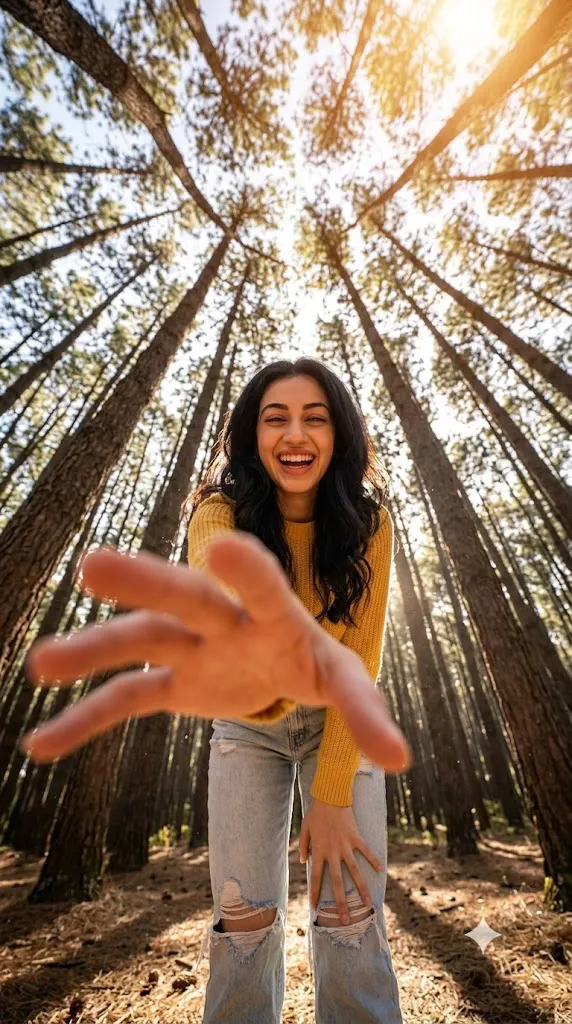
Create an ultra-realistic worm’s-eye view portrait of a smiling woman standing in a pine forest. Use the uploaded image as the facial reference and preserve exact facial features, skin tone, and identity. She wears a bright yellow sweater and ripped blue jeans. The camera is positioned extremely low to the ground, looking upward. One hand reaches toward the camera, appearing dramatically enlarged due to forced perspective. Towering pine trees surround her, forming radial lines that converge toward the sky. Warm sunlight shines through the trees from behind, creating cinematic lens flare and glowing backlight. Joyful expression, natural posture, ultra-wide-angle lens effect, high detail, realistic textures, shallow depth of field, outdoor adventure photography, professional DSLR quality, cinematic lighting, 8K resolution, vertical 9:16 aspect ratio.
The Worm’s-Eye Forest Adventure Portrait Prompt combines this striking camera angle with the beauty of nature. Imagine a smiling woman standing among towering pine trees, wearing a bright yellow sweater and ripped blue jeans. The camera is positioned near ground level, pointing upward through the forest canopy. This extreme low-angle composition causes nearby elements, such as an outstretched hand, to appear dramatically larger due to forced perspective. Meanwhile, the tall trees stretch toward the sky, forming beautiful radial lines that naturally draw the viewer’s attention to the subject.
One of the most captivating elements of this portrait style is the interaction between sunlight and the environment. When sunlight filters through the pine trees from behind the subject, it creates stunning lens flares, glowing highlights, and cinematic backlighting. The result is an image filled with warmth, depth, and visual storytelling.
This portrait style is highly popular in modern travel photography, outdoor fashion campaigns, adventure editorials, and social media content because it communicates energy, positivity, and exploration. The ultra-wide-angle lens effect exaggerates perspective, making the scene feel immersive and larger than life.
Modern AI image-generation tools allow creators to produce highly realistic worm’s-eye portraits with incredible detail. However, generating a truly convincing image requires a carefully structured prompt that describes the subject, environment, lighting, camera settings, lens characteristics, and overall mood. Combined with thoughtful editing, the final image can look indistinguishable from a professional outdoor fashion shoot.
In this article, you will learn how to use photo editing to enhance this style, discover the best tools for generating AI portraits, understand how to write effective prompts, and follow a complete editing workflow to create a stunning Worm’s-Eye Forest Adventure Portrait.
How To Use Photo Editing?
Photo editing is an essential step in transforming a generated image into a professional-quality portrait. While AI can produce impressive results, editing helps refine lighting, color balance, texture, and overall visual impact.
The first step is correcting exposure. Forest environments often contain bright highlights and deep shadows. Adjusting exposure ensures that details remain visible throughout the image while preserving the cinematic mood.
Color grading is particularly important for outdoor portraits. The yellow sweater should appear vibrant and eye-catching, while the greens of the forest remain natural and balanced. Careful adjustments help create a harmonious color palette without oversaturation.
Lens flare enhancement can also add realism. If the sunlight is visible behind the subject, subtle flare effects can strengthen the cinematic atmosphere. However, excessive flare may reduce image quality, so moderation is key.
Skin retouching should remain minimal. Modern portrait photography values realistic skin texture rather than overly smooth, artificial results. Maintaining pores and natural imperfections helps preserve authenticity.
Sharpening can be selectively applied to the eyes, hair, clothing textures, and hand details. Because forced perspective makes the hand a focal point, ensuring sharp detail in this area is especially important.
Background refinement helps maintain separation between the subject and the forest. Slight adjustments to contrast and clarity can enhance the radial tree patterns without overwhelming the portrait.
Finally, adding a subtle film grain effect can provide a premium cinematic finish while enhancing the adventurous outdoor aesthetic.
Tools You Can Use For Prompt Copy and Create Photo
Creating a high-quality Worm’s-Eye Forest Adventure Portrait becomes easier when using professional AI image-generation and editing tools.
AI Image Generation Tools
ChatGPT
ChatGPT can help create highly detailed prompts that describe camera angles, lighting, clothing, environmental details, and artistic style.
Midjourney
Midjourney excels at cinematic outdoor scenes and creative perspective photography.
Leonardo AI
Leonardo AI generates realistic portraits with impressive environmental detail and texture quality.
Ideogram
Ideogram performs well for fashion-oriented outdoor compositions and social-media-ready imagery.
Adobe Firefly
Adobe Firefly offers professional image-generation capabilities integrated with Adobe’s creative tools.
Photo Editing Software
Adobe Photoshop
Photoshop provides advanced retouching, compositing, and perspective correction tools.
Adobe Lightroom
Lightroom is ideal for exposure balancing, color grading, and cinematic tone adjustments.
Capture One
Capture One offers excellent color accuracy and professional workflow management.
Snapseed
Snapseed provides powerful mobile editing capabilities for quick enhancements.
PicsArt
PicsArt is useful for creative effects, filters, and social-media optimization.
How To Edit Photo?
Step 1: Import the Image
Open the generated portrait in Photoshop, Lightroom, or your preferred editing software.
Step 2: Adjust Exposure
Balance highlights and shadows while preserving sunlight details.
Step 3: Enhance Colors
Boost the yellow sweater slightly while maintaining realistic forest greens.
Step 4: Refine Skin Tones
Ensure natural warmth and realistic texture.
Step 5: Improve Lens Flare
Enhance existing flare subtly for a cinematic look.
Step 6: Increase Contrast
Add depth without crushing shadows.
Step 7: Sharpen Key Elements
Focus on eyes, hair, clothing textures, and the foreground hand.
Step 8: Refine Background Detail
Enhance tree structure while preserving depth.
Step 9: Add Cinematic Color Grading
Introduce warm highlights and slightly cooler shadows.
Step 10: Apply Selective Vignetting
Draw attention toward the subject while maintaining natural framing.
Step 11: Add Subtle Film Grain
A light grain effect enhances realism and atmosphere.
Step 12: Export at Maximum Quality
Save as PNG, TIFF, or high-resolution JPEG for the best results.
Conclusion
The Worm’s-Eye Forest Adventure Portrait Prompt is a powerful example of how perspective can transform an ordinary image into a visually striking work of art. By placing the camera at ground level and looking upward, the composition creates drama, scale, and a sense of adventure that immediately captures attention.
The combination of forced perspective, towering pine trees, warm sunlight, and cinematic lens flare results in an immersive image that feels both playful and professional. This style is ideal for outdoor fashion photography, travel editorials, lifestyle branding, and social media content because it communicates confidence, exploration, and joy.
Achieving the best results requires a carefully crafted prompt, realistic lighting descriptions, and thoughtful editing. When these elements work together, the final portrait appears natural, cinematic, and highly engaging.
Whether you are a photographer, AI artist, content creator, or outdoor enthusiast, the Worm’s-Eye Forest Adventure Portrait style offers endless creative possibilities. With the right tools, techniques, and artistic vision, you can create breathtaking portraits that stand out and leave a lasting impression.