Introduction
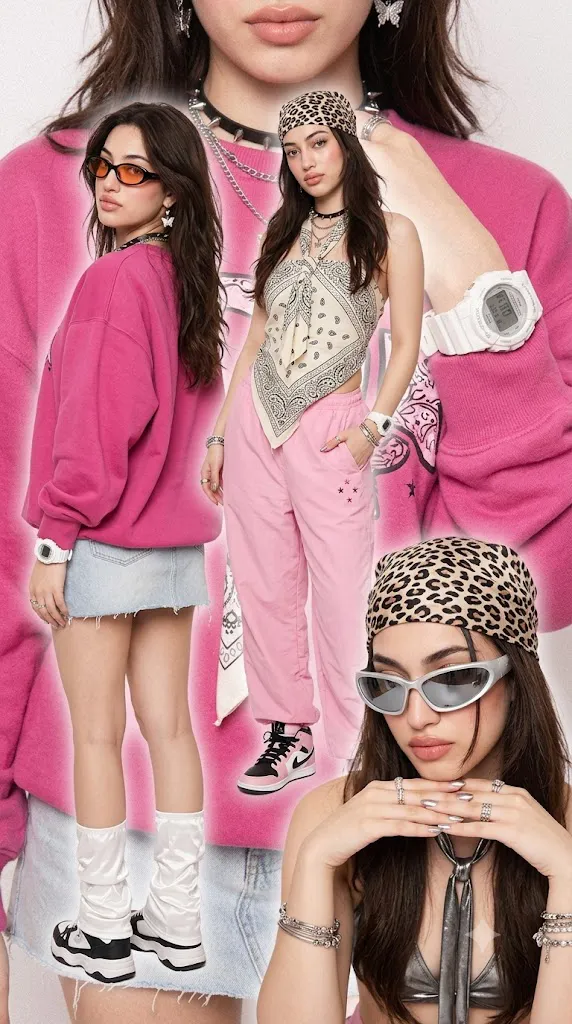
The Y2K Cyber Fashion Multi-Layer Collage Portrait Prompt is inspired by the bold fashion editorials, pop culture magazines, and street-style photography that defined the late 1990s and early 2000s. This creative portrait style combines multiple poses of the same subject into one dynamic composition, producing a visually rich collage that feels energetic, fashionable, and nostalgic. Instead of presenting a single portrait, the image tells a story through layered compositions, varied expressions, and coordinated styling.
"Y2K Cyber Fashion Multi-Layer Collage Portrait Prompt"
Create a photorealistic Y2K fashion collage using the uploaded image strictly as the facial identity reference. Preserve the exact facial structure, skin tone, hairstyle, eyes, nose, lips, and proportions without beautification. Build a multi-layer editorial composition featuring four different poses of the same subject. Use soft studio lighting with balanced exposure and subtle analog film grain. Include oversized pink fashion pieces, leopard-print accessories, layered jewelry, futuristic sunglasses, denim textures, chunky sneakers, sporty digital watches, and Y2K-inspired styling. Arrange the poses diagonally across the composition with a softly blurred oversized portrait in the background. Apply premium magazine color grading featuring pink, white, black, and silver tones while maintaining ultra-detailed 8K realism. No text or watermark.
One of the most recognizable features of this concept is the multi-layer layout. A large blurred background portrait creates depth while three or more additional poses are arranged diagonally across the frame. Each pose showcases a different outfit variation, expression, or camera angle while maintaining a cohesive editorial design. This layered approach creates movement and visual interest without overwhelming the viewer.
Identity preservation remains the highest priority. When using an uploaded reference image, the AI must keep the face completely unchanged. Facial proportions, skin tone, hairstyle, eyes, nose, lips, jawline, facial expression, and overall identity should remain exactly the same as the reference. Clothing, accessories, hairstyles, and backgrounds may change, but facial identity should never be modified or beautified.
Fashion styling reflects classic Y2K trends with oversized sweaters, leopard-print bandanas, crop tops, denim skirts, loose training pants, layered necklaces, futuristic sunglasses, chunky sneakers, sporty digital watches, metallic rings, and playful accessories. These fashion elements capture the confident, expressive aesthetic associated with early-2000s streetwear and cyber-inspired fashion.
Lighting should remain soft and evenly distributed, similar to a studio ring light. Harsh shadows are avoided, allowing makeup, clothing textures, and accessories to remain clearly visible. Gentle film grain adds nostalgic character without reducing image quality.
The dominant color palette includes pink, white, black, silver, and soft neutral tones. Careful color grading keeps the portrait vibrant while avoiding oversaturation. Combined with photorealistic rendering and premium composition, the final result resembles a fashion editorial or magazine cover celebrating Y2K culture.
How To Use Photo Editing?
Professional editing enhances the generated collage while preserving its nostalgic editorial style.
Begin by balancing exposure across every layer of the composition. Each pose should maintain similar brightness so that the collage feels unified.
Adjust white balance toward neutral tones with slightly warm skin colors. Pink clothing and accessories should remain vibrant without becoming fluorescent.
Preserve realistic skin texture. Editorial beauty should come from lighting and careful retouching rather than excessive smoothing.
Increase texture slightly on denim fabrics, knitwear, metallic accessories, and layered jewelry while maintaining realistic materials.
Refine the blurred background portrait so it supports the foreground composition without distracting attention.
Apply subtle film grain to reinforce the retro Y2K aesthetic while preserving high-resolution detail.
Finish with cinematic color grading that emphasizes pink, silver, black, and white while maintaining balanced contrast.
Tools You Can Use For Prompt Copy and Create Photo
Modern AI platforms and editing software make creating editorial collage portraits much easier.
AI Image Generation Tools
ChatGPT
Excellent for writing detailed prompts describing outfits, composition, facial identity preservation, lighting, and fashion styling.
Midjourney
Creates visually striking editorial fashion portraits with artistic layouts.
Leonardo AI
Produces realistic facial consistency and detailed clothing textures.
Ideogram
Suitable for editorial-style fashion concepts and collage compositions.
Adobe Firefly
Integrates AI generation with Adobe's professional creative workflow.
Photo Editing Software
Adobe Photoshop
Perfect for layer management, collage construction, retouching, and lighting refinement.
Adobe Lightroom
Excellent for exposure correction, cinematic color grading, and film-inspired finishing.
Capture One
Offers exceptional skin-tone rendering and professional color management.
Affinity Photo
Provides advanced editing tools suitable for magazine-quality compositions.
Snapseed
Useful for mobile adjustments involving contrast, warmth, sharpness, and subtle grain.
How To Edit Photo?
Step 1: Generate the Base Portraits
Create each pose individually while preserving identical facial identity.
Step 2: Arrange the Collage
Place the background portrait first, followed by the foreground poses in a balanced layout.
Step 3: Balance Exposure
Ensure every portrait layer receives consistent brightness.
Step 4: Preserve Natural Skin
Retain realistic facial texture throughout every pose.
Step 5: Enhance Clothing Details
Improve textures on sweaters, denim, accessories, and metallic fabrics naturally.
Step 6: Refine Background Blur
Maintain soft blur behind the foreground poses to improve visual depth.
Step 7: Apply Cinematic Color Grading
Balance pink, black, silver, and white tones while preserving realistic skin colors.
Step 8: Add Fine Film Grain
Introduce subtle analog grain evenly across the entire composition.
Step 9: Improve Layer Separation
Adjust shadows and highlights to distinguish each pose clearly without harsh edges.
Step 10: Verify Facial Consistency
Confirm that every pose displays exactly the same facial identity as the uploaded reference.
Step 11: Final Refinements
Remove distracting artifacts while preserving realistic lighting and textures.
Step 12: Export in High Resolution
Save the completed collage as PNG or TIFF to maintain maximum quality for magazines, portfolios, digital publishing, or print.
Conclusion
The Y2K Cyber Fashion Multi-Layer Collage Portrait Prompt celebrates one of fashion's most recognizable eras through expressive styling, layered composition, nostalgic color palettes, and editorial-quality photography. By combining multiple coordinated poses into one carefully designed layout, the prompt transforms a simple portrait into a visually engaging fashion story.
Soft studio lighting, photorealistic textures, subtle analog grain, and carefully balanced colors create an authentic Y2K atmosphere without sacrificing modern image quality. The combination of oversized streetwear, futuristic accessories, leopard prints, layered jewelry, and dynamic composition reflects the confidence and creativity associated with early-2000s fashion culture.
While AI image-generation technology can quickly produce impressive visuals, outstanding editorial results still depend on carefully written prompts and thoughtful editing. Maintaining facial identity, refining clothing textures, balancing exposure, applying cinematic color grading, and preserving realistic skin details ensure that the finished collage remains both fashionable and believable.
Whether you're designing magazine covers, fashion campaigns, social media artwork, portfolio projects, or creative AI collections, the Y2K Cyber Fashion Multi-Layer Collage Portrait Prompt offers a stylish foundation for producing energetic, photorealistic images inspired by one of fashion's most iconic eras.