Introduction
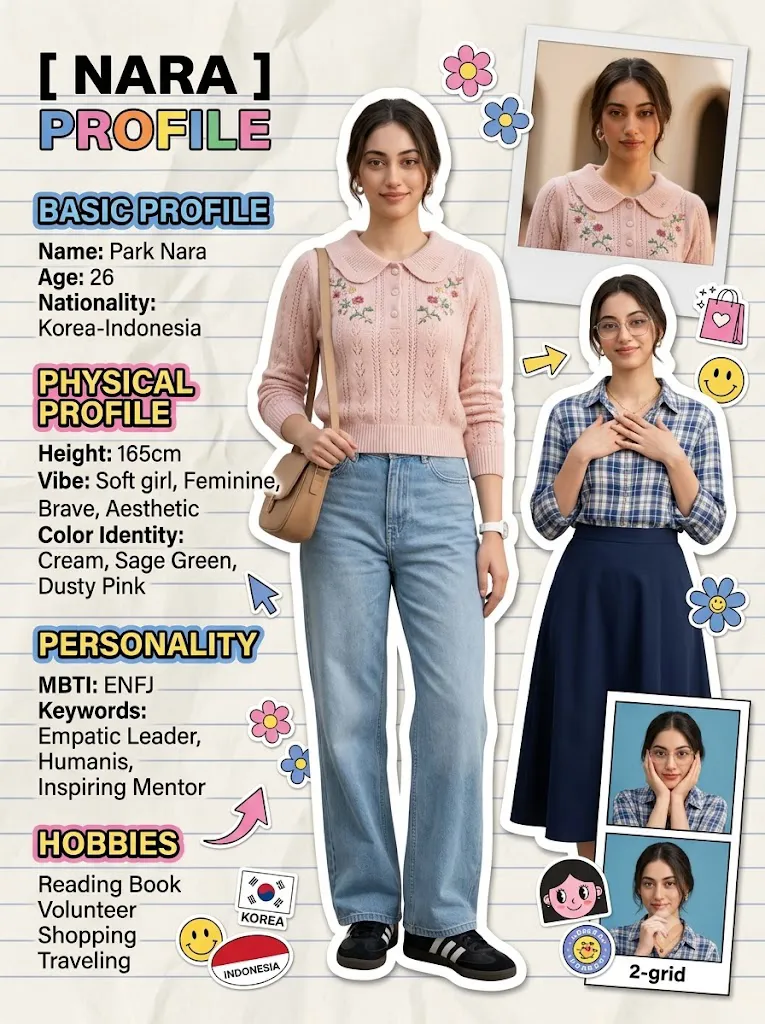
The Y2K Fashion Magazine Profile Collage Portrait style is one of the most creative and visually engaging AI art trends today. Inspired by the colorful magazine layouts of the late 1990s and early 2000s, this design style combines fashion photography, scrapbook aesthetics, profile infographics, playful stickers, and editorial graphics into a single eye-catching composition. It transforms an ordinary portrait into a magazine-inspired profile page that feels modern, youthful, and full of personality.
"Y2K Fashion Magazine Profile Collage Portrait Prompt"
Create a high-quality Y2K fashion magazine profile collage using the uploaded portrait as the exact facial identity reference. Preserve the same face, hairstyle, expression, and overall appearance throughout every portrait. Design the layout on a wrinkled ivory paper background with subtle blue stripes. Include a full-body fashion portrait as the primary image, accompanied by smaller upper-body cutouts, Polaroid-style close-up portraits, and profile photo boxes arranged in a balanced editorial composition. Add colorful typography, profile information sections, decorative arrows, flower stickers, shopping doodles, emoji graphics, handwritten notes, scrapbook elements, and playful Y2K design details. Use premium commercial fashion lighting, vibrant yet balanced colors, crisp textures, clean infographic layout, professional magazine styling, ultra-detailed graphics, 8K quality, and a polished editorial finish.
Unlike traditional portrait photography, a Y2K collage design tells a visual story through multiple images, decorative typography, profile information, doodles, and layered paper textures. Wrinkled paper backgrounds, colorful section headers, arrows, emojis, flowers, shopping icons, Polaroid frames, and handwritten-style graphics all contribute to the nostalgic Y2K aesthetic while maintaining a clean editorial layout.
One of the biggest advantages of AI image generation is the ability to preserve the facial identity of the reference image while placing the subject into multiple fashion poses within the same composition. Full-body portraits, upper-body cutouts, close-up Polaroid frames, and profile photos can all appear together in a magazine-style spread. This makes the design perfect for fashion portfolios, social media posts, personal branding, digital scrapbooks, profile cards, and creative promotional content.
Whether you're an AI artist, content creator, designer, fashion blogger, or digital marketer, mastering the Y2K Fashion Magazine Profile Collage Prompt allows you to produce professional-quality editorial graphics with vibrant personality and premium visual appeal.
How To Use Photo Editing?
AI image generation creates the foundation of the collage, while photo editing helps organize the layout, improve quality, and add finishing touches.
Step 1: Select a High-Resolution Portrait
Choose a clear portrait with good lighting and visible facial details. High-quality reference images help the AI preserve facial identity across every section of the collage.
Step 2: Copy a Detailed Prompt
Use a descriptive prompt that specifies the fashion outfits, layout structure, background texture, profile information, decorative elements, and graphic style.
Step 3: Upload the Reference Image
Import the photo into an AI image generator that supports image-to-image editing or face-reference guidance.
Step 4: Generate Multiple Layouts
Create several versions to compare composition, facial consistency, clothing accuracy, typography placement, and decorative balance.
Step 5: Select the Best Design
Choose the version with the strongest visual hierarchy, realistic portraits, and well-organized infographic sections.
Step 6: Refine the Artwork
Use editing software to clean the layout, improve typography, enhance colors, and sharpen important visual details.
Combining AI generation with professional editing creates polished magazine spreads that look ready for publication.
Tools You Can Use For Prompt Copy and Create Photo
The following tools are excellent for creating Y2K magazine collage portraits.
ChatGPT
Generate detailed prompts describing layouts, fashion styling, typography, backgrounds, and decorative graphic elements.
Midjourney
Produces highly artistic magazine-style compositions with premium fashion aesthetics and creative layouts.
Flux AI
Maintains consistent facial identity while generating realistic portraits and stylish editorial compositions.
Stable Diffusion
Provides advanced customization through image-to-image workflows, ControlNet, and prompt refinement.
GPT Image
Useful for creating high-quality fashion collage portraits with multiple compositions from detailed prompts.
Adobe Photoshop
Ideal for combining images, improving layouts, refining typography, enhancing textures, and adding final design adjustments.
Adobe Illustrator
Perfect for creating clean vector graphics, infographic icons, arrows, labels, and decorative design elements.
Canva
Excellent for building complete magazine pages using templates, text layouts, stickers, and branding assets.
Using AI image generation together with professional editing software helps produce premium editorial designs suitable for print and digital media.
How To Edit Photo?
Professional editing transforms the AI-generated collage into a refined editorial design.
Organize the Layout
Adjust spacing between portraits, text blocks, and decorative elements to create a clean visual hierarchy.
Improve Typography
Use bold section headers, consistent fonts, and balanced text alignment to improve readability.
Enhance Portrait Quality
Sharpen facial features, clothing textures, and accessories while preserving natural appearance.
Refine Background Texture
Enhance the wrinkled paper effect and subtle stripe pattern without overpowering the portraits.
Balance Colors
Adjust saturation and contrast so that pastel backgrounds and colorful stickers complement the fashion photography.
Add Decorative Elements
Include flowers, arrows, stars, hearts, shopping icons, speech bubbles, and Y2K-inspired graphics while avoiding visual clutter.
Export in High Resolution
Save the final design in 4K or higher resolution for websites, portfolios, posters, social media, or high-quality printing.
Conclusion
The Y2K Fashion Magazine Profile Collage Portrait style combines nostalgic early-2000s design with modern AI creativity to produce unique editorial layouts full of personality and visual storytelling. By combining multiple portrait compositions, colorful typography, scrapbook-inspired graphics, and premium fashion styling, you can create magazine-quality profile pages that stand out across digital and print platforms.
The key to success lies in writing a detailed prompt, preserving facial consistency, organizing a balanced layout, and refining the final design through professional editing. Every decorative element—from stickers and doodles to Polaroid frames and profile sections—should support the overall composition while maintaining a fun and fashionable appearance.
As AI image generation continues to improve, experimenting with different color palettes, fashion trends, typography styles, and layout ideas will help you develop your own signature editorial aesthetic. With practice and creativity, you can consistently produce vibrant Y2K-inspired magazine collages that capture both nostalgia and contemporary fashion in one memorable design.